Showing posts with label AOT. Show all posts

Friday, April 5, 2019

AX2012-D365 Bug: TrvWorkflowExpLines query misses fields

The issue appears once you post project or inter-company expenses.

Once you approved and never opened Accounting distribution form for an expense, Project activity number field will be empty, or, for the Inter-company case, even the project information will be lost.


This is how TrvWorkflowExpLines query should look like to overcome the issue.


Wednesday, March 6, 2019

Extended version of Universal Field Changer for Microsoft Dynamics AX2012

Oh yeah! The Field changer is still on the road! Now equipped with two updating options:


Feel free to use this surgeon's tool at your own risk! Grab it from here.

Friday, January 5, 2018

AX 2012 Wizard does not update Analysis Serivce Project: workaround

Recently I bumped into a strange issue in AX 2012, which prevents importing Analysis Services Projects to AOT.

Given that this import is an essential part of cubes development and deployment, I decided to find a way to get this thing done.

The issue is in the fact that nevertheless all changes made to your perspective are successfully present in the Wizard tree, they are never saved back to AOT. Therefore, the previous version of your project is always deployed to SQL, no matter what you try to achieve.

The workaround is pretty simple. Make up your perspective, run the Wizard and let it finish its job. Make Deploy option unchecked because it is pointless.


Once the Wizard window is closed, just find your project in the node of Analysis Services Projects and delete it.


Then find a recently created folder in your TEMP directory; this one must contain your recently added artifacts, say, financial dimensions as depicted.


Here we go.


Now just import this particular project back to AOT, and run the Wizard again to deploy the projects.


It is also worth double-checking the project content in Visual Studio before running the Wizard for the second time.


If you missed the target, find the right folder with your added/changed objects.

Now the Wizard should find no changes and just deploy it.


Saturday, December 9, 2017

How to create an AOT table field for a given Extended data type

As you can see from the following code, we have to get the primitive or container type for a given EDT. It comes from method AOTtpeStr() as an abbreviation. Then you should call an appropriate method to create a new field.

private void createFieldInTableInAOT()
{
    TreeNode            treeNode = treenode::findNode(#ExtendedDataTypesPath);
    TreeNode            treeNodeEDT2extend  = treeNode.AOTfindChild(edtType);
    AOTTableFieldList   fieldNode;
    str                 typeStrCode = treeNodeEDT2extend.AOTtypeStr();

    if(!treeNodeEDT2extend)
    {
        warning(funcName() + ".\n Extended data type "+ edtType + " not exists in AOT!");
        return ;
    }

    switch (typeStrCode)
    {
        // string
        case 'UTS':
            treeNodeFields.addString(edtName);
            break;
        // real
        case 'UTR':
            treeNodeFields.addReal(edtName);
            break;
        // integer
        case 'UTI':
            treeNodeFields.addInteger(edtName);
            break;
        // int64
        case 'UTW':
            treeNodeFields.addInt64(edtName);
            break;
        // date
        case 'UTD':
            treeNodeFields.addDate(edtName);
            break;
        // time
        case 'UTT':
            treeNodeFields.addTime(edtName);
            break;
        // datetime
        case 'UTZ':
            treeNodeFields.addDateTime(edtName);
            break;
        // enum
        case 'UTE':
            treeNodeFields.addEnum(edtName);
            break;
        // container
        case 'UTQ':
            treeNodeFields.addContainer(edtName);
            break;
        // GUID
        case 'UTG':
            treeNodeFields.addGuid(edtName);
            break;
        default:
                throw error(funcName());
    }
    
    fieldNode       = treeNodeFields.AOTfindChild(edtName);
    fieldNode.AOTsetProperty(#PropertyExtendeddatatype, edtType);
    fieldNode.AOTsave();
    currentFieldGroupTreeNode.AOTadd(edtName);

    info(strfmt("Field '%1' of type '%2' created", edtName, edtType));
}


Thursday, March 31, 2016

Date valid fields in View and AOT Query

Unfortunately, I did not manage to select addresses effective as of today from the DirPartyPostalAddressView view.


Nevertherless, its ValidTimeStateEnabled property set to Yes.


My workaround is to use SysQueryRangeUtil class providing greaterThanUtcNow and lessThanUtcNow methods to create an extended range. So my Query looks like the following.


Friday, January 23, 2015

Breakpoint; in CIL code

I needed to debug batch processing in BatchRun.ServerGetTask() method.


It was a wrong idea to add breakpoint; instruction into a managed code. Of course, after stopping my AOS did not start anymore because of the error:

Just-In-Time debugging this exception failed with the following error: The operation attempted is not supported

The easiest way to recover this problem is to delete the forementioned instruction and recompile CIL, but I have not access to AOT X++ editor anymore.

Alternatevily, as described in How-To-Debug-Managed-Code-In-AX2012, I did catch this breakpoint in Visual Studio during the short period between Starting and Stopped statutes of AOS service.

Launch Visual Studio as administrator.


Open the class method in question directly frpm xppCIL\Source folder.


Start the AOS service.


Switch back to Visual Studio and attach to the process. It appeared in a few seconds.


Then it stopped at the problematic breakpoint.


Pressing F5 each time it stopped there (actually every minute, as it supposed to be for batch processing), I changed my code back and run full CIL.


Please, do not place breakpoint; in managed code like I did.

Full MSDN article about debugging in AX 2012.

Friday, October 24, 2014

How to iterate project group members: Tables, EDT, etc

Based on S. Kuskov's suggestion and Vania Kashperuk's article, I put down this simple job that iterates Tables and Extended Data Types groups members in a given shared project.
static void tmxIterateProjectGroupMembers(Args _args)
{
    #aot
    #properties
    Str                         projectName = "tmxEDI999";
    ProjectNode                 projectNode;
    ProjectGroupNode            ddProjectGroupNode;
    ProjectGroupNode            edtProjectGroupNode;
    ProjectGroupNode            tblProjectGroupNode;
    ProjectListNode             projectListNode;
    TreeNode                    memberTreeNode;              
    TreeNode                    projectTreeNode;
    TreeNodeIterator            projectIterator;
    
    if(projectName)
    {
        // find all shared projects
        projectListNode = SysTreeNode::getSharedProject();
        // find project with a given name
        projectNode = projectListNode.AOTfindChild(projectName);
        // open it in a separate window in AOT
        projectTreeNode = projectNode.getRunNode();
        // this is the key point after which we can iterate group members
        projectNode = projectNode.loadForInspection();
        // get nested nodes for appropriate names
        ddProjectGroupNode = projectNode.AOTfindChild('DataDictionary');
        edtProjectGroupNode = ddProjectGroupNode.AOTfindChild('Extended Data Types');
        tblProjectGroupNode = ddProjectGroupNode.AOTfindChild('Tables');
        
        // tables
        projectIterator = tblProjectGroupNode.AOTiterator();
        memberTreeNode = projectIterator.next();

        while(memberTreeNode)
        {
            info(strFmt("%1 %2", memberTreeNode.AOTname(), memberTreeNode.treeNodeName()));
            memberTreeNode = projectIterator.next();
        }

        // extended data types
        projectIterator = edtProjectGroupNode.AOTiterator();
        memberTreeNode = projectIterator.next();

        while(memberTreeNode)
        {
            info(strFmt("%1 %2", memberTreeNode.AOTname(), memberTreeNode.treeNodeName()));
            memberTreeNode = projectIterator.next();
        }
    }
}
The key method is loadForInspection. Happy iterating!

Wednesday, September 24, 2014

How to find in AOT all objects named like...

In fact the standard Find tool in AOT works well if you really know how to fill in all these parameters before launch it. Sometimes it is easier to use another options.

Let's say we need to find all the forms that contain 'lookup' word in the end of their names. Easy? Yes, it is! You can go directly to the SysModelElement table and work with it as with any other table: Ctrl-G to switch grid filter, 11 for Form element type, then *lookup in the name, and that's it.


This is rapid way to know the objects names but it is not possible to jump to them in AOT. Here we go with the second option. Just create a new project and filter criteria Element type name and Name for the objects. 


Simple, fast and will keep the search results for future recalls.


Happy searching in AOT!

Thursday, September 11, 2014

Problem with importing a temporary table/class/etc

I bumped into a strange problem. The admin refreshed my development environment from the TEST one; consequently, all my objects were deleted.

When I started re-importing them from an exported xpo-project, a temporary table always caused the following error:

A table, Extended Data Type, Base Enum or class called XXXXX already exists. Import of Table aborted.


The problem can be easily resolved by flushing the user cache:
Stop AX client and delete all  ax_*.auc files in "C:\Users\%USERNAME%\AppData\Local folder" 

Thursday, January 16, 2014

How to set properties for the Reference Group form control from code

There is a small issue in AX 2012 with getting access to the siblings' properties of Reference Group form control - they are unavailable in AOT.

However, you still can get access to it from code during run time.

Let's say you have placed on your form a field named FilterCategory, which is a reference group, and you want to set its sibling FilterCategory_Name width to Column width value. As you can see there is no way to do that in AOT.


So you just create a method supposed to be called in the form init():

void setColumnWidthForFilterCategory()
{
    int                                 i;
    Object                              childControl;

    for (i = 1; i <= FilterCategory.controlCount(); i++) // FilterCategory is of FormReferenceGroupControl type
    {
        childControl = FilterCategory.controlNum( i );
        childControl.width( 0, FormWidth::ColumnWidth );
    }
}

And you get it!


Bug: Drag-n-Drop Creates New Element In Enums With Duplicate Values

Bug in AX 2012 R2.

When you use drag-n-drop in AOT to create a new element for a enum, it creates this element with the exactly same value.


But all enum values must be unique.


It can lead to eventual errors in run time.
Please send a bug report to Microsoft.

Friday, November 30, 2012

Generating Sales order confirmation in XML file in AX 2012

Let's say we need to provide one of our vendors with a Sales order confirmation in the form of XML file for the further consuming in their automated system. We suppose your license configuration is OK for that.

First of all, the appropriate service has to be set up in AIF module of AX 2012. (For the previous version, take a look at Microsoft Dynamics AX AIF: Sending Outbound Documents Automatically post) Given that we are going to export this information, we need to create a new outbound port.

Setting new Outbound port

Open the form of Outbound ports (System administration/Setup/Services and Application Integration Framework) to set up one: give it a name and short description to recognize it later among others.

Adapter should be File system adapter to generate XML file.
URI is the path where you can find generated XML files. Of course, AX has to have appropriate rights for this folder.


Now, we are choosing in the drop-list the appropriate service defined in AOT. For the most documents these services are already created; however, if you need to set up some specific or even new document service, please refer to the development manual.

The one we are looking for is SalesSalesConfirmationService. As you can see, all the document services are named in a very evident style: you always know for which document it serves.


Do not worry, if you cannot find this service in the list because it exists but needs to be registered from AOT  like follows.

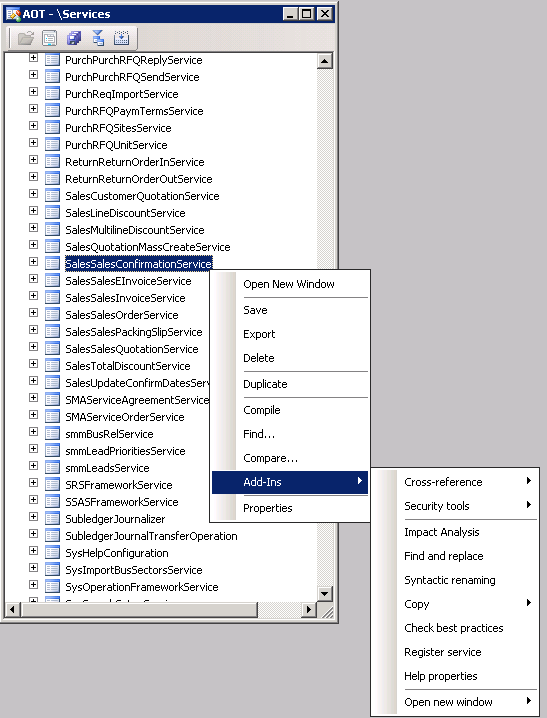
Open Services branch in AOT tree, find this service in it, and register by the context menu item. You need to do it every time you add a new document service. Now this service appears in the list.


Read method will be enough for our job, so we activate our new port. Now we can proceed with the next step:

Adding a batch job maintaining AIF module

For my particular case, I am adding two tasks within it:

 - AifOutboundProcessingService responsible for outbound processing; and
 - AifGatewaySendService that will save XML files in the folder of URI, defined on the preceding step.


Note that you have to strictly follow the sequence so that a document will be pushed in the Message queue first and then a file will be created.


Do not forget to start the batch job with the right recurrence rules. You find more detail on how to deal with this batch job here.

Print management for clients

Finally, we change the print management for the client to whom we want to send XML files while updating Sales order confirmation.


Choose Print archive as a Destination to avoid the real printing and to generate an XML file.


Since now, when I confirm a sales order for this client I get after within one-two minutes an appropriate XML file in the folder.


For your environment, of course, you need to use your own parameters like those for the file folder or period of time for the batch job.

Also, it is possible to set up Sales order confirmation as a batch job, too.

Let me know if you have any troubles with this!

Thursday, March 1, 2012

How to make a temporary instance of a database table to be shown on the form

This short code shows how to work with a temporary table without creating it in AOT.

// how to use temporary table
// method Init of the form
public void init()
{
    WmpInventNutrition        nut; // regular table in AOT
    WmpInventNutrition        tmp; // instead of creating in AOT a temporary table
                                   // we can create a temporary instance of the preivous regular table
    ;
     super();

    // here we make it temporary;
    // it will disappear from memory when loses the scope
    // in other words, when we close the form
    tmp.setTmp();

    // simply selecting some of records from the regular table
    while select nut
        where nut.ItemId like '_wmp*'
    {
        // and putting them in the temporary one
        tmp.data(nut);
        tmp.doInsert();
    }
    // finally to show them on the form
    // we set the form data source to the temporary table
    wmpInventNutrition.setTmp();
    wmpInventNutrition.setTmpData(tmp);
}


Alternatively, if you know exactly how the field match, it will be faster to use insert_recordset:


 // simply selecting some of records from the regular table
    tmp.skipDataMethods();
    insert_recordSet tmp (itemid) select ItemId from nut where nut.ItemId like '_wmp*';
    

Tuesday, January 17, 2012

Universal Field Changer new version for Microsoft Dynamics AX2012

So, I took my old project from the case just to add a new feature: this time I would like to get all the table fields with their labels in the user's language.


Frankly seaking I was going to get it in a grid in order to export to Excel; but unfortunately I did not find a fast way to show my temporary table. Finally, I just use InfoLog in the comma separated format that can be used lately to open in Excel.


Enjoy, anyway!

Description:

Universal Field Changer class for Microsoft Dynamics AX2012:

- collects all the fields from all the tables in AOT in temporary tables;
- makes possible to change any values using filtres by table and field names and existing values;
- provides access to SQL query string;
- prints the field lists with labels in user's language;
- creates dynamically all the form controls and uses method overloading and can be used as a tutorial;

Monday, May 2, 2011

How to find your object in AOT projects

This is a small but precious tool for AX developing.

Have you ever tried to find in which projects your objects are included? Yes, I have... Not so easy to search and look into each project.

Now, it is just a question of one click: this mighty LC Project Search will make the life easier. And good news, it is free. So, profit and enjoy!

There are three xpo-files with appropriate versions for AX 4.0, 2009, and 2012. (I have tested 2009 one). You can import it, then launch with the menu item, and this is ready to go.


Just type the name of any object you're looking for, optionally, you can choose the type of it, then press Search. Be patient, it takes some time to populate the result table.


Now, all projects contain the object are here.

Take a look at Loncar Technologies company web site: there you can get some more.

Tuesday, March 16, 2010

Form Digger

FormDigger is a very useful tool. It facilitates form development substantially by allowing to search fields either by its name or label,  highligt them on the form, take a snapshot of it, and jump directly to AOT.

It should be installed as an XPO project  and then called by Alt-~.

Highly recommended!

By the way, this is the second powerful tool I use created by the same AX master - Evgeny Arlionak

Tuesday, December 1, 2009

How to add all descendant classes to a new project

I bumped into the problem of a class compilation with no licence for X++ source code.

Forward compile option is not enough to make my changes working. Thus I need to export-import all descendant classes as well as the class I changed - FormLetter in my case.

I therefore have to add all these classes to my project. Natural laziness saved me again from this manual work.

I hope this short job inspired by system class SysCompilerOutput and miklenew's job from AXForum will help you in similar situations.


// add to a new project all descendant classes for forward compilation
public static void SISCreateCompileForwardProject(Args _args)
{
#AOT
str project = 'SIS_CompileForward';
SysCompilerOutput sysCompilerOutput;
Dictionary dictionary = new Dictionary();
DictClass dictClass = new DictClass(className2Id("Formletter"));
int numOfClasses = dictionary.classCnt();
ProjectNode sharedProjects;
ProjectNode newProject;

void addToProjectForwardClass(DictClass _dictClass, Dictionary _dictionary, int _numOfClasses)
{
ClassNode classNode;
DictClass dictClassLoop;
DictClass childClass;
int i;
;
if (_dictClass)
{
classNode = infolog.findNode(#ClassesPath + #AOTDelimiter + _dictClass.name());

if (classNode)
{
newProject.addUtilNode(UtilElementType::Class, classNode.name());

for (i=1; i <= _numOfClasses; i++)
{
dictClassLoop = _dictionary.classObject(_dictionary.classCnt2Id(i));

if (dictClassLoop.extend() == _dictClass.id())
{
childClass = new DictClass(dictClassLoop.id());
addToProjectForwardClass(childClass, _dictionary, _numOfClasses);
}
}
}
}
}
;

sharedProjects = infolog.projectRootNode().AOTfindChild('Shared');
sharedProjects.AOTAdd(project);
newProject = sharedProjects.AOTfindChild(project);
newProject.loadForInspection();
newProject = newProject.getRunNode();
addToProjectForwardClass(dictClass, dictionary, numOfClasses);
newProject.AOTsave();


}

Friday, April 25, 2008

To find objects in AOT with particular properties

Sometimes I need to find objects in AOT with particular properties. Find tool (Ctrl-F) works great when you set Containing text field correctly.

In the following case I tried to find all tables in AOT with Temporary property set to Yes.