Showing posts with label enum. Show all posts

Saturday, December 11, 2021

Multiple enum values selection in forms and tables

Previously I posted three supporting functions to work with multiple enum values selection. Now, let's see how they can be used in real scenarios.

With these functions you can easily expose enum values in selection lists and then save the user selection in tables.

Enum lists in a form

Check first how to show two grids in a form; so that the user could move enum values from one to another.
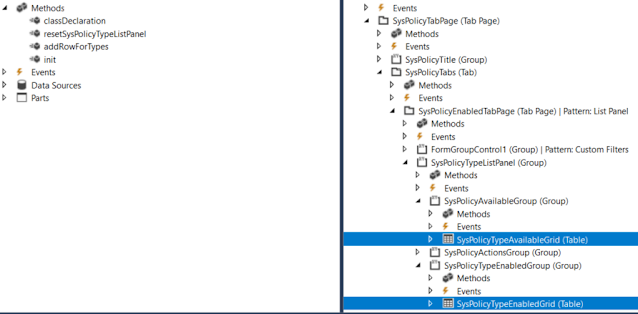


[Form]
public class SysPolicyTypesOneCompanyActiveOnly extends FormRun
{

    private Map                 policyTypes = wzhTest::createMapForEnum(enumStr(SysPolicyTypeEnum));
    private SysPolicyTypeEnum   type;
 
    private void resetSysPolicyTypeListPanel()
    {
        SysPolicyTypeAvailableGrid.deleteRows(0, SysPolicyTypeAvailableGrid.rows());
        SysPolicyTypeEnabledGrid.deleteRows(0, SysPolicyTypeEnabledGrid.rows());

        var mapEnumerator = policyTypes.getEnumerator();
        while (mapEnumerator.moveNext())
        {
            type        = mapEnumerator.currentKey();
            
            if (SysPolicyTypesOneCompanyActiveOnly::exist(type))
            {
                this.addRowForTypes(SysPolicyTypeEnabledGrid, type);
            }
            else
            {
                this.addRowForTypes(SysPolicyTypeAvailableGrid, type);
            }
        }

        SysPolicyTypeAvailableGrid.row(SysPolicyTypeAvailableGrid.rows() ? 1 : 0);
        SysPolicyTypeEnabledGrid.row(SysPolicyTypeEnabledGrid.rows() ? 1 : 0);
    }

    private int addRowForTypes(FormTableControl _table, SysPolicyTypeEnum _type)
    {
        int i;
        // Insert it into the data set in sorted order.
        for (i = _table.rows(); i >= 1; i--)
        {
            SysPolicyTypeEnum typeIdTmp = _table.cell(1, i).data();
            
            if (strCmp(enum2Str(typeIdTmp), enum2Str(_type)) < 0)
            {
                // We need to insert after the current item.
                break;
            }
        }

        // Insert the new item, i is equal to the index of the item we need to insert after.
        _table.insertRows(i, 1);
        _table.cell(1, i + 1).data(_type);

        return i + 1;
    }
...
}

Multiple enum values in a table

In order to save user's selection of particular Enum values in a table, you can add a string type field there. 

The rest is to convert these selected values from string to a list or a container to present them in a form.

Say, we need to let the user to select particular FiscalPeriodStatus values.


First, we add a new string field FiscalPeriodStatusSelection to our table.


We can show the currently saved selection via a display method

    /// <summary>
    /// Returns Fiscal period statuses string values
    /// </summary>
    /// <param name = "_parm">container</param>
    /// <returns>string values of selected period statuses</returns>
    [SysClientCacheDataMethodAttribute(true)]
    public display LedgerExchAdjFiscalPeriodStatusSelection fiscalPeriodStatusSelectionDisp()
    {
        return wzhTest::enumValuesStr2EnumStrStr(this.FiscalPeriodStatusSelection, enumName2Id(enumStr(FiscalPeriodStatus)));
}

And updates this field via AnotherClass which treats the user's selection (in a form, for example)

    this.FiscalPeriodStatusSelection = con2Str(AnotherClass.getFiscalPeriodStatusSelectionCont(), wzhTest::ContSeparator);

    /// <summary>
    /// Gets FiscalPeriodStatus selection as a container
    /// </summary>
    /// <returns>container</returns>
    public container getFiscalPeriodStatusSelectionCont()
    {
        container                               cont;
        
        while (...)
        {
            cont += SomeBufferOrList.FiscalPeriodStatus;
        }
                
        return cont;
    }

Supporting functions to work with multiple selection of Enum values

There a couple of custom static methods you can use to facilitate your job with Enum values in tables and forms.

class wzhTest
{
    public const str contSeparator = ';';
    /// <summary>
    /// Populates a map for all enum's values
    /// </summary>
    /// <param name = "_enumName">Enum name</param>
    /// <returns>Map object</returns>
    public static Map createMapForEnum(EnumName _enumName)
    {
        Map             map          = new Map(Types::Enum, Types::String);
        DictEnum        dictEnum = new DictEnum(enumName2Id(_enumName));
        for(int i = 0; i < dictEnum.values(); i++)
        {
            map.insert(dictEnum.index2Value(i), dictEnum.index2Symbol(i));
        }
        return map;
    }
    /// <summary>
    /// Creates a container with enum values from a given string values container
    /// </summary>
    /// <param name = "_cont">string values container</param>
    /// <param name = "_enumType">enum variable for defining its type</param>
    /// <returns>Container with enum value</returns>
    public static container enumValuesCont2EnumStrCont(container _cont, int _enumId)
    {
        container       ret;
        str             s;
        int             idx = 0;
        int             len = conLen(_cont);
        while (idx < len)
        {
            idx += 1;
            s           = conPeek(_cont, idx);
            if(s)
            {
                ret += enum2Symbol(_enumId, conPeek(_cont, idx));
            }
        }
        return ret;
    }

    /// <summary>
    /// Creates a string with enum values string
    /// </summary>
    /// <param name = "_s">string values separated with ; sign</param>
    /// <param name = "_enumType">enum variable for defining its type</param>
    /// <returns>String with enum values separated with ; sign</returns>
    public static str enumValuesStr2EnumStrStr(str _s, int _enumId)
    {
        container c = str2con(_s, wzhTest::contSeparator);
        c = wzhTest::enumValuesCont2EnumStrCont(c, _enumId);
        return con2Str(c, wzhTest::ContSeparator);
    }
}

Let's see how they work with AccessControlledType enum type.

 static public void main(Args _args)
    {
        AccessControlledType enumEDT;
        //AccessControlledType::MenuItemDisplay / 0
        //AccessControlledType::MenuItemOutput / 1
        //AccessControlledType::MenuItemAction /2
        //AccessControlledType::WebUrlItem /3
        //AccessControlledType::WebActionItem /4
        //AccessControlledType::WebManagedContentItem / 5
        //AccessControlledType::Table / 6
        // AccessControlledType::TableField / 7
        EnumId      id      = enumName2Id(enumStr(AccessControlledType));
        str         name    = enumId2Name(id); //enumStr(AccessControlledType)

Basically, they convert a enum values list from string and vice-versa by using standard functions.

Check the output of each static method.

        //createMapForEnum
        Info("Test createMapForEnum");
        Info(strFmt("%1 : %2 values", id, name));
        Map         m = wzhTest::createMapForEnum(name);
        MapIterator mi = new MapIterator(m);
        int i;
        while(mi.more())
        {
            Info(strFmt("%1 : '%2'", i, mi.value()));
            mi.next();
            i++;
        }


        //enumValuesCont2EnumStrCont
        Info("Test enumValuesCont2EnumStrCont");
        setPrefix('');
        container   c1 = [AccessControlledType::WebActionItem, AccessControlledType::MenuItemOutput];
        container   c2 = wzhTest::enumValuesCont2EnumStrCont(c1, id);

        for(i=1;i<=conLen(c2);i++)
        {
            Info(strFmt("%1 => '%2'", conPeek(c1,i), conPeek(c2,i)));
        }


        //enumValuesStr2EnumStrStr
        Info("Test enumValuesStr2EnumStrStr");
        str         s1 = con2Str([AccessControlledType::Table, AccessControlledType::TableField], wzhTest::contSeparator);
        str         s2 = wzhTest::enumValuesStr2EnumStrStr(s1, id);
        Info(strFmt("'%1' => '%2'", s1, s2));


Friday, January 15, 2021

How to delete obsolete values in ENUMVALUETABLE table X++

Following up this old issue with extensions to enums, I propose to run this class, if you cannot delete added values (grr* in my case) directly in SQL Studio. I am not sure if it is going to work in PROD. Please use it at your own risk.


class ENUMVALUETABLEDelete
{
   
    public static void main(Args _args)
    {
        if(!Box::confirm("Would you like to delete all grr* values of SysPolicyRuleTypeEnum type in ENUMVALUETABLE? (If not, just print them"))
        {
            ENUMVALUETABLEDelete::printRecords();
            return;
        }
        ENUMVALUETABLEDelete::deleteRecords();
        info("all related records have been deleted. Synchonize DB now!");
    }

    private static void deleteRecords()
    {
        Connection                      conn;
        SqlStatementExecutePermission   permission;

        str sqlSelect = 
@"SELECT
t.RECID
 from ENUMVALUETABLE as t
 join ENUMIDTABLE
 on enumid = id
 and ENUMIDTABLE.NAME = 'SysPolicyRuleTypeEnum'
 and t.NAME like 'grr%'";
        str sqlDelete = strFmt("%1 (%2)", "DELETE FROM ENUMVALUETABLE WHERE RECID IN ", sqlSelect);

        permission  = new SqlStatementExecutePermission(sqlDelete);
        conn        = new Connection();
        permission.assert();
        //conn.transactionScopeBegin();
        Statement statement = conn.createStatement();
        
        int result  = statement.executeUpdate(sqlDelete);
        str errText = statement.getLastErrorText();
        if(errText)
        {
            Info(errText);
        }

        // the permissions needs to be reverted back to original condition.
        CodeAccessPermission::revertAssert();
    }

    private static void printRecords()
    {
        Connection                      conn;
        SqlStatementExecutePermission   permission;

        str sqlSelect =
@"SELECT
t.RECID,
t.ENUMID,
t.ENUMVALUE,
t.NAME
 from ENUMVALUETABLE as t
 join ENUMIDTABLE
 on enumid = id
 and ENUMIDTABLE.NAME = 'SysPolicyRuleTypeEnum'
 and t.NAME like 'grr%'";

        permission  = new SqlStatementExecutePermission(sqlSelect);
        conn        = new Connection();
        permission.assert();

        Statement statement = conn.createStatement();
        
        ResultSet results = statement.executeQuery(sqlSelect);
        str errText = statement.getLastErrorText();
        if(errText)
        {
            Info(errText);
        }

        int enumId;
        str name;
        int i = 1;
        while (results.next())
        {
            enumId  = results.getInt(3);
            name    = results.getString(4);
            Info(strFmt("Found %1) %2 : %3", i, enumId, name));
            i++;
        }
        // the permissions needs to be reverted back to original condition.
        CodeAccessPermission::revertAssert();
    }

}

Do not forget to build your models and full DB sync after!

Wednesday, November 27, 2019

Enum extensions case in D365

Added two new values to an enum in the same model but in two different extensions.


The first one is looped perfectly (see code snippet below), and nothing but an index for the second. However, its value is present in a combobox.


[ExtensionOf(formStr(SysPolicyParameters))]
final public class mySysPolicyParametersForm_Extension
{
    public void populateTree()
    {
        DictEnum          policyRuleTypeEnum;
        int               i;
        policyRuleTypeEnum = new DictEnum(enumNum(SysPolicyRuleTypeEnum));


        for(i = 0; i < policyRuleTypeEnum.values(); i++)
        {
            str sym = policyRuleTypeEnum.value2Symbol(i);
            info(strFmt("%1 %2 %3", i, policyRuleTypeEnum.value2Name(i), sym));
        }


        next populateTree();
    }
} 
Already built and synchronized the whole world. What else can it be?

Take a look from the SQL side.


There are some old values that I created before but deleted later. All of them are still there.

I had to delete these non-synced values manually from SQL, then added needed values in AOT, and synched DB.

In fact, DB sync is triggered if you have some changes in tables/views only.
Now it is correctly recreated.


BTW there are two good articles about the subject

 1) Extensible enums: Breaking change for .NET libraries that you need to be aware of
 2) Development tutorial: Extensible base enumerations in Microsoft Dynamics AX 7

Friday, May 3, 2019

How to see enum values in D365

Enum values are unavailable anymore in D365. But we can still find them via SQL.

There are two tables of our interest: EnumValueTable with actual values and EnumIdTable with IDs; the latter can be found by a given name, for example, for LedgerPostingType.


USE [AxDB]
GO
SELECT * from ENUMVALUETABLE
 join ENUMIDTABLE
 on enumid = id
 and ENUMIDTABLE.NAME = 'LedgerPostingType'


Voila


Tuesday, December 12, 2017

Table-Group-All pattern filtering in forms

When we need to support business scenarios with different types of relations for the same table, it comes to using enums like Table-Group-All. You can find the biggest example, I believe, in PriceDiscTable.

This post is to explain the same approach in a simpler way.

Say, we have a table with two fields defining different possible values for two other relation value fields.


The whole idea is in adding a range with an expression to the form query.


The challenge here is to support correct filtering on the form and combine it with the user filters, after it is open for a particular record. In our case it is a customer that can have a value in Sales commission group (or not) and some matching ZIP code in its primary business address.


void  reSelect()
{
    str filter;

    element.cleanDSQuery();
    filter = this.buildViewAllCustomerFilter();
    blockCustomerGroupRelation.value(filter);

    mySalesGroupAssignation_DS.executeQuery();
    mySalesGroupAssignation_DS.queryRun().saveUserSetup(false);
    mySalesGroupAssignation_DS.refresh();
}

This method is supposed to be triggered from linkActive() of the data source. First we clear the original query from possible dynamic links and ranges and create our new range for an expression. You can make it visible to see the final expression for debugging.

private void cleanDSQuery()
{
    mySalesGroupAssignation_DS.query().dataSourceTable(tableNum(mySalesGroupAssignation)).clearDynalinks();

    mySalesGroupAssignation_DS.query().dataSourceTable(tableNum(mySalesGroupAssignation)).clearRanges();
    blockCustomerGroupRelation  = mySalesGroupAssignation_ds.query().dataSourceTable(tableNum(mySalesGroupAssignation)).addRange(fieldNum(mySalesGroupAssignation, myCustomerTableGroupAll));
    blockCustomerGroupRelation.status(RangeStatus::Hidden);
}

Then we create a complex range expression for two fields in two methods.


private str buildViewAllCustomerFilter()
{
    str viewAllAgreementFilter;


    viewAllAgreementFilter = '((';
    viewAllAgreementFilter += element.buildFilterCustomer();
    viewAllAgreementFilter += ') && (';
    viewAllAgreementFilter += element.buildFilterZipCode();
    viewAllAgreementFilter += '))';

    return viewAllAgreementFilter;
}

We add Group based condition only if Sales commission value is set up for a given customer.

private str buildFilterCustomer()
{
    str                 filter;
    // (
    filter = '(';
    // (myCustomerTableGroupAll = Table and myCustomerGroupRelation = account code)
    // OR
    // (myCustomerTableGroupAll = All)
    // AND
    //

    filter += strFmt('((%1.%2==%5) && (%1.%3=="%4")) || (%1.%2==%6)',
                        mySalesGroupAssignation_DS.queryRun().query().dataSourceTable(tableNum(mySalesGroupAssignation)).name(),  // 1
                        fieldStr(mySalesGroupAssignation, myCustomerTableGroupAll),                                               // 2
                        fieldStr(mySalesGroupAssignation, myCustomerGroupRelation),                                               // 3
                        queryValue(custTableFrom.AccountNum),                                                                       // 4
                        any2int(TableGroupAll::Table),                                                                              // 5
                        any2int(TableGroupAll::All)                                                                                 // 6
                        );

    if(custTableFrom.CommissionGroup)
    {
        // OR
        // (myCustomerTableGroupAll = Group and myCustomerGroupRelation = sales commission group)

        filter += strFmt(' || ((%1.%2==%5) && (%1.%3=="%4"))',
                        mySalesGroupAssignation_DS.queryRun().query().dataSourceTable(tableNum(mySalesGroupAssignation)).name(),  // 1
                        fieldStr(mySalesGroupAssignation, myCustomerTableGroupAll),                                               // 2
                        fieldStr(mySalesGroupAssignation, myCustomerGroupRelation),                                               // 3
                        queryValue(custTableFrom.CommissionGroup),                                                                  //4
                        any2int(TableGroupAll::GroupId)                                                                              // 5
                        );
    }

    filter += ')';
    return filter;

}


private str buildFilterZipCode()
{
    str                 filter;
    // (
    // (myZipCodeTableGroupAll = GroupId and myZipCodeGroupRelation = myBusinessAddressZipCode)
    // OR
    // (myZipCodeTableGroupAll = All)

    filter = strFmt('(((%1.%2==%5) && (%1.%3=="%4")) || (%1.%2==%6))',
                        mySalesGroupAssignation_DS.queryRun().query().dataSourceTable(tableNum(mySalesGroupAssignation)).name(),  // 1
                        fieldStr(mySalesGroupAssignation, myZipCodeTableGroupAll),                                               // 2
                        fieldStr(mySalesGroupAssignation, myZipCodeGroupRelation),                                               // 3
                        queryValue(custTableFrom.myBusinessAddressZipCode().myZipGroupId),                                       // 4
                        any2int(myGroupAll::GroupId),                                                                              // 5
                        any2int(myGroupAll::All)                                                                                 // 6
                        );                                                                               // 6

    return filter;

}

You can easily adapt this code to your own scenario. Just be meticulous with the syntax of the extended range expression.

Saturday, December 9, 2017

How to create an AOT table field for a given Extended data type

As you can see from the following code, we have to get the primitive or container type for a given EDT. It comes from method AOTtpeStr() as an abbreviation. Then you should call an appropriate method to create a new field.

private void createFieldInTableInAOT()
{
    TreeNode            treeNode = treenode::findNode(#ExtendedDataTypesPath);
    TreeNode            treeNodeEDT2extend  = treeNode.AOTfindChild(edtType);
    AOTTableFieldList   fieldNode;
    str                 typeStrCode = treeNodeEDT2extend.AOTtypeStr();

    if(!treeNodeEDT2extend)
    {
        warning(funcName() + ".\n Extended data type "+ edtType + " not exists in AOT!");
        return ;
    }

    switch (typeStrCode)
    {
        // string
        case 'UTS':
            treeNodeFields.addString(edtName);
            break;
        // real
        case 'UTR':
            treeNodeFields.addReal(edtName);
            break;
        // integer
        case 'UTI':
            treeNodeFields.addInteger(edtName);
            break;
        // int64
        case 'UTW':
            treeNodeFields.addInt64(edtName);
            break;
        // date
        case 'UTD':
            treeNodeFields.addDate(edtName);
            break;
        // time
        case 'UTT':
            treeNodeFields.addTime(edtName);
            break;
        // datetime
        case 'UTZ':
            treeNodeFields.addDateTime(edtName);
            break;
        // enum
        case 'UTE':
            treeNodeFields.addEnum(edtName);
            break;
        // container
        case 'UTQ':
            treeNodeFields.addContainer(edtName);
            break;
        // GUID
        case 'UTG':
            treeNodeFields.addGuid(edtName);
            break;
        default:
                throw error(funcName());
    }
    
    fieldNode       = treeNodeFields.AOTfindChild(edtName);
    fieldNode.AOTsetProperty(#PropertyExtendeddatatype, edtType);
    fieldNode.AOTsave();
    currentFieldGroupTreeNode.AOTadd(edtName);

    info(strfmt("Field '%1' of type '%2' created", edtName, edtType));
}


Thursday, January 16, 2014

Bug: Drag-n-Drop Creates New Element In Enums With Duplicate Values

Bug in AX 2012 R2.

When you use drag-n-drop in AOT to create a new element for a enum, it creates this element with the exactly same value.


But all enum values must be unique.


It can lead to eventual errors in run time.
Please send a bug report to Microsoft.

Thursday, August 12, 2010

Value in Query range

How to use Enum values in Query ranges:


public void init()
{
    QueryBuildRange   criteriaOpen;
    ;
    super();
    criteriaOpen = this.query().dataSourceTable(tableNum(ProdTable)).addRange(fieldnum(ProdTable, ProdStatus));
    criteriaOpen.value("Started"); // it does not work in non-English interface!!!

    criteriaOpen.value(enum2str(ProdStatus::StartedUp)); // not enough good...

        criteriaOpen.value(QueryValue(ProdStatus::StartedUp); // now it is correct!    
}