Showing posts with label batch processing. Show all posts

Thursday, August 15, 2019

How to debug Workflow in D365 without access to Batch.exe

Correct me if I am wrong, but there is no specific article https://docs.microsoft.com about debugging custom Workflow in D365.

So, once I bumped into necessity to test my custom Workflow classes, I found myself unlucky not having admin rights fot Batch.exe (as described here https://ax.docentric.com/debug-workflows-in-dynamics-365-for-finance-and-operations/)

Next search results (in particular this one https://thwidmer.wordpress.com/category/dynamics-ax-2012/page/2/) brought me to the following steps.

I stopped DynamicsAxBatch, which execute actual batch processing in D365.


I added the following simple class and and a menu item button to a form.


class CDPWFDebuggerActive
{
    static public void main(Args _args)
    {
        SysWorkflowMessageQueueManager::runStatic(conNull());
    }

}


Now I run it by the button to execute batch processing in step-by-step mode, and it perfectly hits my breakpoints inside of Workflow handlers once I attached to the standard IIS process.



Wednesday, May 8, 2019

How to change status for multiple batch jobs at once

All you need to change status for multiple batch jobs at once is to move the Change status button from its menu to any place in the grid tab.


Enjoy!


Thursday, March 1, 2018

AX 2012 R3 CU13 Bug: DMF Bundle batch processing misses records

If you load many records via DMF, the most probable scenario is that you would divide them by setting a number of threads.

Unfortunately, there is a bug with it in the CU13.


When this batch job ends you will find 8*1041 records processed only.


As you can see the records ids are calculated correctly but the processing method gets wrong variables instead.


Down in the code, the batch task itself is set for a wrong number of records, too.

This is how to fix this bug.


There are two lessons we can take from this story:
- do not touch the code if it works;
- use really good names for your variables (it is not strong-typed environment!)

Saturday, February 10, 2018

How to update progress in DMF batch tasks

I do not  know why but standard DMF writer does not update its batch task progress. It is really dull to run DMF target step and see 0% progress for long time trying to guess only what ETA is.

Fortunately it is easy to fix. The whole idea is simple: init a server side progress and update it every time the next record is processed.


DMFEntityWriter class
private void myProgressServerInit(RefRecId _startRecId, RefRecId _endRecId)
{
    if(xSession::isCLRSession())
    {
        // this progress just updates percentage in Batch task form
        myProgressServer = RunbaseProgress::newServerProgress(1, newGuid(), -1, DateTimeUtil::minValue());
        myProgressServer.setTotal(_endRecId - _startRecId);
    }
}


public container write(DMFDefinitionGroupExecution  _definitionGroupExecution,
                       DMFdefinationGroupName       _definitionGroup,
                       DMFExecutionID               _executionId,
                       DMFEntity                    _entity,
                       boolean                      _onlyErrored,
                       boolean                      _onlySelected,
                       RefRecId                     _startRefRecId = 0,
                       RefRecId                     _endRefRecId = 0,
                       boolean                      _isCompare = false,
                       DmfStagingBundleId           _bundleId = 0)
{
    Common                      target;
 ...

    if (_entity.TargetIsSetBased)
    {
        ...
    }
    else
    {
        ...

        while (nextStartRecId <= lastRecId)
        {
            ...

            try
            {
                
                this.myProgressServerInit(startRefRecId, endRefRecId);
                
                ...
                while select staging where staging.(defGroupFieldId) == _definitionGroup && staging.(execFieldId) == _executionId
                            && ( (!_onlyErrored && !_onlySelected) ||
                                    (_onlyErrored && staging.(transferStatusFieldId) == DMFTransferStatus::Error) ||
                                    (_onlySelected && staging.(selectedFieldId) == NoYes::Yes)
                                )
                    join tmpStagingRecords where
                        tmpStagingRecords.RecId                 >= startRefRecId   &&
                        tmpStagingRecords.RecId                 <= endRefRecId     &&
                        tmpStagingRecords.StagingRecordRecId    == staging.RecId
                {
                    try
                    {
                        
                        this.myProgressServerIncCount();
                        

                        ...
     }
     catch
     {
     ...
     }
            }
        }
        
        this.myProgressServerKill();
        
    }
 ...
    return [newCount, updCount, stagingLogRecId,msgDisplayed];
}

Friday, February 2, 2018

Parallel Items/Product Validating or Deleting

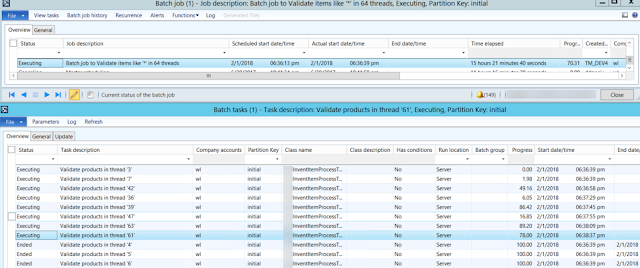
If you need to validate or delete items/products or any other records in a BIG number, it is better to run such processing, first, in CIL, second in parallel threads.

This project is to demonstrate this approach.

The whole concept is similar to what I explained in one of my previous blogpost about Multi thread parallelism and a dispatching table for finding a minimum

myInventItemProcessBatch class populates a special table containing RecIds to be processed and thread number they belong to.


Based on the user selection, it creates appropriate number of batch tasks that can run independently with their progress percentage.


Feel free to elaborate this project by adding new types of processing or new table to process. Also it is probably a good idea to add a new column to the table to separate different instances myInventItemProcessBatch simultaneously running in the same environment.


myInventItemProcessBatch 

private static server int64 populateItems2Process(str 20 _what2find, int _batchThreads)
{
    myInventItemProcessTable    myInventItemProcessTable;
    InventTable                 inventTable;
    int                         firstThread = 1;
    Counter                     countr;
    // flush all previously created items from the table
    delete_from myInventItemProcessTable;
    // insert all needed items in one shot. this part can be refactored to use Query instead
    insert_recordset myInventItemProcessTable (threadNum, ItemRecId, ItemId)
    select firstThread, RecId, ItemId from InventTable
    where
        inventTable.itemId like _what2find;
    // now group them in threads by simply enumerating them from 1 to N
    countr=1;
    ttsBegin;
    while select forUpdate myInventItemProcessTable
    {
        myInventItemProcessTable.threadNum = countr;
        myInventItemProcessTable.update();

        countr++;

        if(countr > _batchThreads)
        {
            countr=1;
        }
    }
    ttsCommit;
    // return the total number of items to process
    select count(RecId) from myInventItemProcessTable;

    return myInventItemProcessTable.RecId;
}

public void run()
{
    // get all required items by their RecIds in the table and group them in threads
    int64 totalRecords = myInventItemProcessBatch::populateItems2Process(what2find, batchThreads);
    if(totalRecords)
    {
        info(strFmt("Found %1 items like '%2' to %3", totalRecords, what2find, processType));
        // create number of batch tasks to parallel processing
        this.scheduleBatchJobs();
    }
    else
    {
        warning(strFmt("There are no items like '%1'", what2find));
    }
}
myInventItemProcessTask process()

... 
select count(RecId) from inventTable
        exists join myInventItemProcessTable
        where
            myInventItemProcessTable.ItemRecId == inventTable.RecId &&
            myInventItemProcessTable.threadNum == threadNum;
    // total number of lines to be processed
    totalLines = inventTable.reciD;
    // to enjoy our bored user during a few next hours
    // this progress just updates percentage in Batch task form
    progressServer = RunbaseProgress::newServerProgress(1, newGuid(), -1, DateTimeUtil::minValue());
    progressServer.setTotal(totalLines);

    while select inventTable
        exists join myInventItemProcessTable
        where
            myInventItemProcessTable.ItemRecId == inventTable.RecId &&
            myInventItemProcessTable.threadNum == threadNum
    {
        progressServer.incCount();

        try
        {
            // RUN YUR LOGIC HERE //////////////////////
...

Saturday, March 12, 2016

Multi thread parallelism and a dispatching table for finding a minimum

In my free time I enjoy by solving programming puzzles from Advent of Code website. Some of them are pretty simple, though others could be tricky, however, all of them are always witty. Of course, I do it in AX so that I could use as much its power as possible.

The day 4 Ideal Stocking Stuffer became a die-hard to me. And it is not because of its "business complexity" -- you simply need to find the lowest positive number producing an MD5 hash for a given secret code, so that such a hash, in hexadecimal, starts with at least five zeroes.

Honestly, I have a vague idea about MD5 hash math -- I just took a working example and injected it into my class.

The stumbling point here was calculation time. Even for the first part of the puzzle, which is always easier than than the second one, it took so much time that I started flirting with the idea to improve performance.

Wrapping the MD5 hash calculation method so that it could be run in CIL got it faster but not enough to be happy.


The next idea was batch task execution in parallel threads, like it is brilliantly explained by Ganas1 in four chapter blog series:

Batch Bundling

However, we need to find the lowest positive number; therefore, we do not know how many tasks must be created. (Let's assume that we are limited with the maximum of Int64)


My solution is the following.

I created a table, which is to centrally dispatch creating, executing, and stopping batch tasks based on a separate, sequentially assigned positive number ranges. So, for each batch task it keeps the assigned thread number, ranges, execution status and found results, if any.


The batch task generating class creates them for a given number of logical processors, four in my environment.


Each task checks the table for a found result. If it is already found in any range, it stops.
If not, it looks for the highest range from the table and than tries to add a new record. In case of success, it runs finding the lowest number in the given range.

If such a number is found in the current thread, this value becomes a new candidate only if there are no results found in the lower ranges and no any lower ranges still running.


Now blood runs faster: even the second part of the job did not give me a pause to get another beer from the fridge.

However, it is up to your judgement to set up the right range size and number of parallel tasks. The smaller a single step is, the more the transaction cost will be. And vice-versa, the larger the range is, the longer you need to wait the higher ranges tasks to finish: the total execution time is the longest task's.


This project comprises examples of the following techniques:

  • dynamic dialog creation on RunBaseBatch
  • wrapping for execution in CIL
  • execution time calc
  • multiple batch task creation
  • try-catch exception handling for concurrent table updating
  • InteropPermission assertion


Happy AX mining!

Wednesday, March 2, 2016

Infolog in batch task history using SysOperation framework

If you add tasks to a batch job using SysOperation framework, like the following:


[...]

while (mapIterator.more())
    {
        if (!batchHeader)
        {
            batchHeader = this.getCurrentBatchHeader();
        }

        controller = wblDirPartyMergeTaskController::construct();

        [...]

        if (batchHeader)
        {
            batchInfo = controller.batchInfo();
            batchHeader.addRuntimeTask(controller, this.getCurrentBatchTask().RecId);
        }
        else
        {
            setPrefix(batchInfoStr);
            controller.parmExecutionMode(SysOperationExecutionMode::Synchronous);
            controller.run();
        }
      
        mapIterator.next();
    }

    if (batchHeader)
    {
        batchHeader.save();
    }
}

You need to set Execution mode to Synchronous while initializing your service class controller.

// class wblDirPartyMergeTaskController extends SysOperationServiceController
public void new()
{
    super();
    // default for controllers in these classes is synchronous execution
    // batch execution will be explicitly specified. The default for
    // SysOperationServiceController is ReliableAsynchronous execution
    this.parmExecutionMode(SysOperationExecutionMode::Synchronous);

    this.parmOther(newValue);
}
      
Otherwise you will see nothing in bath tasks history infolog.

Friday, January 23, 2015

Breakpoint; in CIL code

I needed to debug batch processing in BatchRun.ServerGetTask() method.


It was a wrong idea to add breakpoint; instruction into a managed code. Of course, after stopping my AOS did not start anymore because of the error:

Just-In-Time debugging this exception failed with the following error: The operation attempted is not supported

The easiest way to recover this problem is to delete the forementioned instruction and recompile CIL, but I have not access to AOT X++ editor anymore.

Alternatevily, as described in How-To-Debug-Managed-Code-In-AX2012, I did catch this breakpoint in Visual Studio during the short period between Starting and Stopped statutes of AOS service.

Launch Visual Studio as administrator.


Open the class method in question directly frpm xppCIL\Source folder.


Start the AOS service.


Switch back to Visual Studio and attach to the process. It appeared in a few seconds.



Then it stopped at the problematic breakpoint.


Pressing F5 each time it stopped there (actually every minute, as it supposed to be for batch processing), I changed my code back and run full CIL.


Please, do not place breakpoint; in managed code like I did.

Full MSDN article about debugging in AX 2012.

Tuesday, December 30, 2014

Batch task progress on server for AX 2009

I already explained how to update progress for batch tasking in AX 2012. Now, it's time for AX2009.

You can simply change new() method in SysOperationProgressServer class as follows:


public void new(int _numberOfBars = 1, boolean _bypass=false)


Evidently it will increase the total execution time of a batch because SysProgress table will be updated for every task as many times as you call incCount(), setCount() etc.

So, it is worth changing construct method in RunbaseProgress class, so that the developer could decide to update progress or not.


Happy New Year!

Thursday, May 29, 2014

How to update cross-reference in batch

As you can see in AX 2012 updating cross references is not a batch job any more. But is worth setting it up to be run automatically during the night.

There is the article on MSDN describing this subject but without a batch, and if it looks too complicated for you, as for me, I would suggest another way found on AXForum (in Russian).

Once you started cross-reference updating from the client, you can easily find this job in Batch Job menu.


As we can see it is xRefUpdateIL class used for this goal, that in turn runs UpdateAll method.


So, it is possible to create your own job or batchable class to run, but we can just change the recurrence and set up other parameters, like alerts, for the ended batch job and change then its status to Waiting.


The same is true for partial reference update, say, for certain tables and classes of a project.


Happy cross-reference updating!


Monday, February 8, 2010

Error: Multiple calls to CodeAccessPermission.Assert

Multiple calls to CodeAccessPermission.Assert
(S)\Classes\SkipAOSValidationPermission\assert
(S)\Classes\BatchRun\runJob - line 166
(S)\Classes\BatchRun\do - line 54
(C)\Forms\BatchRun\Methods\doBatch - line 18

Sometimes I got this error while working with Change based alerts batch processing. After that the status of the related job in batch list changed to Executing, and the only way to get rid of it was deleting that job.


This issue arises in [Classes]BatchRun.runJob method because of absence of closing revertAssert() method in case of exceptions after calling runas() method.

So, my solution is to comment the existing call of revertAssert()...

if (batchClass.runsImpersonated())
        {
            // Ok to assert here because the user name comes from
            // the batch table
            runAsPermission = new RunAsPermission(batch.CreatedBy);
            runAsPermission.assert();
            // BP Deviation Documented
            runas(batch.CreatedBy,
                classnum(BatchRun),
                staticmethodstr(BatchRun, runJobStatic),
                [batchId]);

           // Alexey Voytsekhovskiy (SIS) (2010/02/08) (Demande #0074)
           // CodeAccessPermission::revertAssert();
        }
        else
        {
            BatchRun::runJobStatic([batchId]);
        }

and move it after catching all kind of exceptions:


catch (Exception::UpdateConflictNotRecovered)
    {
        isErrorCaught   = true;
        exception       = Exception::UpdateConflictNotRecovered;
    }

    // Alexey Voytsekhovskiy (SIS) (2010/02/08) (Demande #0074)
    // in case of exception Permssion should be revert anyway!!
    CodeAccessPermission::revertAssert();

It allows to avoid multiple calls to CodeAccessPermission.Assert (there is another call far in this method) and see the log of the job ended with an error.


By the way, here is a short and sweet trick with multiple calls if needed.
