Showing posts with label form. Show all posts

Tuesday, December 24, 2024

Tables metada browser

 Following my previous article I add a simple form to browse tables metada, like, fields, relations, their attributes, etc.

It has the old good horizontal and vertical splitters to facilitate your browsing.


Filtering by attributes like System or Data entity lets rapidly find required subset of tables and fields.

Do not forget that each grid can be exported to Excel.


All data are saved in three InMemory temporary tables, and all the logic is implemented in one class wzhTableTools.


So, you can easily elaborate this solution if some other metada need to be exposed.

Challenge: I still cannot find how to get OnDelete action type for a relation. :(


Class

internal final class wzhTableTools
{
    public static wzhTablesTmp populateTables()
    {
        Dictionary      dict        = new Dictionary();
        int             numOfTables = dict.tableCnt();
        DictTable       dictTable;
        TableId         tableId;
        int             j;
        wzhTablesTmp    wzhTablesTmp;

        // Loop through all tables in the system
        for (j=1 ; j<= numOfTables; j++)
        {
            tableId                     = dict.tableCnt2Id(j);
            dictTable                   = dict.tableObject(tableId);

            wzhTablesTmp.clear();
            wzhTablesTmp.Id             = tableId;
            wzhTablesTmp.Name           = dictTable.name();
            wzhTablesTmp.IsTmp          = dictTable.isTmp();
            wzhTablesTmp.IsView         = dictTable.isView();
            wzhTablesTmp.PName          = dictTable.label();
            wzhTablesTmp.IsAbstract     = dictTable.isAbstract();
            wzhTablesTmp.IsDataEntity   = dictTable.isDataEntity();
            wzhTablesTmp.IsMap          = dictTable.isMap();
            wzhTablesTmp.IsTempDb       = dictTable.isTempDb();
            wzhTablesTmp.IsSystem       = dictTable.isSystemTable();
            wzhTablesTmp.IsSQL          = dictTable.isSql();

            wzhTablesTmp.insert();
        }

        return wzhTablesTmp;
    }

    public static wzhFieldsTmp populateFields(TableId _tableId)
    {
        Dictionary      dict        = new Dictionary();
        DictTable       dictTable   = dict.tableObject(_tableId);
        int             numOfFields = dictTable.fieldCnt();
        int             j;
        FieldId         fieldId;
        DictField       dictField;
        wzhFieldsTmp    wzhFieldsTmp;

        // Loop through all fields in the table
        for (j=1 ; j<= numOfFields; j++)
        {
            fieldId                 = dictTable.fieldCnt2Id(j);
            dictField               = dictTable.fieldObject(fieldId);

            wzhFieldsTmp.clear();
            wzhFieldsTmp.Id                     = fieldId;
            wzhFieldsTmp.Name                   = dictField.name();
            wzhFieldsTmp.Type                   = dictField.baseType();
            wzhFieldsTmp.EDT                    = extendedTypeId2name(dictField.typeId());
            wzhFieldsTmp.IsVisible              = dictField.visible();
            wzhFieldsTmp.IsMandatory            = dictField.mandatory();
            wzhFieldsTmp.IsAllowEdit            = dictField.allowEdit();
            wzhFieldsTmp.IsAllowEditOnCreate    = dictField.allowEditOnCreate();
            wzhFieldsTmp.EDTPName               = extendedTypeId2Pname(dictField.typeId());
            wzhFieldsTmp.PName                  = dictField.label();
            wzhFieldsTmp.IsSystem               = dictField.isSystem();
            wzhFieldsTmp.IsSQL                  = dictField.isSql();
            wzhFieldsTmp.insert();
        }
        return wzhFieldsTmp;
    }

    public static wzhRelatedTablesTmp populateRelatedTables(TableId _tableId, FieldId _fieldId)
    {
        Dictionary      dict        = new Dictionary();
        int             numOfTables = dict.tableCnt();
        DictTable       dictTable;
        DictRelation    dictRelation;
        TableId         tableId;
        int             i, j;
        int             linesCnt;
        int             relationLine;
        int             c;
        str             relName;
        wzhRelatedTablesTmp wzhRelatedTablesTmp;
        
        // Loop through all tables in the system
        for (j=1 ; j<= numOfTables; j++)
        {
            tableId         = dict.tableCnt2Id(j);
            dictTable       = dict.tableObject(tableId);
            dictRelation    = new DictRelation(tableId);
            
            // Loop through all table relations
            int relCount    = dictTable.relationCnt();

            for (i = 1; i <= relCount; i++)
            {
                relName = dictTable.relation(i);
                dictRelation.loadNameRelation(relName);
                
                if (dictRelation && dictRelation.externTable() == _tableId)
                {
                    linesCnt = dictRelation.lines();
                    for (relationLine=1; relationLine <= linesCnt; relationLine++)
                    {
                        // Check if the relation is with AMDeviceTable.DeviceId
                        if (dictRelation.lineExternTableValue(relationLine) == _fieldId)
                        {
                            c++;
                            wzhRelatedTablesTmp.clear();
                            wzhRelatedTablesTmp.Id                         = c;
                            wzhRelatedTablesTmp.FieldId                    = dictRelation.lineTableValue(relationLine);
                            wzhRelatedTablesTmp.RelatedTableName           = dictTable.name();
                            wzhRelatedTablesTmp.RelatedTablePName          = dictTable.label();
                            wzhRelatedTablesTmp.RelationName               = relName;
                            wzhRelatedTablesTmp.Role                       = dictRelation.Role();
                            wzhRelatedTablesTmp.RelatedTableRole           = dictRelation.RelatedTableRole();
                            wzhRelatedTablesTmp.RelatedTableCardinality    = dictRelation.RelatedTableCardinality();
                            wzhRelatedTablesTmp.IsEDTRelation              = dictRelation.EDTRelation();
                            wzhRelatedTablesTmp.Cardinality                = dictRelation.Cardinality();
                            wzhRelatedTablesTmp.RelationshipType           = dictRelation.relationshipType();
                            wzhRelatedTablesTmp.RelatedFieldName           = fieldId2Name(tableId, wzhRelatedTablesTmp.FieldId);
                            wzhRelatedTablesTmp.insert();
                        }
                    }
                }
            }
        }
        return wzhRelatedTablesTmp;
    }

}

Form

[Form]
public class wzhTables extends FormRun
{
    public void clearFields()
    {
        delete_from wzhFieldsTmp;
        delete_from wzhRelatedTablesTmp;
        wzhFieldsTmp_ds.research();
        wzhRelatedTablesTmp_ds.research();
    }

    public void clearRelatedTables()
    {
        delete_from wzhRelatedTablesTmp;
        wzhRelatedTablesTmp_ds.research();
    }

    public void populateTables()
    {
        wzhTablesTmp.setTmpData(wzhTableTools::populateTables());
        wzhTablesTmp_ds.research();
    }

    public void populateFields()
    {
        wzhFieldsTmp.setTmpData(wzhTableTools::populateFields(wzhTablesTmp.Id));
        wzhFieldsTmp_ds.research();
    }

    public void populateRelatedTables()
    {
        wzhRelatedTablesTmp.setTmpData(wzhTableTools::populateRelatedTables(wzhTablesTmp.Id, wzhFieldsTmp.Id));
        wzhRelatedTablesTmp_ds.research();
    }

    [DataSource]
    class wzhTablesTmp
    {
        public int active()
        {
            int ret;
    
            ret = super();
            element.clearFields();
            element.populateFields();
    
            return ret;
        }

        public void init()
        {
            super();
            element.populateTables();
        }

    }

    [DataSource]
    class wzhFieldsTmp
    {
        public int active()
        {
            int ret;
    
            ret = super();
            element.clearRelatedTables();
            element.populateRelatedTables();
    
            return ret;
        }

    }

}


Friday, August 4, 2023

How to select\unselect all records in a form grid

 While adding standard command button you can opt for SelectAll to mark all records in a form grid. However, there is no such a command for the opposite - unselect all records.


You can easily achieve it by using the following method and two usual button form controls.

[Form]
public class myForm extends FormRun
{
    public void selectAll(boolean _select)
    {
        VendPaymFormat_DS.markAllLoadedRecords(_select);
    }

    [Control("Button")]
    class FormButtonControlSelectAll
    {
        public void clicked()
        {
            element.selectAll(true);
            super();
        }
    }

    [Control("Button")]
    class FormButtonControlUnSelectAll
    {
        public void clicked()
        {
            element.selectAll(false);
            super();
        }
    }
}


Monday, March 6, 2023

How to open multiple Purchase orders in new browser tabs

static public void initFromPurchTable(FormDataSource _formDS)
{
	PurchTable      currentPurchTable;
	Browser         browser = new Browser();
	for (currentPurchTable = _formDS.getFirst(true) ? _formDS.getFirst(true): _formDS.cursor();
	currentPurchTable;
	currentPurchTable= _formDS.getnext())
	{
		var generator     = new Microsoft.Dynamics.AX.Framework.Utilities.UrlHelper.UrlGenerator();
		var currentHost   = new System.Uri(UrlUtility::getUrl());
		generator.HostUrl = currentHost.GetLeftPart(System.UriPartial::Authority);
		generator.Company = curext();
		generator.MenuItemName = 'PurchTableListPage';
		generator.Partition = getCurrentPartition();
		// repeat this segment for each datasource to filter
		var requestQueryParameterCollection = generator.RequestQueryParameterCollection;
		requestQueryParameterCollection.AddRequestQueryParameter(
																'PurchTable',
																'PurchId', currentPurchTable.PurchId
																);
		System.Uri fullURI = generator.GenerateFullUrl();
		browser.navigate(fullURI.AbsoluteUri, true);
	}
}

Saturday, December 11, 2021

Multiple enum values selection in forms and tables

Previously I posted three supporting functions to work with multiple enum values selection. Now, let's see how they can be used in real scenarios.

With these functions you can easily expose enum values in selection lists and then save the user selection in tables.

Enum lists in a form

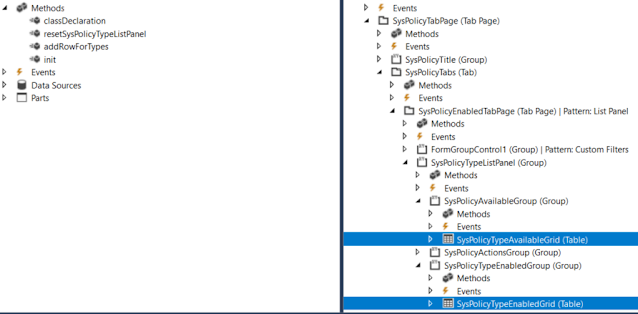
Check first how to show two grids in a form; so that the user could move enum values from one to another.


[Form]
public class SysPolicyTypesOneCompanyActiveOnly extends FormRun
{

    private Map                 policyTypes = wzhTest::createMapForEnum(enumStr(SysPolicyTypeEnum));
    private SysPolicyTypeEnum   type;
 
    private void resetSysPolicyTypeListPanel()
    {
        SysPolicyTypeAvailableGrid.deleteRows(0, SysPolicyTypeAvailableGrid.rows());
        SysPolicyTypeEnabledGrid.deleteRows(0, SysPolicyTypeEnabledGrid.rows());

        var mapEnumerator = policyTypes.getEnumerator();
        while (mapEnumerator.moveNext())
        {
            type        = mapEnumerator.currentKey();
            
            if (SysPolicyTypesOneCompanyActiveOnly::exist(type))
            {
                this.addRowForTypes(SysPolicyTypeEnabledGrid, type);
            }
            else
            {
                this.addRowForTypes(SysPolicyTypeAvailableGrid, type);
            }
        }

        SysPolicyTypeAvailableGrid.row(SysPolicyTypeAvailableGrid.rows() ? 1 : 0);
        SysPolicyTypeEnabledGrid.row(SysPolicyTypeEnabledGrid.rows() ? 1 : 0);
    }

    private int addRowForTypes(FormTableControl _table, SysPolicyTypeEnum _type)
    {
        int i;
        // Insert it into the data set in sorted order.
        for (i = _table.rows(); i >= 1; i--)
        {
            SysPolicyTypeEnum typeIdTmp = _table.cell(1, i).data();
            
            if (strCmp(enum2Str(typeIdTmp), enum2Str(_type)) < 0)
            {
                // We need to insert after the current item.
                break;
            }
        }

        // Insert the new item, i is equal to the index of the item we need to insert after.
        _table.insertRows(i, 1);
        _table.cell(1, i + 1).data(_type);

        return i + 1;
    }
...
}

Multiple enum values in a table

In order to save user's selection of particular Enum values in a table, you can add a string type field there. 

The rest is to convert these selected values from string to a list or a container to present them in a form.

Say, we need to let the user to select particular FiscalPeriodStatus values.


First, we add a new string field FiscalPeriodStatusSelection to our table.


We can show the currently saved selection via a display method

    /// <summary>
    /// Returns Fiscal period statuses string values
    /// </summary>
    /// <param name = "_parm">container</param>
    /// <returns>string values of selected period statuses</returns>
    [SysClientCacheDataMethodAttribute(true)]
    public display LedgerExchAdjFiscalPeriodStatusSelection fiscalPeriodStatusSelectionDisp()
    {
        return wzhTest::enumValuesStr2EnumStrStr(this.FiscalPeriodStatusSelection, enumName2Id(enumStr(FiscalPeriodStatus)));
}

And updates this field via AnotherClass which treats the user's selection (in a form, for example)

    this.FiscalPeriodStatusSelection = con2Str(AnotherClass.getFiscalPeriodStatusSelectionCont(), wzhTest::ContSeparator);

    /// <summary>
    /// Gets FiscalPeriodStatus selection as a container
    /// </summary>
    /// <returns>container</returns>
    public container getFiscalPeriodStatusSelectionCont()
    {
        container                               cont;
        
        while (...)
        {
            cont += SomeBufferOrList.FiscalPeriodStatus;
        }
                
        return cont;
    }

Wednesday, April 22, 2020

New Image in FormGroupControl with BusinessCard Extended style

Developing and customizing forms in D365 are limited by predefined patterns and styles.

We can however overcome these limitations to some extent by placing new form controls and changing properties of existing ones and, of course, a bit of coding.

As an example, let's add a new Workflow image similar to Expense category to be shown in BusinessCard form group control, once an expense is assigned to the current user.


There are multiple ways to achieve the required change. To mention a few, playing with Style and ExtendedStyle properies in design, changing form controls placement with Top, Bottom, Left, Right properties, playing with DisplayOptions at run time, combining both images into one, replacing the standard images to customized ones: one for Assigned-to-me Category and standard Category, and so one.


Here we consider adding a new image of Workflow icon next to the standard Category one.We have a display method returning the required image. The key point here is to set its ExtendedStyle property to card_imageSquare, so that it would be shown properly.


Now it looks almost perfect, but the new form control pushed a bit the currency amount out of the card frame. 


Let's fix it by hiding the standard form control and placing its duplicate with ExtendedStyle = None.


The last thing is to make the text bold in order to emphasize it.


[ExtensionOf(tableStr(TrvExpTrans))]
final class TrvExpTrans_Extension
{
    boolean isCurrentUserWorkflow()
    {
        ...
    }

    display container currentUserWorkflowIndicator()
    {
        ImageReference imgRef;
        if (this.ApprovalStatus == TrvAppStatus::Pending && this.isCurrentUserWorkflow())
        {
            imgRef = ImageReference::constructForSymbol(ImageReferenceSymbol::Workflow);
            return imgRef.pack();
        }

        return conNull();
    }

    [FormDataSourceEventHandler(formDataSourceStr(TrvExpenses, TrvExpTrans), FormDataSourceEventType::DisplayOptionInitialize)]
    public static void ds_OnDisplayOptionInitialize(FormDataSource sender, FormDataSourceEventArgs e)
    {
        FormDataSourceDisplayOptionInitializeEventArgs  eventArgs   = e as FormDataSourceDisplayOptionInitializeEventArgs;

        FormDesign                                      fd          = sender.formRun().design(0);
        FormRowDisplayOption                            fo          = eventArgs.displayOption();
        FormControl                                     fc          = fd.controlName("newAmountCurrWithCurrencyCode");
        // if we can find our new form control for the expense amount
        if(fo && fc)
        {
            // let's make it bold to emphasize
            fo.affectedElementsByControl(fc.id());
            fo.fontBold(true);
        }
    }

}

The final view.


Wednesday, November 20, 2019

Operating with system defined buttons in form Action pane

Say, we have to reference Edit button.


For this we use the macro #define.SystemDefinedViewEditButton('SystemDefinedViewEditButton')

The whole list is present in SysSystemDefinedButtons macro


Code snippet for your active method in name_DS

int active()
        {
            
            #SysSystemDefinedButtons
 
            ret = super();
 
         < ... >
            FormCommandButtonControl editButton = element.control(element.controlId(#SystemDefinedViewEditButton)) as FormCommandButtonControl;
            editButton.enabled(name_ds.allowEdit());
 
            return ret;
        }

Check this article https://docs.microsoft.com/en-us/dynamics365/fin-ops-core/dev-itpro/user-interface/system-defined-buttons

Friday, April 12, 2019

Dangerous bug in CustCollectionsPoolsListPage form AX2012/D365

There is a form CustCollectionsPoolsListPage where two data sources are outer joined to the root data source with no relations (no links).


If by any reason the initial query does not contain links for these two aforementioned, SQL starts producing a Cartesian product and generating a huge temporary table. The latter can potentially lead to SQL server crash, like it happened in our environment.


The following fix may leave much to be desired but at least it creates needed links in case they are absent.

On CustTable data source we have to add an additional check for the existing query.


public void executeQuery()
{
    element.populateAgingIndicators(selectedCustAging);

    // Use the query from the cue?
    if (!useInitialQuery 
                        // Begin
                        || !this.wblCheckQuery(this.query())
                        // End: 
                        )
    {
        this.query(element.addOriginalPoolQuery(listPageHelper.getCurrentPoolQuery()));
    }


    super();

    element.setButtonAccess();
    element.setGridColumnLabels();
}


// to avoid the cartesian product in case of absent link for this outer join
private boolean wblCheckQuery(Query _query)
{
    QueryBuildDataSource custAgingDs;
    QueryBuildDataSource custAgingLegalEntityDs;
    boolean ret = true;

    custAgingDs             = _query.dataSourceName(#CustAgingDsName);
    custAgingLegalEntityDs  = _query.dataSourceName(#CustAgingLegalEntityName);
    if (!custAgingDs || !custAgingLegalEntityDs || custAgingDs.linkCount() <= 0 || custAgingLegalEntityDs.linkCount() <= 0)
    {
        ret = checkFailed("Saved query is corrupted. Try to recreate the cue");
    }
    return ret;
}

From SQL perspective we can catch such an issue by the following query.


use tempdb
select * from sys.dm_db_session_space_usage spu
join sys.dm_exec_sessions s on s.session_id = spu.session_id
join sys.dm_exec_requests r on s.session_id = r.session_id
cross apply sys.dm_exec_sql_text(sql_handle) t 
order by internal_objects_alloc_page_count desc

Wednesday, April 3, 2019

Accessing FormDataSource

Say, we need to change the form data source sorting order or any other more complex change.

This is an old but good note by Vania Kashperuk about the subject in AX 2012.


public void init()
{
    super();
    this.queryBuildDataSource().addSortField(fieldNum(myDescartesInbound, RecId), SortOrder::Descending);
}


Wednesday, January 23, 2019

bugs in SysLookupMultiSelectGrid class and form

You can find a lot of example about how to support multiple selection lookups. AX 2012/D365 provide us with SysLookupMultiSelectGrid class and form to implement such scenarios.

There are two bugs however still existing in the standard code.

SysLookupMultiSelectGrid class, method lookup() must be as follows in order to refresh Query in case QueryRun is given.


// the standard method does not update the query in case if queryrun is given
public static void wblLookup(Query _query, FormStringControl _ctrlIds, FormStringControl _ctrlStrs, container _selectField, queryRun _queryRun = null)
{
    SysLookupMultiSelectGrid    lookupMS = new SysLookupMultiSelectGrid();

    lookupMS.parmCallingControlId(_ctrlIds);
    lookupMS.parmCallingControlStr(_ctrlStrs);
    lookupMS.parmQuery(_query);
    lookupMS.parmQueryRun(_queryRun);
    if(_queryRun)
    // Begin: Alexey Voytsekhovskiy
    {
        lookupMS.parmQuery(_queryRun.query());
    }
    // End: Alexey Voytsekhovskiy
    lookupMS.parmSelectField(_selectField);
    lookupMS.run();
}

SysLookupMultiSelectGrid form, method executeQuery() on common data source must be as follows in order not to consider referenced data sources, which may come with a given query.


public void executeQuery()
{
    QueryRun qr;
    Query lookupMultiSelectQueryCopy = new Query(lookupMS.parmQuery());
    FormRun formRun;
    FormDataSource formDataSource;
    int dsCount, i = 1;
    Common formDataSourceCursor, queryRunCursor;

    // Always use the query defined on the SysLookupMultiSelectGrid class. Note that a copy is used
    // so that any modifications made to the Query by the Form at runtime aren't fed back through
    // the next time the lookup is presented to the user. (The Query is used to define which fields
    // are present on the Form during lookup construction. Therefore, if any fields are added at runtime
    // by the Forms engine, duplicated or non-original-Query defined fields may be presented on the
    // 2nd or later presentations of the lookup if a copy isn't used.)
    this.query(lookupMultiSelectQueryCopy);

    // check if user has set any queryrun. If yes, that means the cursors are set by user explicitly,
    // usually the case where query contains tmp tables and needs to be populated.
    qr = lookupMS.parmQueryRun();
    if(qr)
    {
        formRun = this.formRun();
        dsCount = formRun.dataSourceCount();

        // get data source from query run, get the cursor and set it on the form data source cursor.
        for(i = 1; i<=dsCount; i++)
        {
            formDataSource = formRun.dataSource(i);
            if(formDataSource
                            // Begin: Alexey Voytsekhovskiy
                            // we don't need a reference data source here!
                            && !formDataSource.isReferenceDataSource()
                            // End: Alexey Voytsekhovskiy
                            )
            {
                // get form data source cursor and set the queryrun cursor as data on it.
                formDataSourceCursor = formDataSource.cursor();
                queryRunCursor = qr.get(formDataSourceCursor.TableId);
                if(queryRunCursor)
                {
                    if(queryRunCursor.isTempDb() || queryRunCursor.isTmp())
                    {
                        formDataSourceCursor.setTmpData(queryRunCursor);
                    }
                    else
                    {
                        formDataSourceCursor.data(queryRunCursor);
                    }

                }
            }
        }
    }
    super();
}

Wednesday, October 17, 2018

How to get all related table ids from code

We can loop all relations on a table by code.


static void myGetRelatedTableNames(Args _args)
{
    myInExtCodeValueTable           myInExtCodeValueTable;
    int                             mapId;
    TableName                       relatedTableName;
    TableId                         relatedTableId;
    Set                             tablesIdsSet    = new Set(Types::Integer);
    Set                             tablesNamesSet  = new Set(Types::String);
    TableId                         tableId         = tableName2id(tableStr(myInExtCodeValueTable));
    Dictionary                      dictionary      = new Dictionary();
    SysDictTable                    dictTable       = dictionary.tableObject(tableId);
    DictRelation                    dictRelation    = new DictRelation(myInExtCodeValueTable.TableId);
    int                             mapCnt          = dictTable.relationCnt();
    container                       ret ;            
    str                             relationName;
    //create a maps of literals for all tables from the table relations
    // so that we could get tables names based on their ids
    // and if any new relation will be added to multiple external codes table
    // it is present automatically in this view
    for (mapId=1; mapId <= mapCnt; mapId++)
    {
        // elaborate if any table present many times
        relationName        = dictTable.relation(mapId);
        dictRelation.loadNameRelation(relationName);
        if(dictRelation)
        {
            relatedTableId      = dictRelation.externTable();
            relatedTableName    = tableId2pname(relatedTableId);
            tablesIdsSet.add(relatedTableId);
            tablesNamesSet.add(relatedTableName);
            info(strFmt("Table %1 - %2", relatedTableId, relatedTableName));
        }
    }
        
    ret = [tablesIdsSet.pack(), tablesNamesSet.pack()];
}


It can be useful in cases when we need, say, to open a form with a related record.


Here you can find a more elaborated example.

Wednesday, June 6, 2018

Extensions and Edit and Display methods declaration in D365

Just a short note for my current PU.

Display methods work well as instance methods from table extensions. As to edit-methods, we still need to declare them as static.


[ExtensionOf(tableStr(ProjProposalJour))]
final class myProjProposalJourTable_ProjInvReport_Extension

 static public server edit myProjInvReportFmtDescWithBr myEditInvReportFormatWithBR(ProjProposalJour _this, boolean _set, PrintMgmtReportFormatDescription  _newReportFormat)
    {
        PrintMgmtReportFormatDescription    newReportFormat = _newReportFormat;
        PrintMgmtReportFormatDescription    reportFormat;

        reportFormat = ProjInvoicePrintMgmt::myGetReportFormatWithBR(_this);
        if (_set)
        {
            if (_this.RecId && newReportFormat && newReportFormat != reportFormat)
            {
                ProjInvoicePrintMgmt::myCreateOrUpdateInvoiceWithBRPrintSettings(_this, PrintMgmtNodeType::ProjProposalJour, newReportFormat);
                reportFormat = newReportFormat;
            }
        }
        return reportFormat;
    }


Do not forget to pass the table buffer as the first argument.

More detail can be found in Vania's article about news in PU11.


Thursday, May 24, 2018

Simple form for Financial dimension value set lookup

Simple form for Financial dimension lookup.

On any form a consultant can add Fin dim field, which is actually just a rec id, then click on it to see the real value set. (Added FormRef to DimensionAttributeValueSet table.)

If opened as a separate window, the form allows to lookup any fin dim value.


Download AX 2012 XPO file.

Friday, March 9, 2018

TempDB table on a form with multiple updates

If you, like me, are still trying to understand how to use a TempDB table in a form and update it as many times as you need, or you are getting the error

"Cannot execute the required database operation.The method is only applicable to TempDB table variables that are not linked to existing physical table instance."

then you would better read the following short explanation.

Let's say your tempDB table is meant to be populated by request from a form on the server side.


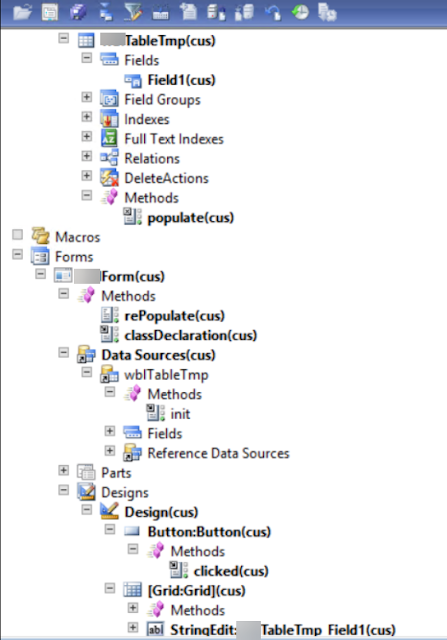
In the form data source Init() we just initialize another tempDB buffer of the same type and link its physical instance to the current data source buffer.


public void init()
{
    super();
    myTableTmpLocal.doInsert();
    delete_from myTableTmpLocal;
    //myTableTmp::populate(myTableTmpLocal); // <-- no need at this step! 
    // if you need to populate it here by default, then comment the two previous lines
    myTableTmp.linkPhysicalTableInstance(myTableTmpLocal);
}

Any time you need to update its content, just re-populate it in a method by providing the linked temporary buffer from the form.


void clicked()
{
    super();
    element.rePopulate();
}

public void rePopulate()
{
    myTableTmp::populate(myTableTmpLocal);
    myTableTmp.linkPhysicalTableInstance(myTableTmpLocal);
    myTableTmp_DS.research();
}

Populating method defined on the table, for example.


static server void populate(myTableTmp _myTableTmp)
{
    int k;
    
    delete_from _myTableTmp; //<-- important to not have duplicates!
    
    for (k = 1; k<=4; k++)
    {
        _myTableTmp.Field1 = int2str(k);
        _myTableTmp.insert();
    }
}

All credits for this trick are for Iulian Cordobin.

Friday, December 15, 2017

How to link two tables on the form via DynaLink


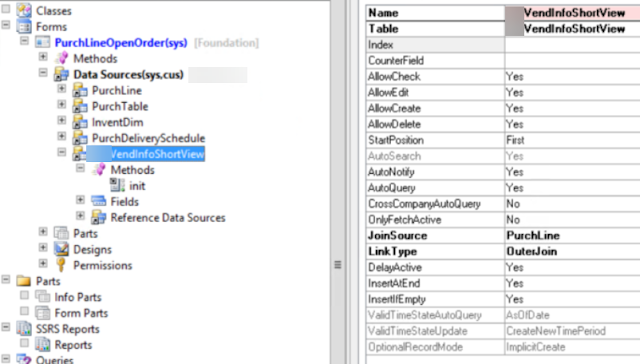
public void init()
{
    QueryBuildDataSource    qbdsPurchLine;
    super();
    
    qbdsPurchLine = PurchLine_DS.query().dataSourceName(tableStr(PurchLine));
    qbdsPurchLine.clearDynalinks();
    qbdsPurchLine.addDynalink(fieldNum(PurchLine, VendAccount), myVendInfoShortView, fieldNum(myVendInfoShortView, AccountNum));
}


Monday, April 10, 2017

InMemory and TempDB in joins on forms

One of the tricky point of the previously announced project for AIF external code mapping and Reverse view is the usage of temporary tables in the latter's form.

As we know there are two different temporary table types in AX 2012: InMemory and TempDB.

In my project I needed to join a temporary table with internal values to the regular table with external codes.

"Cannot select a record in xxxx.
InMemory temporary tables must be the outer tables when they are joined to a TempDB table or permanent table."

How to avoid this famous error?

Brief, I need to populate the temp buffer at the server side and then to pass it to the form data source.

The easiest way to understand how they are processed by AX is switching the type for and debugging then the Reverse view form opening in Init and temporary table populating method. Seeing is believing.

This is how Reverse View regular and temp table are joined.


Let's start with InMemory type. The form considers it as the client tier based table.


In the server based populating method, we need to instantiate the local temp buffer and then set it to the argument buffer via setTmpData() method so that it was still on the server tier. Old school.


Then the same approach to set it to the caller data source. Our temp InMemory table is still on the server and can be joined.


Now, change the table type to TempDB and debug it again. As you can see the form determines it as the server based object.


This time we need to insert new records directly to the argument buffer so that it could be linked to the caller form data source via linkPhysicalTableInstance() method.


If do not have any special reason, the TempDB is recommended to use.


AIF Many to One External Codes Value Mapping and Reverse View Extension

I do not see any reason why we are not allowed to map many external codes to one internal for AIF inbound port value mapping.

In fact, this is just a question of one additional table, which can be easily created as a copy of the exting one, and a slight change to three classes and AIF related forms.


For the demo's sake it is implemented for Customer and Units only, but you can add the same to any AX externally enabled table.

 Please download and use this extension to the standard AIF in AX 2012.

Another valuable feature of this project is the External codes Reverse View.


Any time I saw something like depicted, I dreamt to have a way to look into this halo in reverse.


The Reverse view enables you to find any existing relation between 1:1 and N:1 external and internal codes.

Filter by any column, export them to Excel, and go directly to the internal table by Edit or double-clicking.

Besides aforementioned, there are examples of using the powerfull AX objects, like:
- table map;
- Data Dictionary operations for scalability;
- set;
- InMemory and TempDB usage in Form and joins.


Thursday, January 19, 2017

How to restore a hidden Fact box in the form without File and View menu options

There is no easy way out if you hid fact boxes in a modal form, like a wizard, for example, which has neither File nor View menu option.


Personalise/Reset won't help with it.


This is a trick to make hidden fact boxes visible again.
Take the form name in question.


Then go to your user's usage data and delete the records selected by the name in second "element name" column.


Now, welcome back your fact boxes!

Wednesday, January 11, 2017

Heavy form performance issue

One of my client complained about very slow opening of one form, which they use as a core functionality for supporting customer service calls. This form is really heavy equipped with many form controls, like grids, and dozen of linked data sources.

The behaviour was really strange: for some users it worked more or less fast, say, 3-6 secondes, for certains, on the contrary, it could take up to 25-30 secondes.

All of them were assigned to System admin role. No special security, like, RLS or whatsoever was implemented.

Trace Parser and Code Profiler showed that the sequence of the execution flow was the same; however, almost all of the methods executed as twice as longer for the"slow" user than for the "rapid" one.

The strangest thing was in the fact that Trace Parser showed inclusive execution time which was not the sum of all its including methods: evidently something happened behind the scene.

Another funny thing, after clearing the "slow" user's cache files, the first run was slow, which is normal, the second run was incredibly fast, as much fast as for the "rapid" users, but starting the third run it fell down to slowliness.

The key was actually in the small option as it explained on the article Configure client performance options:

Preload complex forms

By default, forms that include more than 80 controls are preloaded and added to a preload cache. When the user opens a form, the system checks the preload cache for a preloaded version of the form. If a preloaded version is found, the system completes the initialization process and loads the form. Not all forms are preloaded. If resource limitations are met, the system starts to remove forms from the cache, starting with the forms that were least recently used. Forms such as lookups, parts, preview panes, and system forms are excluded from this mechanism.
You can turn off preloading by using the following methods:
  • To turn off preloading for the whole system, in the Client performance options form, clear the Form pre-loading enabled (requires a client restart) option.
  • To turn off preloading for a form, follow one of these steps:
    • Set form argument allowUseOfPreloadedForm for the X++ method to true.
    • Set the Form.AllowPreLoading metadata property to No.

So, once I changed the latter for this heavy form that some users personalized, it started to open very fast for all of them.

I want to thank:

All my colleagues at work;
Brandon Wiese;
Brandon Ahmad;
Freeangel and all other members from this thread (in Russian).