Showing posts with label xpo. Show all posts

Wednesday, March 6, 2019

Extended version of Universal Field Changer for Microsoft Dynamics AX2012

Oh yeah! The Field changer is still on the road! Now equipped with two updating options:


Feel free to use this surgeon's tool at your own risk! Grab it from here.

Wednesday, January 20, 2016

Export-Import XPO files

Among our AX mundane chores I would highlight the promotion process. Nevertheless, this changed drastically since AX 2012 started using models and model stores; sometimes, the old good way is in demand, yet.

I am talking about promoting your projects between environments via exporting and importing XPO files. First, we export the project from, say, DEV environment to an XPO file. Then we import it to TEST environment with the Definition only option checked. After that we export the current content of this project as a back up. Finally, we re-import the project entirely.

Schematically the process goes as follows:

DEV-MyProject->DEV\MyProject.xpo
TEST<-DEV\MyProject.xpo (definition)
TEST-MyProject->\BackUp\MyProject
TEST<-DEV\MyProject.xpo

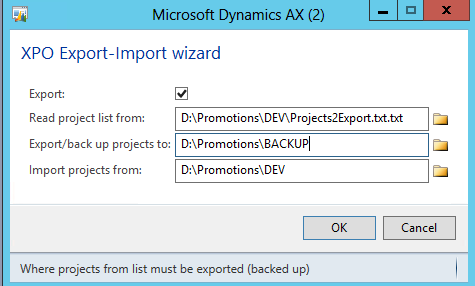
Not a big deal when it comes to one-two projects only. Everything changes when you need to cope with a dozen of them... I developed a small class that keeps me lazy by doing all these steps.

You need to set up its parameters for every environment where you need to promote projects.


It reads project names to export-import line by line from a plain text file and processes them one by one.

Note: it works on CUS layer only and without labels; however, it can be easily adapted to your context.

Here is the link to download.

Thursday, September 11, 2014

Problem with importing a temporary table/class/etc

I bumped into a strange problem. The admin refreshed my development environment from the TEST one; consequently, all my objects were deleted.

When I started re-importing them from an exported xpo-project, a temporary table always caused the following error:

A table, Extended Data Type, Base Enum or class called XXXXX already exists. Import of Table aborted.


The problem can be easily resolved by flushing the user cache:
Stop AX client and delete all  ax_*.auc files in "C:\Users\%USERNAME%\AppData\Local folder" 

Tuesday, January 17, 2012

Universal Field Changer new version for Microsoft Dynamics AX2012

So, I took my old project from the case just to add a new feature: this time I would like to get all the table fields with their labels in the user's language.


Frankly seaking I was going to get it in a grid in order to export to Excel; but unfortunately I did not find a fast way to show my temporary table. Finally, I just use InfoLog in the comma separated format that can be used lately to open in Excel.


Enjoy, anyway!

Description:

Universal Field Changer class for Microsoft Dynamics AX2012:

- collects all the fields from all the tables in AOT in temporary tables;
- makes possible to change any values using filtres by table and field names and existing values;
- provides access to SQL query string;
- prints the field lists with labels in user's language;
- creates dynamically all the form controls and uses method overloading and can be used as a tutorial;

Monday, May 2, 2011

How to find your object in AOT projects

This is a small but precious tool for AX developing.

Have you ever tried to find in which projects your objects are included? Yes, I have... Not so easy to search and look into each project.

Now, it is just a question of one click: this mighty LC Project Search will make the life easier. And good news, it is free. So, profit and enjoy!

There are three xpo-files with appropriate versions for AX 4.0, 2009, and 2012. (I have tested 2009 one). You can import it, then launch with the menu item, and this is ready to go.


Just type the name of any object you're looking for, optionally, you can choose the type of it, then press Search. Be patient, it takes some time to populate the result table.


Now, all projects contain the object are here.

Take a look at Loncar Technologies company web site: there you can get some more.

Wednesday, February 18, 2009

XPO file viewer

When you deal with a pile of Axapta project files (xpo-files) it might be very useful to take a look at what it consists of.

For this goal, I created a small application that allows to see the content of an XPO file in Tree view as you got used to see during the import procedure in AX.

No need anymore to load AX, just launch XPOViewer.exe (from XPOViewer.zip archive) and open the file you want to see. You can also start this application by double-click on files having set it as default system action: by xpo files association.


Loading large project files can take much time, so, be patient and enjoy the progress bar.

In the Tree view you can copy any branch text to your clipboard by Ctrl-C key combination or from the context menu.