Showing posts with label Visual Studio. Show all posts

Monday, June 21, 2021

TF command line to fix the error: Mapping on the working folder is already in use

 Just to document my command line to get rid of this blocking error.


My environment is under Azure DevOps version control and some other user already created a workspace on this computer.

Close Visual Studio (2017 in my case) and open the command line. It can be open via Developer Command Prompt for VS 2017; so you would not need to provide the entire path to tf.exe.


Next, run a tf command to delete the workspace created by the previous user (Name and Surname)

tf workspace /delete DEV365-FO-VM-3;"Name Surname" /collection:https://YOURCOMPANYPROJECT.visualstudio.com


Then stop all locally running D365FO services, like Web Publishing, Batch processing, etc, in order to avoid errors with locked files in your K:\AosService\PackagesLocalDirectory subfolders.

Now you can open Visual Studio, connect to Azure DevOps server, create a new workspace, map your folders for projects and metadata, and get latest.

Thursday, July 9, 2020

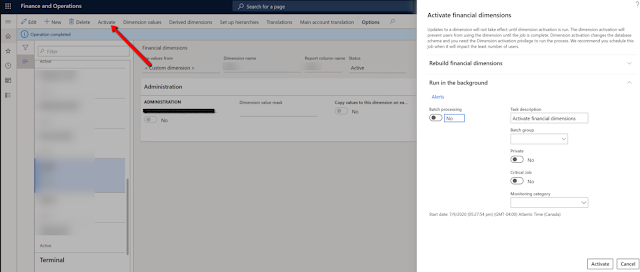
How to activate a financial dimension

First, run the following script over your DB via SQL Management Studio.


update SQLSYSTEMVARIABLES SET VALUE = 1 where PARM = 'CONFIGURATIONMODE'

select value from SQLSYSTEMVARIABLES  where PARM = 'CONFIGURATIONMODE'


Then restart IIS from inside of Visual Studio.


Activate your financial dimension.


Now, run the same script but by setting the variable to zero, and restart IIS again.


update SQLSYSTEMVARIABLES SET VALUE = 0 where PARM = 'CONFIGURATIONMODE'

select value from SQLSYSTEMVARIABLES  where PARM = 'CONFIGURATIONMODE'

Friday, March 13, 2020

Visual Studio 2015 crash with "The supplied SnapshotPoint is on an incorrect snapshot" error

This error is really annoying bug in VS2015 when you barely touch your code, and the VS crashes all the time.

Thanks Joris, there is a workaround in VS Options:


Friday, January 23, 2015

Breakpoint; in CIL code

I needed to debug batch processing in BatchRun.ServerGetTask() method.


It was a wrong idea to add breakpoint; instruction into a managed code. Of course, after stopping my AOS did not start anymore because of the error:

Just-In-Time debugging this exception failed with the following error: The operation attempted is not supported

The easiest way to recover this problem is to delete the forementioned instruction and recompile CIL, but I have not access to AOT X++ editor anymore.

Alternatevily, as described in How-To-Debug-Managed-Code-In-AX2012, I did catch this breakpoint in Visual Studio during the short period between Starting and Stopped statutes of AOS service.

Launch Visual Studio as administrator.


Open the class method in question directly frpm xppCIL\Source folder.


Start the AOS service.


Switch back to Visual Studio and attach to the process. It appeared in a few seconds.


Then it stopped at the problematic breakpoint.


Pressing F5 each time it stopped there (actually every minute, as it supposed to be for batch processing), I changed my code back and run full CIL.


Please, do not place breakpoint; in managed code like I did.

Full MSDN article about debugging in AX 2012.

Tuesday, April 29, 2014

How to get rid of hyper links in SSRS report

As we remember AX 2012 allows us to jump directly to the details based on EDT or table relations. Sometimes this weight a report that supposed to be saved in Excel, for example.

It is easy to suppress hyper links in Visual Studio by changing field property in design.


Happy DAXing!

Monday, June 4, 2012

How to get AOS name to attach to in Visual Studio 2010

When you are going to debug your AX application in Visual Studio 2010, it is easy to choose which AOS to attach to. There is the application file path in the hint above the name of AOS service.