Showing posts with label D365. Show all posts

Sunday, May 8, 2022

How to move AX2012 attachment files to SharePoint while upgrading database to D365FO

Problem

When it comes to upgrading attachments from AX2012 to D365FO, only URLs, notes, and files saved in the former's database may be transferred to the Azure Blob Storage (on-cloud). 

Therefore, all files from attachments in AX2012 should be moved to the database first in order to be successfully migrated to D365FO.

What if there are millions of them? Technically speaking it might be a good option to save them on SharePoint (on-cloud); however, unfortunately, such attachments links will be deleted, too.

You can find more detail on Document management in D365FO in https://docs.microsoft.com/en-us/dynamics365/fin-ops-core/fin-ops/organization-administration/configure-document-management

Technical details

During the Ax2012-D365FO database upgrade process, among other standard classes ('scripts') ReleaseUpdateDB72_Docu is triggered, which actually deletes records in DocuValue and related tables for all files not saved in the data base including even those referenced on a local SharePoint server.

Solution

As a solution we can move all external files referenced in AX2012 attachments to a on-cloud SharePoint server first

Then an extension to the aforementioned class must be triggered during the standard DB upgrade procedure; so that it would keep existing links and update them accordingly to a new SharePoint folder structure.


For example, we can agree that existing local folders will be reproduced on the SharePoint Server instance.


The following code must be adapted accordingly to your landscape and tested first on a small set of files in a dev environment.

Please, use it at your own risk.

[ExtensionOf(classStr(ReleaseUpdateDB72_Docu))
final class myReleaseUpdateDB72_Docu_Extension
{
    public const str myLegacy          = 'Legacy';
    public const int myActionClassId   = 118; //DocuActionURLClassId
    public const str myName            = 'Legacy attachments for ';
    public const str myHost            = 'myCompany.sharepoint.com';
    public const str mySite            = '/sites/D365FOFileShare';

    public const str myUpgradeModifiedUser = 'myAxDocUpgradeUser'; // fake user for marking records
    public const int myMaxRowsToUpdatePerStatement = 10000;

    public const str myPart1 = "https://myCompany.sharepoint.com/sites/D365FOFileShare/Legacy/";
    public const str myPart2 = "https://myCompany.sharepoint.com/sites/D365FOFileShare/_api/Web/GetFileByServerRelativePath(decodedurl=''/sites/D365FOFileShare/Legacy/";
    public const str myPart3 = "'')";
    public const str myPart4 = "/";
    public const str myPart5 = ".";
    public const str myPart6 = "''";

    /// <summary>
    /// Sets a special value to File field to avoid dropping these records by standard script
    /// To be run BEFORE the script
    /// </summary>
    private void myPreUpdateDocuValue_CorrectFileLocations()
    {
        SysDictTable    docuValueTable = new SysDictTable(tableNum(DocuValue));
        SysDictTable    docuRefTable = new SysDictTable(tableNum(DocuRef));
        SysDictTable    docuTypeTable = new SysDictTable(tableNum(DocuType));
        str             sqlQuery;

        Connection connection = new Connection();
        try
        {
            int impactedRows;

            // First update all DocuValues with null files and empty path
            // these files are placed in network shared folders and must be retargeted to SharePoint server
            // with setting FILE to a dummy values so that the standard next() won't delete them
            do
            {
                    sqlQuery =
                    strFmt(@"
                    UPDATE TOP (%8) docValue
                    SET docValue.%6 = CAST('%1' AS VARBINARY)
                    FROM %2 docValue
                    JOIN %3 docRef ON docRef.%7 = docValue.%5 
                    JOIN %11 docType ON (docRef.%12 = docType.%13 and  docRef.%14 = docType.%15)
                    AND docValue.%6 IS NULL AND docValue.%9 ='' AND docValue.%10 = 0 AND docType.%16 = 0",
                    myUpgradeModifiedUser,                                                     // %1 - upgrade modified user 
                    docuValueTable.name(DbBackend::Sql),                                        // %2 - DocuValue
                    docuRefTable.name(DbBackend::Sql),                                          // %3 - DocuRef
                    docuValueTable.fieldName(fieldNum(DocuValue, ModifiedBy), DbBackend::Sql),  // %4 - DocuValue.ModifiedBy
                    docuValueTable.fieldName(fieldNum(DocuValue, RecId), DbBackend::Sql),       // %5 - DocuValue.RecId
                    docuValueTable.fieldName(fieldNum(DocuValue, File), DbBackend::Sql),        // %6 - DocuValue.File
                    docuRefTable.fieldName(fieldNum(DocuRef, ValueRecId), DbBackend::Sql),      // %7 - DocuRef.ValueRecId
                    myMaxRowsToUpdatePerStatement,                                             // %8 - Max rows to update per statement
                    docuValueTable.fieldName(fieldNum(DocuValue, PATH), DbBackend::Sql),        // %9 - DocuRef.PATH
                    docuValueTable.fieldName(fieldNum(DocuValue, Type), DbBackend::Sql),        // %10 - DocuValue.Type
                    docuTypeTable.name(DbBackend::Sql),                                         // %11 - docuTypeTable
                    docuRefTable.fieldName(fieldNum(DocuRef, TypeId), DbBackend::Sql),          // %12 - DocuRef.TypeId
                    docuTypeTable.fieldName(fieldNum(DocuType, TypeId), DbBackend::Sql),        // %13 - DocuType.TypeId
                    docuRefTable.fieldName(fieldNum(DocuRef,ACTUALCOMPANYID), DbBackend::Sql),  // %14 - DocuType.ACTUALCOMPANYID
                    docuTypeTable.fieldName(fieldNum(DocuType, DATAAREAID), DbBackend::Sql),    // %15 - DocuType.DATAAREAID
                    docuTypeTable.fieldName(fieldNum(DocuType, FILEPLACE), DbBackend::Sql)      // %16 - DocuType.FILEPLACE
                    );       

                impactedRows = this.myExecuteSQL(sqlQuery, connection);
            }
            while (impactedRows == myMaxRowsToUpdatePerStatement);

        }
        finally
        {
            connection.finalize();
        }
    }

    /// <summary>
    /// Nulls FILE field back and updates other field to keep SharePoint links correctly
    /// To be run AFTER the script
    /// </summary>
    private void myPostUpdateDocuValue_CorrectFileLocations()
    {
        SysDictTable    docuValueTable = new SysDictTable(tableNum(DocuValue));
        SysDictTable    docuRefTable = new SysDictTable(tableNum(DocuRef));
        SysDictTable    docuTypeTable = new SysDictTable(tableNum(DocuType));
        str             sqlQuery;

        Connection connection = new Connection();
        try
        {
            int impactedRows;

            // First update all premarked DocuRef with the new SharePoint docuType
            do
            {
                    sqlQuery =
                    strFmt(@"
                    UPDATE TOP (%8) docRef
                    SET 
                    docRef.%17 = '%21' + '_' + docRef.%18
                    FROM %3  docRef
                    JOIN %2 docValue ON docRef.%7 = docValue.%5 AND docValue.%6 = CAST('%1' AS VARBINARY) and docRef.%17 <> '%21' + '_' + docRef.%18",
                    myUpgradeModifiedUser,                                                      // %1 - upgrade modified user 
                    docuValueTable.name(DbBackend::Sql),                                        // %2 - DocuValue
                    docuRefTable.name(DbBackend::Sql),                                          // %3 - DocuRef
                    docuValueTable.fieldName(fieldNum(DocuValue, Type), DbBackend::Sql),        // %4 - DocuValue.Type
                    docuValueTable.fieldName(fieldNum(DocuValue, RecId), DbBackend::Sql),       // %5 - DocuValue.RecId
                    docuValueTable.fieldName(fieldNum(DocuValue, File), DbBackend::Sql),        // %6 - DocuValue.File
                    docuRefTable.fieldName(fieldNum(DocuRef, ValueRecId), DbBackend::Sql),      // %7 - DocuRef.ValueRecId
                    myMaxRowsToUpdatePerStatement,                                             // %8 - Max rows to update per statement
                    docuValueTable.fieldName(fieldNum(DocuValue, PATH), DbBackend::Sql),        // %9 - DocuRef.PATH
                    docuValueTable.fieldName(fieldNum(DocuValue, StorageProviderId), DbBackend::Sql),       // %10 - DocuRef.StorageProviderId
                    docuValueTable.fieldName(fieldNum(DocuValue, AccessInformation), DbBackend::Sql),      // %11 - DocuRef.AccessInformation
                    myPart1,                                                                       // %12 - https://myCompany.sharepoint.com/sites/D365FOFileShare/
                    myPart2,                                                                       // %13 - https://myCompany.sharepoint.com/sites/D365FOFileShare/api/Web/GetFileByServerRelativePath(decodedurl='/sites/D365FOFileShare/
                    myPart3 ,                                                                      // %14 - ')
                    myPart4 ,                                                                      // %15 - /
                    myPart5 ,                                                                      // %16 - .
                    docuRefTable.fieldName(fieldNum(DocuRef, TYPEID), DbBackend::Sql),              //%17 - DocuRef.TypeId
                    docuRefTable.fieldName(fieldNum(DocuRef, ACTUALCOMPANYID), DbBackend::Sql),     //%18 - 'SPND'
                    docuValueTable.fieldName(fieldNum(DocuValue, FILENAME), DbBackend::Sql),        // %19 - DocuValue.FILENAME
                    docuValueTable.fieldName(fieldNum(DocuValue, FILETYPE), DbBackend::Sql),        // %20 - DocuValue.FILETYPE
                    myLegacy                                                                       // %21 - 'Legacy'
                    );       
                impactedRows = this.myExecuteSQL(sqlQuery, connection);
            }
            while (impactedRows == myMaxRowsToUpdatePerStatement);

            impactedRows = 0;

            // Now update all premarked DocuValues with new paths and unmark them
            do
            {
                sqlQuery =
                    strFmt(@"
                    UPDATE TOP (%8) docValue
                    SET
                    docValue.%6 = NULL,
                    docValue.%4 = 0,
                    docValue.%10 = 2,
                    docValue.%9  = '%12'+ docRef.%18 + '%15'+ docValue.%19+'%16' + docValue.%20,
                    docValue.%11 = '%13'+ + docRef.%18 + '%15'+ docValue.%19+'%16' + docValue.%20 + '%14'
                    FROM %2 docValue
                    JOIN %3 docRef ON docRef.%7 = docValue.%5 AND docValue.%6 = CAST('%1' AS VARBINARY)",
                    //@myPart1 + dr.ACTUALCOMPANYID + @myPart4 + dv.FILENAME+ @myPart5 + dv.FILETYPE
                    myUpgradeModifiedUser,                                                      // %1 - upgrade modified user
                    docuValueTable.name(DbBackend::Sql),                                        // %2 - DocuValue
                    docuRefTable.name(DbBackend::Sql),                                          // %3 - DocuRef
                    docuValueTable.fieldName(fieldNum(DocuValue, Type), DbBackend::Sql),        // %4 - DocuValue.Type
                    docuValueTable.fieldName(fieldNum(DocuValue, RecId), DbBackend::Sql),       // %5 - DocuValue.RecId
                    docuValueTable.fieldName(fieldNum(DocuValue, File), DbBackend::Sql),        // %6 - DocuValue.File
                    docuRefTable.fieldName(fieldNum(DocuRef, ValueRecId), DbBackend::Sql),      // %7 - DocuRef.ValueRecId
                    myMaxRowsToUpdatePerStatement,                                             // %8 - Max rows to update per statement
                    docuValueTable.fieldName(fieldNum(DocuValue, PATH), DbBackend::Sql),        // %9 - DocuRef.PATH
                    docuValueTable.fieldName(fieldNum(DocuValue, StorageProviderId), DbBackend::Sql),       // %10 - DocuRef.StorageProviderId
                    docuValueTable.fieldName(fieldNum(DocuValue, AccessInformation), DbBackend::Sql),      // %11 - DocuRef.AccessInformation
                    myPart1,                                                                       // %12 - https://myCompany.sharepoint.com/sites/D365FOFileShare/
                    myPart2,                                                                       // %13 - https://myCompany.sharepoint.com/sites/D365FOFileShare/api/Web/GetFileByServerRelativePath(decodedurl='/sites/D365FOFileShare/
                    myPart3 ,                                                                      // %14 - ')
                    myPart4 ,                                                                      // %15 - /
                    myPart5 ,                                                                      // %16 - .
                    docuRefTable.fieldName(fieldNum(DocuRef, TYPEID), DbBackend::Sql),              //%17 - DocuRef.TypeId
                    docuRefTable.fieldName(fieldNum(DocuRef, ACTUALCOMPANYID), DbBackend::Sql),     //%18 - 'SPND'
                    docuValueTable.fieldName(fieldNum(DocuValue, FILENAME), DbBackend::Sql),        // %19 - DocuValue.FILENAME
                    docuValueTable.fieldName(fieldNum(DocuValue, FILETYPE), DbBackend::Sql),        // %20 - DocuValue.FILETYPE
                    myLegacy                                                                       // %21 - 'Legacy'
                    );
                impactedRows = this.myExecuteSQL(sqlQuery, connection);
            }
            while (impactedRows == myMaxRowsToUpdatePerStatement);

        }
        finally
        {
            connection.finalize();
        }
    }

    /// <summary>
    /// Updates document reference and value records to handle file storage in the cloud.
    /// </summary>
    [
        UpgradeScriptDescription("Updates document value records to handle file storage in the cloud"),
        UpgradeScriptStage(ReleaseUpdateScriptStage::PostSync),
        UpgradeScriptType(ReleaseUpdateScriptType::PartitionScript),
        UpgradeScriptTable(tableStr(DocuRef), false, true, true, false),
        UpgradeScriptTable(tableStr(DocuValue), false, true, true, true)
    ]
    public void updateDocuValue_CorrectFileLocations()
    {
        this.myPreUpdateDocuValue_CorrectFileLocations();
        next updateDocuValue_CorrectFileLocations();
        this.myPostUpdateDocuValue_CorrectFileLocations();
    }

    /// <summary>
    /// Updates document type records to handle file storage in the cloud.
    /// </summary>
    [
        UpgradeScriptDescription("Updates document type records to handle file storage in the cloud"),
        UpgradeScriptStage(ReleaseUpdateScriptStage::PostSync),
        UpgradeScriptType(ReleaseUpdateScriptType::PartitionScript),
        UpgradeDependsOnTaskAttribute(methodStr(ReleaseUpdateDB72_Docu, updateDocuValue_CorrectFileLocations)),
        UpgradeScriptTable(tableStr(DocuType), false, true, true, false)
    ]
    public void updateDocuType_CorrectFilePlacement()
    {
        next updateDocuType_CorrectFilePlacement();
        this.myCreateNewDocuType();
    }

    /// <summary>
    /// Executes the provided SQL statement.
    /// </summary>
    /// <param name="_sqlStatement">The SQL statement to execute.</param>
    /// <param name="_connection>The SQL connection to use; otherwise a new connection will be created.</param>
    /// <returns>The number of rows impacted by the statement.</returns>
    private int myExecuteSQL(str _sqlStatement, Connection _connection = null)
    {
        Connection sessionConn = _connection ? _connection : new Connection();
        try
        {
            Statement statement     = sessionConn.createStatement();
            new SqlStatementExecutePermission(_sqlStatement).assert();
            int impactedRows = statement.executeUpdate(_sqlStatement);
            statement.close();
            CodeAccessPermission::revertAssert();
            return impactedRows;
        }
        finally
        {
            if (!_connection)
            {
                sessionConn.finalize();
            }
        }
    }

    /// <summary>
    /// gets a Set of all legal entities present in the staging
    /// </summary>
    /// <returns>Set</returns>
    public Set getCompanySet()
    {
        DocuRef docuRef;
        Set companySet = new Set(Types::String);
        while select ActualCompanyId from docuRef
            group by ActualCompanyId
        {
            companySet.add(docuRef.ActualCompanyId);
        }
        return companySet;
    }

    /// <summary>              
    /// Creates new DocuType records for legacy attachment moved now to SharePoint 
    /// </summary>
    private void myCreateNewDocuType()
    {
        Set             companySet  = this.getCompanySet();
        SetEnumerator   se          = companySet.getEnumerator();
        DocuType        documentType;
        ttsbegin;
        while (se.MoveNext())
        {
            SelectableDataArea currCompany = se.current();
            changecompany(currCompany)
            {
                DocuTypeId typeId = myLegacy+'_'+currCompany;
                if(!DocuType::exist( typeId))
                {
                    documentType.clear();
                    documentType.TypeGroup                  = DocuTypeGroup::File;
                    documentType.RemoveOption               = DocuRemoveOption::DocumentAndFile;
                    documentType.FileRemovalConfirmation    = NoYes::Yes;
                    documentType.TypeId                     = typeId;
                    documentType.ActionClassId              = myActionClassId; //DocuActionURLClassId
                    documentType.Name                       = myName+currCompany;
                    documentType.FilePlace                  = DocuFilePlace::SharePoint;
                    documentType.Host                       = myHost;
                    documentType.Site                       = mySite;
                    documentType.FolderPath                 = myLegacy+'/'+currCompany;
                    documentType.doInsert();
                }
            }
        }                     
        ttscommit;
    }

}]

Thursday, March 17, 2022

Lookup, JumpRef, Modified for a form data source field through CoC

 As  explained in his old article https://community.dynamics.com/365/financeandoperations/b/ievgensaxblog/posts/d365foe-how-to-override-form-data-source-field-lookup-method, it is much better to override methods directly on a data source field than on its linked form controls.

I just want to re-iterate it and place here code snippets.


  • User can add new control using form personalization and this control won’t support overridden logic. It could be critical if you are restricting field lookup values or adding validations.
  • One form could have several controls that refers to one data source field so you have to duplicate your code.
  • Number of delegates are limited as well.
So, say we need to implement Lookup, JumpRef, and Modified methods for a custom field on CustInvoiceTable data source of CustFreeInvoice form. Implement these three aforementioned methods, e.g., directly in an extension to the form class.

 
[ExtensionOf(formStr(CustFreeInvoice))]
final class myCustFreeInvoice_Form_Extension
{
    public void myAssignedBankAccountIdModified(FormDataObject _targetField)
    {
       <logic>
    }
    public void myAssignedBankAccountIdJumpRef(FormDataObject _targetField)
    {
       <logic>
}
    // Different parameter here!
    public void myAssignedBankAccountIdLookup(FormStringControl _callingControl)
    {
       <logic>
    }

Now simply override them for the field when the data source is initialized.
 
public class myCustFreeInvoice_Form_EventHandler
{
    [FormDataSourceEventHandler(formDataSourceStr(CustFreeInvoice, CustInvoiceTable), FormDataSourceEventType::Initialized)]
    public static void myCustInvoiceTable_OnInitialized(FormDataSource _sender, FormDataSourceEventArgs _e)
    {
        FormRun         eogFormRun                  = _sender.formRun();
        FormDataObject  eogCustomField              = _sender.object(fieldNum(CustInvoiceTable, eogCustomField));
fdoEOGAssignedBankAccountId.registerOverrideMethod(methodStr(FormDataObject, jumpRef), formMethodStr(CustFreeInvoice, myAssignedBankAccountIdJumpRef), myFormRun); fdoEOGAssignedBankAccountId.registerOverrideMethod(methodStr(FormDataObject, lookup), formMethodStr(CustFreeInvoice, myAssignedBankAccountIdLookup), myFormRun); fdoEOGAssignedBankAccountId.registerOverrideMethod(methodStr(FormDataObject, modified), formMethodStr(CustFreeInvoice, myAssignedBankAccountIdModified), myFormRun); }

Monday, March 7, 2022

How to populate custom fields in GeneralJournalAccountEntry from LedgerJournalTrans for Ledger, Customer, Vendor, and Bank account type

 Say, we need to add a new field UniqueId to LedgerJournalTrans and then have it populated in GeneralJournalAccountEntry, once a General journal posted.


In other words the field value must be transferred from a general journal line to a related voucher transaction.


Generally speaking there are two different ways how GL transactions created in D365FO: via Source document framework and via LedgerVoucherObject. Moreover, one transaction may be a result of summarization of multiple documents. So, this approach works for this particular scenario, when GL transactions come from a general journal. The proposed solution covers Ledger, Customer, Vendor, and Bank types. You can elaborate it for Project, Fixed Asset, etc. Check their appropriate classes.

LedgerJournalCheckPost class creates one transaction per a line of Ledger type, two if the latter has an offset info.


When it comes to other transaction type, first, a transaction in CustTransVendTransBankTrans etc is created, and then based on the latter a new transaction is added.


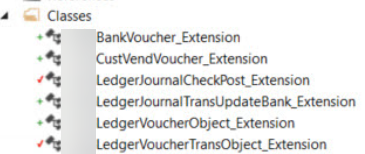
So, we creates the following extensions.

Tables.


Classes.


Below, you can find code snippets for each of them.

BankVoucher_Extension

[ExtensionOf(classStr(BankVoucher))]
final class BankVoucher_Extension
{
    public UniqueId UniqueId;


    public UniqueId parmUniqueId(UniqueId _parm = uniqueId)
    {
        uniqueId = _parm;

        return uniqueId;
    }


    protected LedgerVoucherTransObject initializeLedgerVoucherTransObjectForPosting(LedgerVoucherObject _ledgerVoucherObject, CurrencyExchangeHelper _exchangeRateHelper)
    {
        LedgerVoucherTransObject ledgerVoucherTransObject = next initializeLedgerVoucherTransObjectForPosting(_ledgerVoucherObject, _exchangeRateHelper);
        if(ledgerVoucherTransObject)
{ ledgerVoucherTransObject.parmUniqueId(_ledgerVoucherObject.parmUniqueId()); } return ledgerVoucherTransObject; } }

CustVendVoucher_Extension

[ExtensionOf(classStr(CustVendVoucher))]
final class CustVendVoucher_Extension
{
    public UniqueId uniqueId;
    public UniqueId parmUniqueId(UniqueId _parm = uniqueId)
    {
        uniqueId = _parm;

        return uniqueId;
    }

   protected LedgerVoucherTransObject createLedgerVoucherTransObject(boolean _useSubLedger,
                                                                     LedgerDimensionAccount _ledgerDimensionMerged,
                                                                     LedgerJournalTrans _ledgerJournalTrans,
                                                                     LedgerVoucher _ledgerPostingJournal,
                                                                     CustVendTrans _custVendTrans)
    {
        LedgerVoucherTransObject ledgerVoucherTransObject = next createLedgerVoucherTransObject( _useSubLedger, _ledgerDimensionMerged, _ledgerJournalTrans, _ledgerPostingJournal, _custVendTrans);
        if(ledgerVoucherTransObject)
{ ledgerVoucherTransObject.parmUniqueId(uniqueId); } return ledgerVoucherTransObject; } }

LedgerJournalCheckPost_Extension

[ExtensionOf(classStr(LedgerJournalCheckPost))]
final class LedgerJournalCheckPost_Extension
{

    protected LedgerVoucherObject createPostingReference(LedgerJournalTrans _ledgerJournalTrans, SysModule _sysModule)
    {
        LedgerVoucherObject newVoucher = next  createPostingReference(_ledgerJournalTrans, _sysModule);
        if(newVoucher)
{ newVoucher.parmUniqueId(_ledgerJournalTrans.uniqueId); } return newVoucher; } protected LedgerVoucherObject updatePostingReference(LedgerVoucherObject _postingReference, LedgerJournalTrans _ledgerJournalTrans, SysModule _sysModule) { next updatePostingReference(_postingReference, _ledgerJournalTrans, _sysModule); if(_postingReference)
        {     _postingReference.parmUniqueId(_ledgerJournalTrans.uniqueId);         } return _postingReference; } }

LedgerJournalTransUpdateBank_Extension

[ExtensionOf(classStr(LedgerJournalTransUpdateBank))]
final class LedgerJournalTransUpdateBank_Extension
{

    protected BankVoucher initBankVoucher(  LedgerJournalTrans _ledgerJournalTrans,
                                            TaxAmount _taxAmount,
                                            real _taxWithholdAmount,
                                            DimensionDefault _defaultDimension,
                                            LedgerJournalType _ledgerJournalType,
                                            boolean _skipDimensionValidation)
    {
        BankVoucher bankVoucher = next initBankVoucher(_ledgerJournalTrans, _taxAmount, _taxWithholdAmount, _defaultDimension, _ledgerJournalType, _skipDimensionValidation);
        if(bankVoucher)
        {     bankVoucher.parmUniqueId(_ledgerJournalTrans.uniqueId);         } return bankVoucher; } }

LedgerVoucherObject_Extension

[ExtensionOf(classStr(LedgerVoucherObject))]
final class LedgerVoucherObject_Extension
{
    public UniqueId uniqueId;

    public UniqueId parmUniqueId(UniqueId _parm = uniqueId)
    {
        uniqueId = _parm;

        return uniqueId;
    }

}

LedgerVoucherTransObject_Extension

[ExtensionOf(classStr(LedgerVoucherTransObject))]
final class LedgerVoucherTransObject_Extension
{
    public UniqueId uniqueId;

    public UniqueId parmUniqueId(UniqueId _parm = uniqueId)
    {
        generalJournalAccountEntry.UniqueId  = _parm;
        return generalJournalAccountEntry.UniqueId;
    }

   
    public static LedgerVoucherTransObject newTransLedgerJournal(
                                                                    LedgerJournalTrans  _ledgerJournalTrans,
                                                                    TaxAmount           _taxAmount,
                                                                    boolean             _bridging,
                                                                    container           _intercompanyRecIds,
                                                                    boolean             _reversalsMayExist,
                                                                    boolean             _forcedExchangeRate)
    {
        LedgerVoucherTransObject ledgerVoucherTransObject = next newTransLedgerJournal(_ledgerJournalTrans, _taxAmount, _bridging, _intercompanyRecIds, _reversalsMayExist, _forcedExchangeRate);
        if(ledgerVoucherTransObject)
        {     ledgerVoucherTransObject.parmUniqueId(_ledgerJournalTrans.UniqueId);         } return ledgerVoucherTransObject; } public LedgerPostingTransactionTmp getLedgerPostingTransaction() { LedgerPostingTransactionTmp ledgerPostingTransaction = next getLedgerPostingTransaction(); ledgerPostingTransaction.UniqueId = generalJournalAccountEntry.UniqueId; return ledgerPostingTransaction; } public void initFromLedgerPostingTransaction(LedgerPostingTransactionTmp _ledgerPostingTransaction,LedgerPostingTransactionProjectTmp _projectPostingTransaction) { next initFromLedgerPostingTransaction(_ledgerPostingTransaction,_projectPostingTransaction); generalJournalAccountEntry.UniqueId = _ledgerPostingTransaction.UniqueId; } public static LedgerVoucherTransObject newTransactionAccountingAmountsDefault( LedgerVoucherObject _defaultLedgerPostingReference, LedgerPostingType _postingType, RecId _ledgerDimensionId, CurrencyCode _transactionCurrencyCode, Money _transactionCurrencyAmount, MoneyMST _accountingCurrencyAmount, CurrencyExchangeHelper _currencyExchangeHelper) { LedgerVoucherTransObject postingTrans; postingTrans = next newTransactionAccountingAmountsDefault(_defaultLedgerPostingReference, _postingType, _ledgerDimensionId, _transactionCurrencyCode, _transactionCurrencyAmount, _accountingCurrencyAmount, _currencyExchangeHelper);         if(postingTrans)
        {     postingTrans.parmUniqueId(_defaultLedgerPostingReference.parmUniqueId());         } return postingTrans; } }

I wish to credit the following articles I used:

http://axforum.info/forums/showthread.php?t=74038

https://allaboutdynamic.com/2018/06/25/d365-ax7-update-custom-fields-in-custtrans-vendtrans-from-ledgerjournaltrans-during-the-posting-of-journal/

http://axwiki.blogspot.com/2017/01/customize-field-in-ledgerjournaltabletr.html

Monday, August 9, 2021

If cloud-hosted deployment is stuck at preparation

 If you see that your deployment process to a cloud-hosted environment hangs up at Preparation step with no failed steps and empty logs; it may be required to rotate the secrets.


Tuesday, July 13, 2021

Setup Business Event Endpoint with MuleSoft


When it comes to setting up a Business Event BE endpoint: D365FO just sends a basic data contract (“payload”) via POST method.

So, in fact we can use Microsoft Power Automate endpoint type to interact with your eventual MuleSoft  HTTP listener.

A simple app (a flow) in MuleSoft Design Center consisting of two steps: HTTP listener and Logger.


This basic BE data contract info to add a new type:

{"TestField":"","BusinessEventId":"","ControlNumber":0,"EventId":"","EventTime":"/Date(-2208988800000)/","MajorVersion":0,"MinorVersion":0}


For you particular case you can use pre-generated scheme for your new Business Event.


After that you can add other steps to your MuleSoft app.

Friday, July 2, 2021

Some ISV/Custom labels not resolved when migrated from AX 2012 to D365FO

 After migration from AX 2012 to D365FO I noticed a strange thing with one ISV module labels.

Some of them are perfectly resolved by their old notation with @ in the reference; but none in a new style.


As suggested by Muthusamy V in this old thread https://community.dynamics.com/365/financeandoperations/f/dynamics-365-for-finance-and-operations-forum/312828/label-issues-in-sdp-deployment?pifragment-109037=2#responses

and explained by one of my colleagues, I simply need to delete these files from K:\AosService\PackagesLocalDirectory\ApplicationSuite\ folder. (All D365FO service must be stopped)


Then it works well.


Monday, June 21, 2021

TF command line to fix the error: Mapping on the working folder is already in use

 Just to document my command line to get rid of this blocking error.


My environment is under Azure DevOps version control and some other user already created a workspace on this computer.

Close Visual Studio (2017 in my case) and open the command line. It can be open via Developer Command Prompt for VS 2017; so you would not need to provide the entire path to tf.exe.


Next, run a tf command to delete the workspace created by the previous user (Name and Surname)

tf workspace /delete DEV365-FO-VM-3;"Name Surname" /collection:https://YOURCOMPANYPROJECT.visualstudio.com


Then stop all locally running D365FO services, like Web Publishing, Batch processing, etc, in order to avoid errors with locked files in your K:\AosService\PackagesLocalDirectory subfolders.

Now you can open Visual Studio, connect to Azure DevOps server, create a new workspace, map your folders for projects and metadata, and get latest.

My first D365FO Build pipeline with Microsoft-hosted agent

This contains some particular details and explanatory images which can be useful while following the basic Microsoft article https://docs.microsoft.com/en-us/dynamics365/fin-ops-core/dev-itpro/dev-tools/hosted-build-automation

Thanks Joris for the NuGet packages and other colleagues for their help.

So, my goal is to create a Build pipeline for Version 18, and my deployable package must have a few ISV models, one of which is provided as libraries and source code.

Personal Access Token

First create or update your Personal Access Token and copy-paste it in a secure place (I mean Notepad++, of course). This will be used as a password for uploading Nuget packages to your Artifacts feed later.


Create a feed


Create nuget.config file and place it together with Nuget files as described in the next part.

NuGet packages

Get NuGet packages from LCS shared asset library.


Place these files in a special NuGet folder and create or update packages.config file.


Add them to the source controlled folder. DEV must be mapped too.


Publish packages by using the command line

Now open Windows command prompt to publish these Nuget files to your feed.


Use your Personal Access Token as a password.


Once uploading is done, you can check that the feed contains all packages.


Creating the pipeline

Before importing or creating a pipeline, install Azure DevOps pipeline tools Dynamics 365 Finance and Operations from Marketplace in your Extensions.


I export a pipeline from one organization and then import it to mine.


Then check and update the project name and relevant folder references, change variables and triggers, if needed.

Visual Studio build step

As one of my ISV provided in mix code/binaries mode, I need to reference its non X++-libraries at this step.


/p:ReferencePath A semicolon-separated list of paths that contain any non-X++ binaries that are referenced and required for compilation. You should include the location of the extracted Compiler Tools NuGet package, because it might contain required references.


So, once triggered it builds the solution, creates a deployable deployable package and publishes it.


Published artifacts can be found here.


Thursday, April 22, 2021

Maximum Size for Business Events

Business Events help to integrate D365FO with other systems; they are supposed to be specific and small. But how exactly small should they be? What is the maximum size for one message?

If we take a look at the code, we will see that the maximum is driven by the type of Business Event End Point:


Some of these classes specifically set their max. 


For example, BusinessEventsServiceBusAdapter even implements some logic here.


As per Flow and HTTP, it is defined as 1MB minus 4KB for the header.


So, we have two conclusions here:

- we have to check these hard-coded limits directly in the code, as they may be changed in future;

- if you need to send a chunk of information bigger than the maximum size, you'd better revise your solution. For example, instead of sending a file you can send just its Azure Storage locator;

Another option can be developing your own End Point.

Some useful links.

How to develop Business Events

How to use Business Events

Example of using Microsoft Power Automate (Flow) to integrate with D365FO via Business Events  

Wednesday, July 29, 2020

How to get a list of the Tables maintained by Change Tracking in SQL

Thanks to Brent Ozar and Dave Phillips who showed us how to get a list of the Tables maintained by Change Tracking directly in MS SQL Server Management Studio. It works for both AX2012 and D365 versions.


SET TRANSACTION ISOLATION LEVEL READ UNCOMMITTED;
GO
SELECT
   sct1.name AS CT_schema,
   sot1.name AS CT_table,
   ps1.row_count AS CT_rows,
   ps1.reserved_page_count*8./1024. AS CT_reserved_MB,
   sct2.name AS tracked_schema,
   sot2.name AS tracked_name,
   ps2.row_count AS tracked_rows,
   ps2.reserved_page_count*8./1024. AS tracked_base_table_MB,
   change_tracking_min_valid_version(sot2.object_id) AS min_valid_version
FROM sys.internal_tables it
JOIN sys.objects sot1 ON it.object_id=sot1.object_id
JOIN sys.schemas AS sct1 ON sot1.schema_id=sct1.schema_id
JOIN sys.dm_db_partition_stats ps1 ON it.object_id = ps1. object_id AND ps1.index_id in (0,1)
LEFT JOIN sys.objects sot2 ON it.parent_object_id=sot2.object_id
LEFT JOIN sys.schemas AS sct2 ON sot2.schema_id=sct2.schema_id
LEFT JOIN sys.dm_db_partition_stats ps2 ON sot2.object_id = ps2. object_id AND ps2.index_id in (0,1)
WHERE it.internal_type IN (209, 210)
order by tracked_name
;

GO