Let's say we need to print for selected sales orders all their items with sales prices and barcodes. It means our report must look like this.
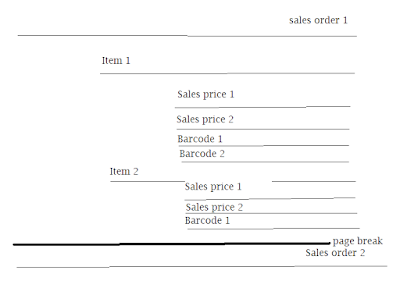
One page by SalesId, some kind of a card with all items presented in the related SalesLine table. Then for each ItemId we group all its sales prices, first, and all its barcodes, second.
As suggested by Best Practice, we can create one flat temporary table (regular in my case just to ease debugging) to merge all data into one data source for our report.

Additional GroupType field is populated with different values for each table: SalesLine, Barcode, or SalesLine (could be done as enum). They will be used in report design for filtering tablix elements.
As to design we would need the main TablixSalesId with grouping by SalesId and breaking page for each instance.

Then nested TablixItemId grouped by ItemId.

Now we need to add two new ones - TablixBarcode and TablixSalesPrice without any additional grouping but with filters as follows.


This approach with adding "artificial" field to a flat table let to distinguish data and easily group and filter them.


Feel free to download the full project here.
This is the code of two principal methods of Report data provider class.

One page by SalesId, some kind of a card with all items presented in the related SalesLine table. Then for each ItemId we group all its sales prices, first, and all its barcodes, second.
As suggested by Best Practice, we can create one flat temporary table (regular in my case just to ease debugging) to merge all data into one data source for our report.
Additional GroupType field is populated with different values for each table: SalesLine, Barcode, or SalesLine (could be done as enum). They will be used in report design for filtering tablix elements.
As to design we would need the main TablixSalesId with grouping by SalesId and breaking page for each instance.

Then nested TablixItemId grouped by ItemId.

Now we need to add two new ones - TablixBarcode and TablixSalesPrice without any additional grouping but with filters as follows.


This approach with adding "artificial" field to a flat table let to distinguish data and easily group and filter them.


Feel free to download the full project here.
This is the code of two principal methods of Report data provider class.





 Posts

