Friday, February 2, 2018

Parallel Items/Product Validating or Deleting

If you need to validate or delete items/products or any other records in a BIG number, it is better to run such processing, first, in CIL, second in parallel threads.

This project is to demonstrate this approach.

The whole concept is similar to what I explained in one of my previous blogpost about Multi thread parallelism and a dispatching table for finding a minimum

myInventItemProcessBatch class populates a special table containing RecIds to be processed and thread number they belong to.


Based on the user selection, it creates appropriate number of batch tasks that can run independently with their progress percentage.
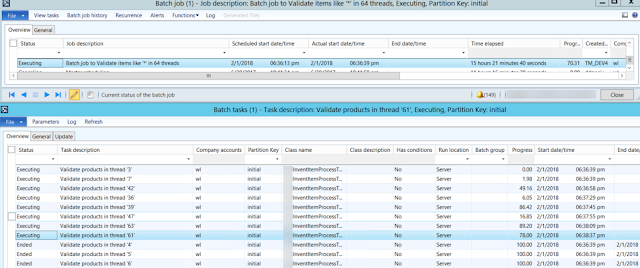


Feel free to elaborate this project by adding new types of processing or new table to process. Also it is probably a good idea to add a new column to the table to separate different instances myInventItemProcessBatch simultaneously running in the same environment.


myInventItemProcessBatch 

private static server int64 populateItems2Process(str 20 _what2find, int _batchThreads)
{
    myInventItemProcessTable    myInventItemProcessTable;
    InventTable                 inventTable;
    int                         firstThread = 1;
    Counter                     countr;
    // flush all previously created items from the table
    delete_from myInventItemProcessTable;
    // insert all needed items in one shot. this part can be refactored to use Query instead
    insert_recordset myInventItemProcessTable (threadNum, ItemRecId, ItemId)
    select firstThread, RecId, ItemId from InventTable
    where
        inventTable.itemId like _what2find;
    // now group them in threads by simply enumerating them from 1 to N
    countr=1;
    ttsBegin;
    while select forUpdate myInventItemProcessTable
    {
        myInventItemProcessTable.threadNum = countr;
        myInventItemProcessTable.update();

        countr++;

        if(countr > _batchThreads)
        {
            countr=1;
        }
    }
    ttsCommit;
    // return the total number of items to process
    select count(RecId) from myInventItemProcessTable;

    return myInventItemProcessTable.RecId;
}

public void run()
{
    // get all required items by their RecIds in the table and group them in threads
    int64 totalRecords = myInventItemProcessBatch::populateItems2Process(what2find, batchThreads);
    if(totalRecords)
    {
        info(strFmt("Found %1 items like '%2' to %3", totalRecords, what2find, processType));
        // create number of batch tasks to parallel processing
        this.scheduleBatchJobs();
    }
    else
    {
        warning(strFmt("There are no items like '%1'", what2find));
    }
}
myInventItemProcessTask process()

... 
select count(RecId) from inventTable
        exists join myInventItemProcessTable
        where
            myInventItemProcessTable.ItemRecId == inventTable.RecId &&
            myInventItemProcessTable.threadNum == threadNum;
    // total number of lines to be processed
    totalLines = inventTable.reciD;
    // to enjoy our bored user during a few next hours
    // this progress just updates percentage in Batch task form
    progressServer = RunbaseProgress::newServerProgress(1, newGuid(), -1, DateTimeUtil::minValue());
    progressServer.setTotal(totalLines);

    while select inventTable
        exists join myInventItemProcessTable
        where
            myInventItemProcessTable.ItemRecId == inventTable.RecId &&
            myInventItemProcessTable.threadNum == threadNum
    {
        progressServer.incCount();

        try
        {
            // RUN YUR LOGIC HERE //////////////////////
...

Friday, January 5, 2018

AX 2012 Wizard does not update Analysis Serivce Project: workaround

Recently I bumped into a strange issue in AX 2012, which prevents importing Analysis Services Projects to AOT.

Given that this import is an essential part of cubes development and deployment, I decided to find a way to get this thing done.

The issue is in the fact that nevertheless all changes made to your perspective are successfully present in the Wizard tree, they are never saved back to AOT. Therefore, the previous version of your project is always deployed to SQL, no matter what you try to achieve.

The workaround is pretty simple. Make up your perspective, run the Wizard and let it finish its job. Make Deploy option unchecked because it is pointless.


Once the Wizard window is closed, just find your project in the node of Analysis Services Projects and delete it.


Then find a recently created folder in your TEMP directory; this one must contain your recently added artifacts, say, financial dimensions as depicted.


Here we go.


Now just import this particular project back to AOT, and run the Wizard again to deploy the projects.


It is also worth double-checking the project content in Visual Studio before running the Wizard for the second time.


If you missed the target, find the right folder with your added/changed objects.

Now the Wizard should find no changes and just deploy it.


Friday, December 15, 2017

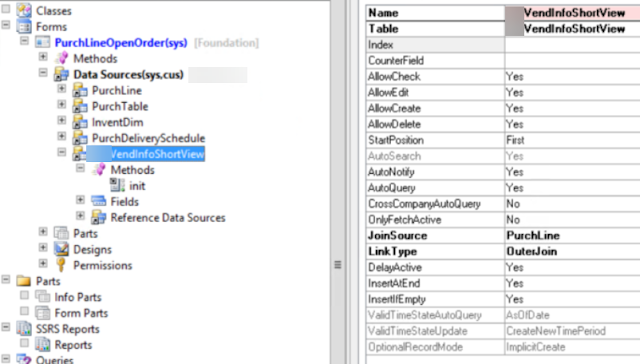
How to link two tables on the form via DynaLink


public void init()
{
    QueryBuildDataSource    qbdsPurchLine;
    super();
    
    qbdsPurchLine = PurchLine_DS.query().dataSourceName(tableStr(PurchLine));
    qbdsPurchLine.clearDynalinks();
    qbdsPurchLine.addDynalink(fieldNum(PurchLine, VendAccount), myVendInfoShortView, fieldNum(myVendInfoShortView, AccountNum));
}


Tuesday, December 12, 2017

Table-Group-All pattern filtering in forms

When we need to support business scenarios with different types of relations for the same table, it comes to using enums like Table-Group-All. You can find the biggest example, I believe, in PriceDiscTable.

This post is to explain the same approach in a simpler way.

Say, we have a table with two fields defining different possible values for two other relation value fields.


The whole idea is in adding a range with an expression to the form query.


The challenge here is to support correct filtering on the form and combine it with the user filters, after it is open for a particular record. In our case it is a customer that can have a value in Sales commission group (or not) and some matching ZIP code in its primary business address.


void  reSelect()
{
    str filter;

    element.cleanDSQuery();
    filter = this.buildViewAllCustomerFilter();
    blockCustomerGroupRelation.value(filter);

    mySalesGroupAssignation_DS.executeQuery();
    mySalesGroupAssignation_DS.queryRun().saveUserSetup(false);
    mySalesGroupAssignation_DS.refresh();
}

This method is supposed to be triggered from linkActive() of the data source. First we clear the original query from possible dynamic links and ranges and create our new range for an expression. You can make it visible to see the final expression for debugging.

private void cleanDSQuery()
{
    mySalesGroupAssignation_DS.query().dataSourceTable(tableNum(mySalesGroupAssignation)).clearDynalinks();

    mySalesGroupAssignation_DS.query().dataSourceTable(tableNum(mySalesGroupAssignation)).clearRanges();
    blockCustomerGroupRelation  = mySalesGroupAssignation_ds.query().dataSourceTable(tableNum(mySalesGroupAssignation)).addRange(fieldNum(mySalesGroupAssignation, myCustomerTableGroupAll));
    blockCustomerGroupRelation.status(RangeStatus::Hidden);
}

Then we create a complex range expression for two fields in two methods.


private str buildViewAllCustomerFilter()
{
    str viewAllAgreementFilter;


    viewAllAgreementFilter = '((';
    viewAllAgreementFilter += element.buildFilterCustomer();
    viewAllAgreementFilter += ') && (';
    viewAllAgreementFilter += element.buildFilterZipCode();
    viewAllAgreementFilter += '))';

    return viewAllAgreementFilter;
}

We add Group based condition only if Sales commission value is set up for a given customer.

private str buildFilterCustomer()
{
    str                 filter;
    // (
    filter = '(';
    // (myCustomerTableGroupAll = Table and myCustomerGroupRelation = account code)
    // OR
    // (myCustomerTableGroupAll = All)
    // AND
    //

    filter += strFmt('((%1.%2==%5) && (%1.%3=="%4")) || (%1.%2==%6)',
                        mySalesGroupAssignation_DS.queryRun().query().dataSourceTable(tableNum(mySalesGroupAssignation)).name(),  // 1
                        fieldStr(mySalesGroupAssignation, myCustomerTableGroupAll),                                               // 2
                        fieldStr(mySalesGroupAssignation, myCustomerGroupRelation),                                               // 3
                        queryValue(custTableFrom.AccountNum),                                                                       // 4
                        any2int(TableGroupAll::Table),                                                                              // 5
                        any2int(TableGroupAll::All)                                                                                 // 6
                        );

    if(custTableFrom.CommissionGroup)
    {
        // OR
        // (myCustomerTableGroupAll = Group and myCustomerGroupRelation = sales commission group)

        filter += strFmt(' || ((%1.%2==%5) && (%1.%3=="%4"))',
                        mySalesGroupAssignation_DS.queryRun().query().dataSourceTable(tableNum(mySalesGroupAssignation)).name(),  // 1
                        fieldStr(mySalesGroupAssignation, myCustomerTableGroupAll),                                               // 2
                        fieldStr(mySalesGroupAssignation, myCustomerGroupRelation),                                               // 3
                        queryValue(custTableFrom.CommissionGroup),                                                                  //4
                        any2int(TableGroupAll::GroupId)                                                                              // 5
                        );
    }

    filter += ')';
    return filter;

}


private str buildFilterZipCode()
{
    str                 filter;
    // (
    // (myZipCodeTableGroupAll = GroupId and myZipCodeGroupRelation = myBusinessAddressZipCode)
    // OR
    // (myZipCodeTableGroupAll = All)

    filter = strFmt('(((%1.%2==%5) && (%1.%3=="%4")) || (%1.%2==%6))',
                        mySalesGroupAssignation_DS.queryRun().query().dataSourceTable(tableNum(mySalesGroupAssignation)).name(),  // 1
                        fieldStr(mySalesGroupAssignation, myZipCodeTableGroupAll),                                               // 2
                        fieldStr(mySalesGroupAssignation, myZipCodeGroupRelation),                                               // 3
                        queryValue(custTableFrom.myBusinessAddressZipCode().myZipGroupId),                                       // 4
                        any2int(myGroupAll::GroupId),                                                                              // 5
                        any2int(myGroupAll::All)                                                                                 // 6
                        );                                                                               // 6

    return filter;

}

You can easily adapt this code to your own scenario. Just be meticulous with the syntax of the extended range expression.

Saturday, December 9, 2017

EDT and tables wizard for AX 2012

AX 2012 Wizard allows to create new Extended data types and new tables with relations, delete actions, indexes and find methods, based on a simple Excel file. Two sample Excel files are included in the zip-package.

Just import two classes (ADO class is to support Excel import).

You can set up new types (if needed) and new tables with all bells and whistles, then run the Wizard and can go fishing until it does its job.

Happy fishing!


It creates:
first
- all new types based on basic types; (ignores if exists)
- all new labels for US-EN and FR-CA or finds existing one for US-EN;
second
- new tables;
- new fields;
- new field group with all new fields and the same label as for table;
- new index based on the first field and set is as cluster index;
- normal relation to the main table if given (one only);
- cascade delete action for all new relations from subordinated tables;
- method find based on the first field.


If it fails to open Excel file, check your currently installed Excel version and adapt the connection string.


How to create an AOT table field for a given Extended data type

As you can see from the following code, we have to get the primitive or container type for a given EDT. It comes from method AOTtpeStr() as an abbreviation. Then you should call an appropriate method to create a new field.

private void createFieldInTableInAOT()
{
    TreeNode            treeNode = treenode::findNode(#ExtendedDataTypesPath);
    TreeNode            treeNodeEDT2extend  = treeNode.AOTfindChild(edtType);
    AOTTableFieldList   fieldNode;
    str                 typeStrCode = treeNodeEDT2extend.AOTtypeStr();

    if(!treeNodeEDT2extend)
    {
        warning(funcName() + ".\n Extended data type "+ edtType + " not exists in AOT!");
        return ;
    }

    switch (typeStrCode)
    {
        // string
        case 'UTS':
            treeNodeFields.addString(edtName);
            break;
        // real
        case 'UTR':
            treeNodeFields.addReal(edtName);
            break;
        // integer
        case 'UTI':
            treeNodeFields.addInteger(edtName);
            break;
        // int64
        case 'UTW':
            treeNodeFields.addInt64(edtName);
            break;
        // date
        case 'UTD':
            treeNodeFields.addDate(edtName);
            break;
        // time
        case 'UTT':
            treeNodeFields.addTime(edtName);
            break;
        // datetime
        case 'UTZ':
            treeNodeFields.addDateTime(edtName);
            break;
        // enum
        case 'UTE':
            treeNodeFields.addEnum(edtName);
            break;
        // container
        case 'UTQ':
            treeNodeFields.addContainer(edtName);
            break;
        // GUID
        case 'UTG':
            treeNodeFields.addGuid(edtName);
            break;
        default:
                throw error(funcName());
    }
    
    fieldNode       = treeNodeFields.AOTfindChild(edtName);
    fieldNode.AOTsetProperty(#PropertyExtendeddatatype, edtType);
    fieldNode.AOTsave();
    currentFieldGroupTreeNode.AOTadd(edtName);

    info(strfmt("Field '%1' of type '%2' created", edtName, edtType));
}