Showing posts with label table. Show all posts

Monday, December 30, 2024

Getting OnDelete value for Table metadata browser

 Thanks to Martin Drab's article New metadata API – Goshoom.NET Dev Blog, I refactored one method of my Table Metadata browser by using Microsoft.Dynamics.AX.Metadata.MetaModel API to loop through the list of table relations.

public static wzhRelatedTablesTmp populateRelatedTables(TableId _tableId, FieldId _fieldId)
    {
        wzhRelatedTablesTmp                     wzhRelatedTablesTmp;

        System.Collections.IEnumerable          relations;
        System.Collections.IEnumerator          enumRelations;
        System.Collections.IEnumerable          constraints;
        System.Collections.IEnumerator          enumConstraints;
        mtdModel.AxTableRelation                relation;
        mtdModel.AxTableRelationConstraint      constraint;
        mtdModel.AxTableRelationConstraintField constraintField;
        mtdModel.AxTable                        table;
        TableName                               relatedTableName    = tableId2Name(_tableId);
        FieldName                               relatedFieldName    = fieldId2Name(_tableId, _fieldId);
        System.Collections.IEnumerable          tables              = mtdSupport::GetAllTables();
        System.Collections.IEnumerator          enumTables          = tables.GetEnumerator();

        // Loop through all tables in the system
        while (enumTables.MoveNext())
        {
            table           = enumTables.Current as mtdModel.AxTable;
            relations       = mtdSupport::GetTableRelations(table.Name) as System.Collections.IEnumerable;
            enumRelations   = relations.GetEnumerator();
            
            while (enumRelations.moveNext())
            {
                relation = enumRelations.Current as  mtdModel.AxTableRelation;
               
                if (relation && relation.RelatedTable == relatedTableName)
                {
                    enumConstraints     = relation.Constraints.GetEnumerator();
                    while (enumConstraints.moveNext())
                    {
                        constraint = enumConstraints.Current as mtdModel.AxTableRelationConstraint;
                        if (constraint is mtdModel.AxTableRelationConstraintField)
                        {
                            constraintField = constraint as mtdModel.AxTableRelationConstraintField;
                            // Check if the relation is with a given table
                            if (constraintField && constraintField.RelatedField == relatedFieldName)
                            {
                                wzhRelatedTablesTmp.clear();
                                wzhRelatedTablesTmp.Id                         = tableName2Id(table.Name);
                                wzhRelatedTablesTmp.FieldName                  = constraintField.Field;
                                wzhRelatedTablesTmp.FieldId                    = fieldname2id(wzhRelatedTablesTmp.Id, constraintField.Field);
                                wzhRelatedTablesTmp.RelatedTableName           = table.Name;
                                wzhRelatedTablesTmp.Label                      = table.Label;
                                wzhRelatedTablesTmp.RelatedTablePName          = SysLabel::labelId2String(table.Label);
                                wzhRelatedTablesTmp.RelationName               = relation.Name;
                                wzhRelatedTablesTmp.Role                       = relation.Role;
                                wzhRelatedTablesTmp.RelatedTableRole           = relation.RelatedTableRole;
                                wzhRelatedTablesTmp.RelatedTableCardinality    = relation.RelatedTableCardinality;
                                wzhRelatedTablesTmp.IsEDTRelation              = relation.EDTRelation;
                                wzhRelatedTablesTmp.Cardinality                = relation.Cardinality;
                                wzhRelatedTablesTmp.RelationshipType           = relation.RelationshipType;
                                wzhRelatedTablesTmp.OnDeleteAction             = relation.OnDelete.ToString();
                                wzhRelatedTablesTmp.insert();
                            }
                        }
                    }
                }
            }
        }
        return wzhRelatedTablesTmp;
    }

Saturday, December 21, 2024

Find all tables with relations to a given field

 Sometimes we need to know which tables are related to a given table on a given field.


Unfortunately, none of AI generative tools I tried was able to provide me with a working code. So, I wrote this code manually based on Microsoft doc and some articles.

static void findAllTablesWithRelations(TableId _tableId, FieldId _fieldId)
    {
        Dictionary      dict = new Dictionary();
        DictTable       dictTable;
        DictRelation    dictRelation;
        TableId         tableId;
        int             i, j;
        int             linesCnt;
        int             relationLine;
        int             c;
        int             numOfTables = dict.tableCnt();
        boolean         relationFound;

        // Loop through all tables in the system
        for (j=1 ; j<= numOfTables; j++)
        {
            relationFound   = false;
            tableId         = dict.tableCnt2Id(j);
            dictTable       = dict.tableObject(tableId);
// Uncomment the following to get specific table types
            //if( dictTable.isAbstract() || 
            //    dictTable.isDataEntity() || 
            //    dictTable.isMap() || 
            //    dictTable.isTempDb() || 
            //    dictTable.isTmp() || 
            //    dictTable.isView())
            //{
            //    continue;
            //}

            dictRelation    = new DictRelation(tableId);
            str tableName   = dictTable.name();
            
            // Loop through all table relations
            int relCount = dictTable.relationCnt();
            //info(strFmt("Number of relations %1", relCount));

            for (i = 1; i <= relCount; i++)
            {
                str relName     = dictTable.relation(i);
                dictRelation.loadNameRelation(relName);
                
                if (dictRelation && dictRelation.externTable() == _tableId)
                {
                    linesCnt = dictRelation.lines();
                    for (relationLine=1; relationLine <= linesCnt; relationLine++)
                    {
                        // Check if the relation is with AMDeviceTable.DeviceId
                        if (dictRelation.lineExternTableValue(relationLine) == _fieldId)
                        {
                            c++;
                            info(strFmt("%1 : %2 : %3", c, dictTable.name(), fieldId2Name(tableId, dictRelation.lineTableValue(relationLine))));
                            relationFound = true;
                            break;
                        }
                    }
                }
                // just one relation is enough
                if(relationFound)
                {
                    break;
                }
            }
        }
    }

You can replace tableId and fieldId with your own values. For example, for GroupId table:

internal final class GetRelatedTables
{
    public static void main(Args _args)
    {
        TableId tableId = tableNum(SuppItemGroup);
        FieldId fieldId = fieldNum(SuppItemGroup, GroupId);

        info(strFmt("Searching related tables for %1.%2 ", tableId2Name(tableId), fieldId2Name(tableId, fieldId)));
        GetRelatedTables::findAllTablesWithRelations(tableId, fieldId);
        info('Search completed');
    }
}

The output:

Search completed

7 : AMInventItemTemplate : PurchInventSuppItemGroupId

6 : AMInventItemTemplateStaging : PurchInventSuppItemGroupId

5 : InventTableModule : SuppItemGroupId

4 : SuppItemTable : AccountCode

3 : VendTable : SuppItemGroupId

2 : RetailMassUpdateWorksheetLine : Purch_SuppItemGroupId

1 : CustTable : SuppItemGroupId

Searching related tables for SuppItemGroup.GroupId

Sunday, April 9, 2023

Two outer joined tables in a report without duplicates from both sides

 I cannot find a particular term for this type of join; so I called it 'hanging left outer join'.


Let's state the problem.


We have two tables:

- LedgerJournalTrans (trans) with a field mgcProjId, which is a reference to ProjTable.

- myDetails (details), which may have 0..N records for certain records from ProjTable.


Examples of data in both may look like the following:


If we apply standard outer join, the output will be as follows


But we need to print all details records by 'hanging' them against the same projId, like this


So, no duplicates from both tables must be present in the merged table myDetailsTmp.


This is how you can achieve it. 

/// <summary>
    /// Process report data.
    /// </summary>
    public void processReport()
    {
        Query                   query;
        QueryRun                qr;
        myDetails               details;
        LedgerJournalTrans      trans;
        ProjId                  prevProjId;
        // merge trans and detail even if details are empty
        void insertWithTrans()
        {
            myDetailsTmp.clear();
myDetailsTmp.RefRecId = trans.RecId;
myDetailsTmp.JournalNum = trans.JournalNum;
myDetailsTmp.TransDate = trans.TransDate;
myDetailsTmp.Voucher = trans.Voucher;
myDetailsTmp.ProjId = trans.mgcProjId;
myDetailsTmp.DetailId = details.DetailId;
myDetailsTmp.WithPrice = details.WithPrice;
myDetailsTmp.insert();
} // merge empty trans and detail; it will be 'a hanging' detail void insertDetails() { myDetailsTmp.clear();
myDetailsTmp.ProjId = details.ProjId;
myDetailsTmp.DetailId = details.DetailId;
myDetailsTmp.WithPrice = details.WithPrice;
myDetailsTmp.insert();
} // process warrants for the previous projId // 'hanging' details on the right side of the report void processRestOfDetails() { // if there are still some warrants we found for the previous projId if (details) { // as we do not have enough rows from trans with the same previous projId, // let's add them with empty part from trans side next details; while(details) { insertWarrants(); next details; } } } // Get the query from the runtime using a dynamic query. query = this.parmQuery(); qr = new QueryRun(query); // we suppose that trans sorted by projId // each projId may have 0..N of warrants (details) while(qr.next()) { // get next transaction trans = qr.get(tablenum(LedgerJournalTrans)); // projId changes if(prevProjId != trans.mgcProjId) { // if there are still some warrants we found for the previous projId processRestOfDetails(); // get the first warrant for the new projId select details where details.ProjId == trans.mgcProjId; // keep the new as a previous for the next iteration prevProjId = trans.mgcProjId; } // if this is a trans with the same projId, then we can merge it with the next warrant else if (details) { next details; } // merge trans with warrants insertWithTrans(); } // if there are still some warrants we found for the previous projId processRestOfDetails(); }

Raw outer joined data


Ascending ProjId


Descending ProjId


Tuesday, March 10, 2020

Data validation by ValidateField and ValidateWrite (old but good)

The most time data are meant to be changed by a user via different kinds of forms or even without it, and sometimes we need to implement additional business logic there.

Say, we want that a discount never be more than 10%, while a user creates lines in a sales order. For such a scenario the best way is to implement ValidateField and check the value for the field of Discount. After that the form does not allow the user to leave the field of discount until its value is less or equal to 10%.


public boolean validateField(FieldId _fieldIdToCheck)
{
    boolean ret;

    ret = super(_fieldIdToCheck);
    switch(_fieldIdToCheck)
    {
        case fieldNum(MySalesLine, Discount):
            if(this.Discount <= 10)
            {
               ret = true;
            }
            else
            {
                ret = checkFailed("Discount cannot be more than 10%");
            }
            break;
    }

    return ret;


But we should remember that ValidateField method is called automatically for a form data source field only.


In other words, if the table record is inserted or updated by code, this logic will be NOT triggered.


[Form]
[DataSource]
     [DataField]
            public boolean validate()
    [Table]
     public boolean validateField(FieldId _fieldIdToCheck)


So, if we need to implement validation logic for the whole record, which is supposed to be triggered every time Insert or Update is called (not for form data sources only), we go with ValidateWrite.


Thanks Mohamed for this brilliant article Microsoft dynamics ax2012 : forms and tables methods call sequences, How To? Watch this presentation! It contains much more very useful information.


Thursday, May 30, 2019

Overcome 'The natural key for the table TableName was not found' while creating data entity

When we need to create a data entity for a table without a natural key, say VendTrans, Data entity Wizard shows the following error.


In order to overcome this limitation, we can simply feed the wizard with a copy of a query table with a natural key added. Lately we can just replace one field and its related relation and index in the data entity and staging table.

So, find VendTrans table and create a copy into your model. Delete all methods, add new String field f, make a new unique index based on this field and make this index primary and clustered. You do not need either build or synchronize your solution yet.


Now run the Wizard again with VendTransCopy as a source, and you will get all needed objects created.

Go to data entity view and change its query data source to VendTrans table.


Then rename field f to something meaningful as VendTrans_RecId and point it to VendTrans.RecId.


Add a new Int64 field with the same name in the related staging table


Then use it instead of field f in the index and relation.


You can delete field f as well as VendTransCopy table.

That is it! Now build and synchronize the solution. The new data entity is ready for use.


Friday, October 19, 2018

Get table name from its id


static void wblTableName(Args _args)
{
    tableId tableId = 175; //1962; //2954; //101377;

    info(strFmt("%1 : %2", tableId2name(tableId), tableId2pname(tableId)));
}

Wednesday, October 17, 2018

How to get all related table ids from code

We can loop all relations on a table by code.


static void myGetRelatedTableNames(Args _args)
{
    myInExtCodeValueTable           myInExtCodeValueTable;
    int                             mapId;
    TableName                       relatedTableName;
    TableId                         relatedTableId;
    Set                             tablesIdsSet    = new Set(Types::Integer);
    Set                             tablesNamesSet  = new Set(Types::String);
    TableId                         tableId         = tableName2id(tableStr(myInExtCodeValueTable));
    Dictionary                      dictionary      = new Dictionary();
    SysDictTable                    dictTable       = dictionary.tableObject(tableId);
    DictRelation                    dictRelation    = new DictRelation(myInExtCodeValueTable.TableId);
    int                             mapCnt          = dictTable.relationCnt();
    container                       ret ;            
    str                             relationName;
    //create a maps of literals for all tables from the table relations
    // so that we could get tables names based on their ids
    // and if any new relation will be added to multiple external codes table
    // it is present automatically in this view
    for (mapId=1; mapId <= mapCnt; mapId++)
    {
        // elaborate if any table present many times
        relationName        = dictTable.relation(mapId);
        dictRelation.loadNameRelation(relationName);
        if(dictRelation)
        {
            relatedTableId      = dictRelation.externTable();
            relatedTableName    = tableId2pname(relatedTableId);
            tablesIdsSet.add(relatedTableId);
            tablesNamesSet.add(relatedTableName);
            info(strFmt("Table %1 - %2", relatedTableId, relatedTableName));
        }
    }
        
    ret = [tablesIdsSet.pack(), tablesNamesSet.pack()];
}


It can be useful in cases when we need, say, to open a form with a related record.


Here you can find a more elaborated example.

Friday, December 15, 2017

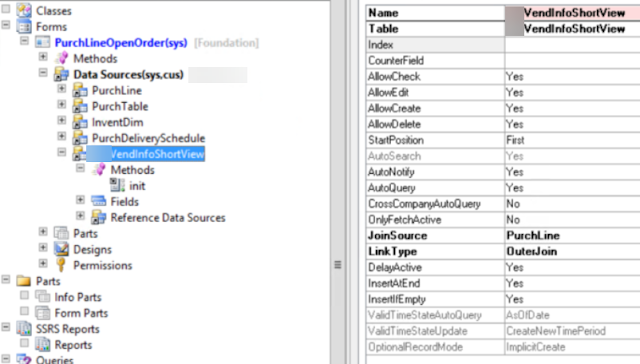
How to link two tables on the form via DynaLink


public void init()
{
    QueryBuildDataSource    qbdsPurchLine;
    super();
    
    qbdsPurchLine = PurchLine_DS.query().dataSourceName(tableStr(PurchLine));
    qbdsPurchLine.clearDynalinks();
    qbdsPurchLine.addDynalink(fieldNum(PurchLine, VendAccount), myVendInfoShortView, fieldNum(myVendInfoShortView, AccountNum));
}


Friday, September 13, 2013

How to compare two records of the same table

Amongst other mundane chores, from time to time AX consultants and programmers need to check if two table records are indentical and what the difference is if they are not.

Here is a small project for AX 2012 with tmxTableBufferOperation class that provides the following static methods: 
  • getOneRecordFieldList(Common _record1) 
  • getTwoRecordsFieldList(Common _record1, Common _record2) 
  • areIdentical(Common _record1, Common _record2)
  • getDifference(Common _record1, Common _record2)
Their names are mnemonical so you won't misunderstand what they do.

There is also a batch demonstrating how to use them:


The main idea is to use reflection DictTable class to enumerate all the fields of the given table buffer and then populate containers with its field ids, names and values.


static public List getTwoRecordsFieldList(Common _record1, Common _record2)
{
    Common              buffer1;
    Common              buffer2;

    List                list        = new List(Types::Container);   //list of all the fields, field names and values
    List                bufferList  = new List(Types::Container);   //final list of all the fields, field names and values of these two records
    ListEnumerator      le;

    int                 i;
    fieldId             fieldId;
    DictTable           dictTable;
    DictField           dictField;

    container           c;

    if(_record1.TableId != _record2.TableId)
    {
        error(strFmt('Both records are supposed to be of the same table type!'));
    }

    dictTable = new DictTable(_record1.TableId);

    if (dictTable)
    {
        // create the list of all the fields in the table
        for (i = dictTable.fieldCnt(); i; i--)
        {
            fieldId = dictTable.fieldCnt2Id(i);
            dictField = new DictField(dictTable.id(), fieldId);
            list.addEnd([fieldId, fieldId2name(dictTable.id(), fieldId)]);
        }

        buffer1 = dictTable.makeRecord();
        buffer2 = dictTable.makeRecord();

        select buffer1 where buffer1.RecId == _record1.recId;
        select buffer2 where buffer2.RecId == _record2.recId;

        le = list.getEnumerator();
        while (le.moveNext())
        {
            c = le.current();
            bufferList.addEnd([[conPeek(c,1), conPeek(c,2), buffer1.(conPeek(c,1))],
                               [conPeek(c,1), conPeek(c,2), buffer2.(conPeek(c,1))]]);
        }
    }
    return bufferList;
}

And how you can use it.

static void tmxCompareFixedAssets(Args _args)
{
    #define.FA1('MACH10DMO-000018')
    #define.FA2('MACH20DMO-000009')
    
    List                    list;
    ListEnumerator          le;
    container               c;
    
    list = TmxTableBufferOperation::getDifference(AssetTable::find(#FA1), AssetTable::find(#FA2));
    le      = list.getEnumerator();
    info('Difference 1 <> 2');
    while (le.moveNext())
    {
        c = le.current();
        info(strFmt("%1: %2 <> %3", conPeek(conPeek(c,1), 2), conPeek(conPeek(c,1), 3),  conPeek(conPeek(c,2), 3)));
    }
    
}

Result:

Monday, July 11, 2011

Paint it black: How to color rows in Table form control

There a lot of answers on how to color grid lines and cells -- for example, this DisplayOption using from DAXGuy. However, my goal is to show how one can paint rows in Table form control. I use the standard tutorial form tutorial_Form_Table from AX2009.

On the table control, we need to change a bit EditControl method where we define in which color the current row will be painted. (Here, I provided you with a link where you can choose RGB colors to paint the hell at your own.)


// Color the active line in a table
FormControl editControl(int column, int row)
{
    #DEFINE.colorDarkTurkoise(112,147,219)                  // colors at your personal perception of hell
    #DEFINE.colorNeonBlue(77,77,255)
    #DEFINE.colorRosyBrown(255,193,193)
    #DEFINE.colorSaddleBrown(139,69,19)
    int oldStrColor = WinApi::RGB2int(#colorRosyBrown);     // colors for cells not in focus
    int oldIntColor = WinApi::RGB2int(#colorSaddleBrown);
    int newIntColor = WinApi::RGB2int(#colorNeonBlue);      // colors for the selected line
    int newStrColor = WinApi::RGB2int(#colorDarkTurkoise);
    ;
    // this is columns with int controls
    if ((column == 2) || (column == 4))
    {
        // not in the header
        if (row > 1)
        {
            // this is in the selected line
            if (row == table.row())
                intEdit.backgroundColor(newIntColor);
            else
                intEdit.backgroundColor(oldIntColor);
            return intEdit;
        }
        // this is the header
        else
        {
            if (row == table.row())
                editline.backgroundColor(newStrColor);
            else
                editline.backgroundColor(oldStrColor);
            return editline;
        }
    }
    else
    {
        if (row == table.row())
            editline.backgroundColor(newStrColor);
        else
            editline.backgroundColor(oldStrColor);
        return editline;
    }

}

So, when the user selects another row, all its controls change their color--it's your responsibility to return the correct form control: StringEdit, IntEdit and so on.

The second method where we redraw the form is activeCellChanged.


public void activeCellChanged()
{
    ;
    super();
    // do not forget to repaint the form!
    element.redraw();
}

Coloring can be realized much more complicated with different color scheme, calculated conditions etc.