Showing posts with label display method. Show all posts

Saturday, December 11, 2021

Multiple enum values selection in forms and tables

Previously I posted three supporting functions to work with multiple enum values selection. Now, let's see how they can be used in real scenarios.

With these functions you can easily expose enum values in selection lists and then save the user selection in tables.

Enum lists in a form

Check first how to show two grids in a form; so that the user could move enum values from one to another.
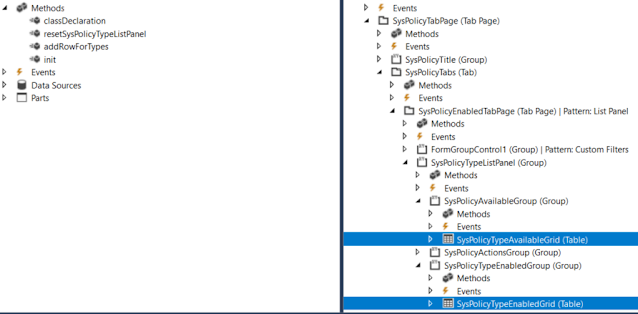


[Form]
public class SysPolicyTypesOneCompanyActiveOnly extends FormRun
{

    private Map                 policyTypes = wzhTest::createMapForEnum(enumStr(SysPolicyTypeEnum));
    private SysPolicyTypeEnum   type;
 
    private void resetSysPolicyTypeListPanel()
    {
        SysPolicyTypeAvailableGrid.deleteRows(0, SysPolicyTypeAvailableGrid.rows());
        SysPolicyTypeEnabledGrid.deleteRows(0, SysPolicyTypeEnabledGrid.rows());

        var mapEnumerator = policyTypes.getEnumerator();
        while (mapEnumerator.moveNext())
        {
            type        = mapEnumerator.currentKey();
            
            if (SysPolicyTypesOneCompanyActiveOnly::exist(type))
            {
                this.addRowForTypes(SysPolicyTypeEnabledGrid, type);
            }
            else
            {
                this.addRowForTypes(SysPolicyTypeAvailableGrid, type);
            }
        }

        SysPolicyTypeAvailableGrid.row(SysPolicyTypeAvailableGrid.rows() ? 1 : 0);
        SysPolicyTypeEnabledGrid.row(SysPolicyTypeEnabledGrid.rows() ? 1 : 0);
    }

    private int addRowForTypes(FormTableControl _table, SysPolicyTypeEnum _type)
    {
        int i;
        // Insert it into the data set in sorted order.
        for (i = _table.rows(); i >= 1; i--)
        {
            SysPolicyTypeEnum typeIdTmp = _table.cell(1, i).data();
            
            if (strCmp(enum2Str(typeIdTmp), enum2Str(_type)) < 0)
            {
                // We need to insert after the current item.
                break;
            }
        }

        // Insert the new item, i is equal to the index of the item we need to insert after.
        _table.insertRows(i, 1);
        _table.cell(1, i + 1).data(_type);

        return i + 1;
    }
...
}

Multiple enum values in a table

In order to save user's selection of particular Enum values in a table, you can add a string type field there. 

The rest is to convert these selected values from string to a list or a container to present them in a form.

Say, we need to let the user to select particular FiscalPeriodStatus values.


First, we add a new string field FiscalPeriodStatusSelection to our table.


We can show the currently saved selection via a display method

    /// <summary>
    /// Returns Fiscal period statuses string values
    /// </summary>
    /// <param name = "_parm">container</param>
    /// <returns>string values of selected period statuses</returns>
    [SysClientCacheDataMethodAttribute(true)]
    public display LedgerExchAdjFiscalPeriodStatusSelection fiscalPeriodStatusSelectionDisp()
    {
        return wzhTest::enumValuesStr2EnumStrStr(this.FiscalPeriodStatusSelection, enumName2Id(enumStr(FiscalPeriodStatus)));
}

And updates this field via AnotherClass which treats the user's selection (in a form, for example)

    this.FiscalPeriodStatusSelection = con2Str(AnotherClass.getFiscalPeriodStatusSelectionCont(), wzhTest::ContSeparator);

    /// <summary>
    /// Gets FiscalPeriodStatus selection as a container
    /// </summary>
    /// <returns>container</returns>
    public container getFiscalPeriodStatusSelectionCont()
    {
        container                               cont;
        
        while (...)
        {
            cont += SomeBufferOrList.FiscalPeriodStatus;
        }
                
        return cont;
    }

Wednesday, April 22, 2020

New Image in FormGroupControl with BusinessCard Extended style

Developing and customizing forms in D365 are limited by predefined patterns and styles.

We can however overcome these limitations to some extent by placing new form controls and changing properties of existing ones and, of course, a bit of coding.

As an example, let's add a new Workflow image similar to Expense category to be shown in BusinessCard form group control, once an expense is assigned to the current user.


There are multiple ways to achieve the required change. To mention a few, playing with Style and ExtendedStyle properies in design, changing form controls placement with Top, Bottom, Left, Right properties, playing with DisplayOptions at run time, combining both images into one, replacing the standard images to customized ones: one for Assigned-to-me Category and standard Category, and so one.


Here we consider adding a new image of Workflow icon next to the standard Category one.We have a display method returning the required image. The key point here is to set its ExtendedStyle property to card_imageSquare, so that it would be shown properly.


Now it looks almost perfect, but the new form control pushed a bit the currency amount out of the card frame. 


Let's fix it by hiding the standard form control and placing its duplicate with ExtendedStyle = None.


The last thing is to make the text bold in order to emphasize it.


[ExtensionOf(tableStr(TrvExpTrans))]
final class TrvExpTrans_Extension
{
    boolean isCurrentUserWorkflow()
    {
        ...
    }

    display container currentUserWorkflowIndicator()
    {
        ImageReference imgRef;
        if (this.ApprovalStatus == TrvAppStatus::Pending && this.isCurrentUserWorkflow())
        {
            imgRef = ImageReference::constructForSymbol(ImageReferenceSymbol::Workflow);
            return imgRef.pack();
        }

        return conNull();
    }

    [FormDataSourceEventHandler(formDataSourceStr(TrvExpenses, TrvExpTrans), FormDataSourceEventType::DisplayOptionInitialize)]
    public static void ds_OnDisplayOptionInitialize(FormDataSource sender, FormDataSourceEventArgs e)
    {
        FormDataSourceDisplayOptionInitializeEventArgs  eventArgs   = e as FormDataSourceDisplayOptionInitializeEventArgs;

        FormDesign                                      fd          = sender.formRun().design(0);
        FormRowDisplayOption                            fo          = eventArgs.displayOption();
        FormControl                                     fc          = fd.controlName("newAmountCurrWithCurrencyCode");
        // if we can find our new form control for the expense amount
        if(fo && fc)
        {
            // let's make it bold to emphasize
            fo.affectedElementsByControl(fc.id());
            fo.fontBold(true);
        }
    }

}

The final view.


Wednesday, June 6, 2018

Extensions and Edit and Display methods declaration in D365

Just a short note for my current PU.

Display methods work well as instance methods from table extensions. As to edit-methods, we still need to declare them as static.


[ExtensionOf(tableStr(ProjProposalJour))]
final class myProjProposalJourTable_ProjInvReport_Extension

 static public server edit myProjInvReportFmtDescWithBr myEditInvReportFormatWithBR(ProjProposalJour _this, boolean _set, PrintMgmtReportFormatDescription  _newReportFormat)
    {
        PrintMgmtReportFormatDescription    newReportFormat = _newReportFormat;
        PrintMgmtReportFormatDescription    reportFormat;

        reportFormat = ProjInvoicePrintMgmt::myGetReportFormatWithBR(_this);
        if (_set)
        {
            if (_this.RecId && newReportFormat && newReportFormat != reportFormat)
            {
                ProjInvoicePrintMgmt::myCreateOrUpdateInvoiceWithBRPrintSettings(_this, PrintMgmtNodeType::ProjProposalJour, newReportFormat);
                reportFormat = newReportFormat;
            }
        }
        return reportFormat;
    }


Do not forget to pass the table buffer as the first argument.

More detail can be found in Vania's article about news in PU11.


Friday, August 15, 2014

Display methods and Caching on forms

Even though the form controls using display methods are deleted from the form, they are still executed if added in cache in Form datasource Init() method.

