Previously I posted three supporting functions to work with multiple enum values selection. Now, let's see how they can be used in real scenarios.
With these functions you can easily expose enum values in selection lists and then save the user selection in tables.
Enum lists in a form
Check first how to show two grids in a form; so that the user could move enum values from one to another.
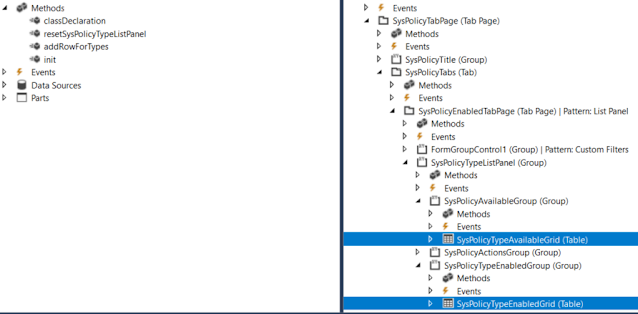
[Form]
public class SysPolicyTypesOneCompanyActiveOnly extends FormRun
{

    private Map                 policyTypes = wzhTest::createMapForEnum(enumStr(SysPolicyTypeEnum));
    private SysPolicyTypeEnum   type;

    private void resetSysPolicyTypeListPanel()
    {
        SysPolicyTypeAvailableGrid.deleteRows(0, SysPolicyTypeAvailableGrid.rows());
        SysPolicyTypeEnabledGrid.deleteRows(0, SysPolicyTypeEnabledGrid.rows());

        var mapEnumerator = policyTypes.getEnumerator();
        while (mapEnumerator.moveNext())
        {
            type        = mapEnumerator.currentKey();

            if (SysPolicyTypesOneCompanyActiveOnly::exist(type))
            {
                this.addRowForTypes(SysPolicyTypeEnabledGrid, type);
            }
            else
            {
                this.addRowForTypes(SysPolicyTypeAvailableGrid, type);
            }
        }

        SysPolicyTypeAvailableGrid.row(SysPolicyTypeAvailableGrid.rows() ? 1 : 0);
        SysPolicyTypeEnabledGrid.row(SysPolicyTypeEnabledGrid.rows() ? 1 : 0);
    }

    private int addRowForTypes(FormTableControl _table, SysPolicyTypeEnum _type)
    {
        int i;
        // Insert it into the data set in sorted order.
        for (i = _table.rows(); i >= 1; i--)
        {
            SysPolicyTypeEnum typeIdTmp = _table.cell(1, i).data();

            if (strCmp(enum2Str(typeIdTmp), enum2Str(_type)) < 0)
            {
                // We need to insert after the current item.
                break;
            }
        }

        // Insert the new item, i is equal to the index of the item we need to insert after.
        _table.insertRows(i, 1);
        _table.cell(1, i + 1).data(_type);

        return i + 1;
    }
...
}
Multiple enum values in a table
In order to save user's selection of particular Enum values in a table, you can add a string type field there.
The rest is to convert these selected values from string to a list or a container to present them in a form.
Say, we need to let the user to select particular FiscalPeriodStatus values.

First, we add a new string field FiscalPeriodStatusSelection to our table.

    /// <summary>
    /// Returns Fiscal period statuses string values
    /// </summary>
    /// <param name = "_parm">container</param>
    /// <returns>string values of selected period statuses</returns>
    [SysClientCacheDataMethodAttribute(true)]
    public display LedgerExchAdjFiscalPeriodStatusSelection fiscalPeriodStatusSelectionDisp()
    {
        return wzhTest::enumValuesStr2EnumStrStr(this.FiscalPeriodStatusSelection, enumName2Id(enumStr(FiscalPeriodStatus)));
    }
And updates this field via AnotherClass which treats the user's selection (in a form, for example)
    this.FiscalPeriodStatusSelection = con2Str(AnotherClass.getFiscalPeriodStatusSelectionCont(), wzhTest::ContSeparator);

    /// <summary>
    /// Gets FiscalPeriodStatus selection as a container
    /// </summary>
    /// <returns>container</returns>
    public container getFiscalPeriodStatusSelectionCont()
    {
        container                               cont;

        while (...)
        {
            cont += SomeBufferOrList.FiscalPeriodStatus;
        }

        return cont;
    }



_1074.jpg)


 Posts
Posts

