Showing posts with label report. Show all posts

Friday, August 4, 2023

How to get rid of a stuck report design in SSRS

It is difficult to say if your recent changes to an SSRS report design are really deployed. I suggest that any textbox be colored to visualize it (you can revert it in the end).

However, sometimes previous design is stuck on the server, and you still see no changes deployed, nevertheless, you already restarted Reporting services. Fortunately, there is a direct way to delete such a stubborn report from the server.

Open Report Server configuration manager as administrator and apply Portal URL setting if it is not done yet.


Then go for your report and delete it.

Next deployment should be OK.


Sunday, April 9, 2023

Two outer joined tables in a report without duplicates from both sides

 I cannot find a particular term for this type of join; so I called it 'hanging left outer join'.


Let's state the problem.


We have two tables:

- LedgerJournalTrans (trans) with a field mgcProjId, which is a reference to ProjTable.

- myDetails (details), which may have 0..N records for certain records from ProjTable.


Examples of data in both may look like the following:


If we apply standard outer join, the output will be as follows


But we need to print all details records by 'hanging' them against the same projId, like this


So, no duplicates from both tables must be present in the merged table myDetailsTmp.


This is how you can achieve it. 

/// <summary>
    /// Process report data.
    /// </summary>
    public void processReport()
    {
        Query                   query;
        QueryRun                qr;
        myDetails               details;
        LedgerJournalTrans      trans;
        ProjId                  prevProjId;
        // merge trans and detail even if details are empty
        void insertWithTrans()
        {
            myDetailsTmp.clear();
myDetailsTmp.RefRecId = trans.RecId;
myDetailsTmp.JournalNum = trans.JournalNum;
myDetailsTmp.TransDate = trans.TransDate;
myDetailsTmp.Voucher = trans.Voucher;
myDetailsTmp.ProjId = trans.mgcProjId;
myDetailsTmp.DetailId = details.DetailId;
myDetailsTmp.WithPrice = details.WithPrice;
myDetailsTmp.insert();
} // merge empty trans and detail; it will be 'a hanging' detail void insertDetails() { myDetailsTmp.clear();
myDetailsTmp.ProjId = details.ProjId;
myDetailsTmp.DetailId = details.DetailId;
myDetailsTmp.WithPrice = details.WithPrice;
myDetailsTmp.insert();
} // process warrants for the previous projId // 'hanging' details on the right side of the report void processRestOfDetails() { // if there are still some warrants we found for the previous projId if (details) { // as we do not have enough rows from trans with the same previous projId, // let's add them with empty part from trans side next details; while(details) { insertWarrants(); next details; } } } // Get the query from the runtime using a dynamic query. query = this.parmQuery(); qr = new QueryRun(query); // we suppose that trans sorted by projId // each projId may have 0..N of warrants (details) while(qr.next()) { // get next transaction trans = qr.get(tablenum(LedgerJournalTrans)); // projId changes if(prevProjId != trans.mgcProjId) { // if there are still some warrants we found for the previous projId processRestOfDetails(); // get the first warrant for the new projId select details where details.ProjId == trans.mgcProjId; // keep the new as a previous for the next iteration prevProjId = trans.mgcProjId; } // if this is a trans with the same projId, then we can merge it with the next warrant else if (details) { next details; } // merge trans with warrants insertWithTrans(); } // if there are still some warrants we found for the previous projId processRestOfDetails(); }

Raw outer joined data


Ascending ProjId


Descending ProjId


Wednesday, June 29, 2022

Union query for Project transactions

Union query may be a very efficient and useful option when you need to fetch similar data fields from different tables. A good example of this may be the case when you to gather information about project related transactions as they can be of different types, like, expenses, fees, items, etc. 

Say, we need to render some report collecting all these different types of transaction that can be posted against a given project and group them by a given financial dimension value in Project group. Let's see how Union query can help us.

In order to better understand the goal, you can take a look to the standard form ProjInvoiceJournal which perfectly explains how all these table relate to each other. 

Most of them contain the same set of fields, and we simply need to get some of them into one view to populate by the report data provider.

So, at the first step, let's create all necessary queries for the source Project transaction related tables. Pick up the first and create a simple query as depicted. 

Then create a view based on this query. 

Then pick up the next and do the same.

Complete these two steps for all necessary transaction types.

Now you can create a Union query and add all your views together as they have the same set of fields.

If you need to distinguish them later who is who, say, in computed column methods, you can use  unionAllBranchId field, but this is out of the current focus.
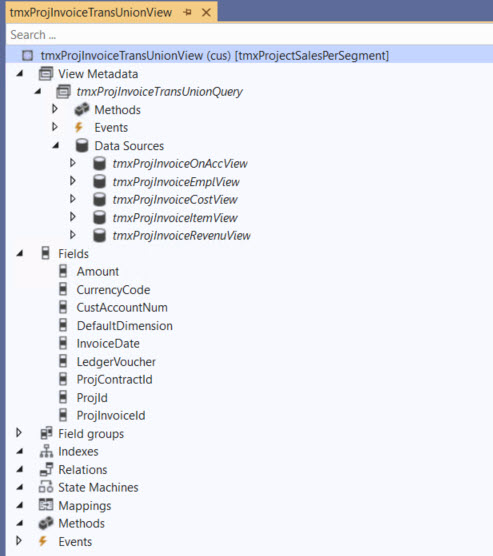
Finally you can elaborate it by adding a new view based on the latter with a simple SUM aggregation for Amount field.
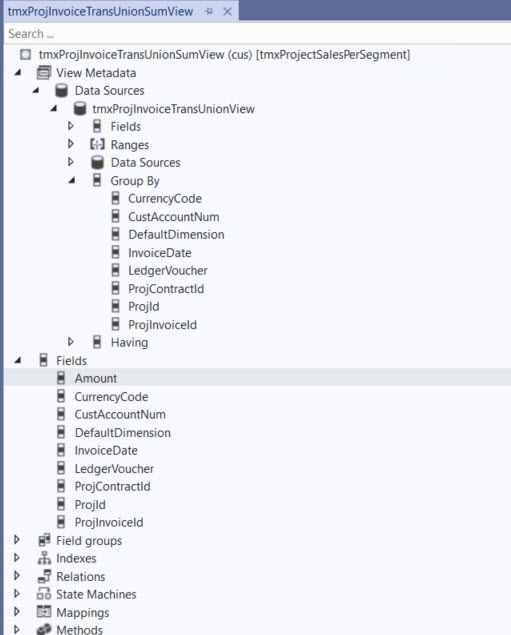
Basically, you achieve your goal with no coding.

I am not going into details about the whole project, which you can get by this URL https://github.com/wojzeh/tmxProjectSalesPerSegment. Ping me, if you have any questions.


Related topics: 

Computed column for union values from multiple outer joined data sources in view

Wednesday, March 31, 2021

Corrupted copy of SSRS report

Sometimes after copying an existing SSRS report or even just a part of its design, parser starts encountering strange errors. For example:

Unidentifiable substring 'Value' in expression. the parser reported error message

There must be something wrong in the mechanism responsible for copying text boxes. In most case, it replaces simple function names with predicates like Microsoft.Value etc. In my case it turned out to be even worse: some bug in strings concatenation; no matter what.

The problem here is that you have no hint about the object name, where such a non-conform string was added. You can try your textboxes one by one by checking all their properties with functions inside: visibility, font, border etc, even labels for its placeholder! And it can become a nightmare when your report contains dozens of them.

Fortunately there is a some workaround. You can open XML files for both of the original report and your copy of it in Notepad++ and run Compare over them (Install this Compare plugin).

Then scroll down to the first bad guy: a couple of strings above you will see its name.

Go back to the editor, find this textbox.

Now check its corrupted property function expressions and fix it.


Tuesday, July 31, 2018

MICROSOFT DYNAMICS SALARY SURVEY 2018 by Nigel Frank

Yeah! They did it again! Tenth time in a row!

I entered Microsoft Dynamics world ten years ago - almost at the same time when Nigel Frank started this great project. I always believed that knowing others salary can help us - hired workers and freelancers - better position ourselves on the market. More than 14000 data respondents make this survey report a valuable guide for those wondering about modern trends.

It is interesting how consultant and developer have been racing these years. It happens probably because of Microsoft efforts to ease development by moving to Visual Studio and to add more and more complex functionality to their products.


Once I got my Microsoft Dynamics AX certification, I was told that this is mutually beneficial to me and to the company and cannot be a reason for my salary increase. As we can see it happens in 70% of cases.


At the same time the most reasons why specialists start flirting with the idea to change their current job are lack of salary increase (57%) and lack of promotional perspectives (54%). A good point to think about!

More than a half of respondents said being ready to consider to relocate even to another country! And, yes, Canada is the destination number one!

Now, being a father of two toddlers, I really appreciate that I am allowed to work from home: until recent days it was three days a week.


As in previous years, Dynamics AX is still in the top 3 all together with CRM and NAV. Let's take a look at USA and Canada salaries.


I have made my notes just about a few points, but you can find a lot of other interesting analytics provided by Nigel Frank in this report. Great job!

As an improvement suggestion, it would be amazing to get time line trends by other Microsoft products as well as by region, occupancy etc. They already got all needed data; therefore, it is just a few hours of Microsoft Power BI developer work! :)

previous post about the report

Wednesday, June 6, 2018

How to add a new report for a business document in D365

My colleague Rod showed it to me when I needed to add a new report to Project Invoice Proposal with billing rules to be present in Print management settings.


    /// <summary>
    /// Subscribes to print mgmt report format publisher to populate custom reports
    /// </summary>
    [SubscribesTo(classstr(PrintMgmtReportFormatPublisher), delegatestr(PrintMgmtReportFormatPublisher, notifyPopulate))]
    public static void notifyPopulate()
    {
        #PrintMgmtSetup

        void addFormat(PrintMgmtDocumentType _type, PrintMgmtReportFormatName _name, PrintMgmtReportFormatCountryRegionId _countryRegionId = #NoCountryRegionId)
        {
            myPrintMgtDocType_ProjInvReport_Handler::addPrintMgmtReportFormat(_type, _name, _name, _countryRegionId);
        }

        addFormat(PrintMgmtDocumentType::myProjInvoiceWithBR, ssrsReportStr(myPSAContractLineInvoice, Report));
    }

    /// <summary>
    /// Adds a report format to the printMgtReportFormat table
    /// </summary>
    /// <param name = "_type">PrintMgmtDocumentType value</param>
    /// <param name = "_name">Name of the report (ie. reportname.Report)</param>
    /// <param name = "_description">Description of the report (ie. reportname.Report)</param>
    /// <param name = "_countryRegionId">Country or default (#NoCountryRegionId)</param>
    /// <param name = "_system">True if this is a system report</param>
    /// <param name = "_ssrs">SSRS report or another type</param>
    private static void addPrintMgmtReportFormat(
        PrintMgmtDocumentType _type,
        PrintMgmtReportFormatName _name,
        PrintMgmtReportFormatDescription _description,
        PrintMgmtReportFormatCountryRegionId _countryRegionId,
        PrintMgmtReportFormatSystem _system = false,
        PrintMgmtSSRS _ssrs = PrintMgmtSSRS::SSRS)
    {
        PrintMgmtReportFormat printMgmtReportFormat;

        select firstonly printMgmtReportFormat
            where printMgmtReportFormat.DocumentType == _type
                && printMgmtReportFormat.Description == _description
                && printMgmtReportFormat.CountryRegionId == _countryRegionId;

        if (!printMgmtReportFormat)
        {
            // Add the new format
            printMgmtReportFormat.clear();
            printMgmtReportFormat.DocumentType = _type;
            printMgmtReportFormat.Name = _name;
            printMgmtReportFormat.Description = _description;
            printMgmtReportFormat.CountryRegionId = _countryRegionId;
            printMgmtReportFormat.System = _system;
            printMgmtReportFormat.ssrs = _ssrs;
            printMgmtReportFormat.insert();
        }
    }

Then I can pick it up in Print management settings in Project module.


It may be a good idea to delete records from PrintMgmtReportFormat table; all its records will be recreated the next time you open Print management form.


Saturday, October 3, 2015

How to run a report for multiple records from a grid

Let's say we want to run our report from the previous post not from a Reports menu but directly from the Sales order form. We will use MultiSelectionHelper and its magic method createQueryRanges for this goal.

First of all we need to allow multiple selection for the menu item and place it as a button on the form.


Also we need to slightly change the report controller, so that it could receive the selected records and add an appropriate range to the query before execution.


public static void main(Args _args)
{
    ItemSalesPriceAndBarcodeController   controller = new ItemSalesPriceAndBarcodeController();

    controller.parmReportName(ssrsReportStr(SalesPriceAndBarcodeReport, Report));
    controller.parmArgs(_args);
    controller.parmShowDialog(true);
    // if it comes from the form, do not load the saved value
    if (_args && _args.dataset() == (tablenum(SalesTable)))
    {
        controller.parmLoadFromSysLastValue(false);
    }
    controller.startOperation();
}

/// <summary>
///    Executes before the report prompts and calls the method to set the ranges to the query.
/// </summary>
public void prePromptModifyContract()
{
    this.setRanges(this.getFirstQuery());
}

/// <summary>
/// Sets the report query ranges based on the caller.
/// </summary>
/// <param name="_query">
/// The hold the <c>Query</c> object of the report.
/// </param>
public void setRanges(Query _query)
{
    QueryBuildDataSource        qbds;
    QueryBuildRange             qbr;
    SalesTable                  salesTable;
    FormDataSource              salesTable_ds;
    FormRun                     caller;
    MultiSelectionHelper        helper;


    if (this.parmArgs() && this.parmArgs().dataset() == (tablenum(salesTable)))
    {
        salesTable = this.parmArgs().record();
        salesTable_ds = salesTable.dataSource();

        caller  =  this.parmArgs().caller();
        //This method will help to get only the marked records from the Grid
        helper  = MultiSelectionHelper::createFromCaller(caller);

        qbds    = _query.dataSourceTable(tablenum(salesTable));

        //Create the Query to filter using itemId
        helper.createQueryRanges(qbds, fieldStr(salesTable, SalesId));
    }
    else
    {
        qbds    = _query.dataSourceTable(tablenum(salesTable));
        qbr = qbds.addRange(fieldNum(salesTable, SalesId));
    }
}

If user selected certain orders to print from the form, we do not need to restore previously saved parameters.

Feel free to download the full project here.

Thursday, May 1, 2014

Clean off the illegal characters from file name

When it comes to use file names, say, in saving reports on the disk or sending them as an attachment, they must conform OS restrictions.

Although we cannot rely on GetInvalidFileNameChars function due to its limitation, it is easy to create your own procedure that clean off the illegal characters from the given file name.

In my example I use a regular expression and a set of characters that should be replaced with the underscore by default.


/// <summary>
/// Checks for invalid characters in the filename and changes them with underscore.
/// </summary>
/// <param name="_fileName">
/// The file name value.
/// </param>
/// <param name="_char2use">
/// The character to use instead of illegal characters. Underscore by default.
/// </param>
/// <returns>
/// valid file name
/// </returns>

static client str makeFileNameValid(str _fileName, str 1 _char2use = "_")
{
    str                 pattern = "[/:*?'<>|]";
    str                 fileName;

    fileName = System.Text.RegularExpressions.Regex::Replace(_fileName, pattern, _char2use);
    fileName = strReplace(fileName , '\\', _char2use);
    return fileName;
}

I used this article.

Tuesday, April 29, 2014

How to get rid of hyper links in SSRS report

As we remember AX 2012 allows us to jump directly to the details based on EDT or table relations. Sometimes this weight a report that supposed to be saved in Excel, for example.

It is easy to suppress hyper links in Visual Studio by changing field property in design.


Happy DAXing!

Monday, March 30, 2009

Watching variables of a report

A little trick to watch your variables during debugging a report. Add a variable to watch and add the Element. prefix to its name.

Friday, December 12, 2008

How to add a custom report from scratch in OnTime2008 with behaviour of standard reports

This is about OnTime2008, the system used for development management. A small issue occurred during design a Customer report: we could not pass the selected project in the project tree as a parameter for SQL statement.

1. Create your stored procedure in MS SQLServer. You can easily use existing SP as a base, i.e. spS_Projects_Summary.Otherwise, you can just add an SQL-statement later in design time inOnTime2008.

2. Create and execute a command like thefollowing. Pay attention to the group of reports where you want to add your report to.
You can either add your xml-defined report design here or define it later in design time in OntIme2008.

HINT: The easiest way is just to create a copy of a standard report looking similar to one you want to create and copy-paste its xml code in MS SQL Server. It will take everything including the C# script.

USE [OnTime2008_Test]
GO

DECLARE @return_value int,
@ReportId int

EXEC @return_value= [dbo].[spI_Reports]
@ReportId= @ReportId OUTPUT,
@Name =N'LBA Deliveries', -- report name
@ReportClass= N'',
@ReportXML= N'', -- can be copied-pasted or designed later
@SqlCommand= N'LBA_spS_DeliveryReport @projectid = {CURRENT_PROJECT}', -- your storedprocedure or SQL statement
@ReportType= 4, -- group for the report: 1- defects; 2- features; 3 - tasks; 4-summaries;5 - workslog; 6 - incidents; 7 - dashboard;
@IsActive= true,
@CreatedById= 1,
@CreatedDateTime= '2008-12-12 15:23:54', -- not important
@LastUpdatedById= 1,
@LastUpdatedDateTime='2008-12-12 15:23:54' -- not important

SELECT @ReportIdas N'@ReportId'

SELECT 'ReturnValue' = @return_value

GO

3. At this stage you may launch OnTime2008 (or re-launch it in order to re-index) and open your newly created report in the approriate group of reports (Reports\Manage Reports...).
Now, just create a shortcut to the report and you can start to use it.

NOTE: Using filters depends on the report group.

The sample of xml code for the report design and the history of this issue you can find on the Axosoft forum.