Wednesday, April 22, 2020

New Image in FormGroupControl with BusinessCard Extended style

Developing and customizing forms in D365 are limited by predefined patterns and styles.

We can however overcome these limitations to some extent by placing new form controls and changing properties of existing ones and, of course, a bit of coding.

As an example, let's add a new Workflow image similar to Expense category to be shown in BusinessCard form group control, once an expense is assigned to the current user.


There are multiple ways to achieve the required change. To mention a few, playing with Style and ExtendedStyle properies in design, changing form controls placement with Top, Bottom, Left, Right properties, playing with DisplayOptions at run time, combining both images into one, replacing the standard images to customized ones: one for Assigned-to-me Category and standard Category, and so one.


Here we consider adding a new image of Workflow icon next to the standard Category one.We have a display method returning the required image. The key point here is to set its ExtendedStyle property to card_imageSquare, so that it would be shown properly.


Now it looks almost perfect, but the new form control pushed a bit the currency amount out of the card frame. 


Let's fix it by hiding the standard form control and placing its duplicate with ExtendedStyle = None.


The last thing is to make the text bold in order to emphasize it.


[ExtensionOf(tableStr(TrvExpTrans))]
final class TrvExpTrans_Extension
{
    boolean isCurrentUserWorkflow()
    {
        ...
    }

    display container currentUserWorkflowIndicator()
    {
        ImageReference imgRef;
        if (this.ApprovalStatus == TrvAppStatus::Pending && this.isCurrentUserWorkflow())
        {
            imgRef = ImageReference::constructForSymbol(ImageReferenceSymbol::Workflow);
            return imgRef.pack();
        }

        return conNull();
    }

    [FormDataSourceEventHandler(formDataSourceStr(TrvExpenses, TrvExpTrans), FormDataSourceEventType::DisplayOptionInitialize)]
    public static void ds_OnDisplayOptionInitialize(FormDataSource sender, FormDataSourceEventArgs e)
    {
        FormDataSourceDisplayOptionInitializeEventArgs  eventArgs   = e as FormDataSourceDisplayOptionInitializeEventArgs;

        FormDesign                                      fd          = sender.formRun().design(0);
        FormRowDisplayOption                            fo          = eventArgs.displayOption();
        FormControl                                     fc          = fd.controlName("newAmountCurrWithCurrencyCode");
        // if we can find our new form control for the expense amount
        if(fo && fc)
        {
            // let's make it bold to emphasize
            fo.affectedElementsByControl(fc.id());
            fo.fontBold(true);
        }
    }

}

The final view.


Friday, March 13, 2020

Visual Studio 2015 crash with "The supplied SnapshotPoint is on an incorrect snapshot" error

This error is really annoying bug in VS2015 when you barely touch your code, and the VS crashes all the time.

Thanks Joris, there is a workaround in VS Options:


Tuesday, March 10, 2020

Data validation by ValidateField and ValidateWrite (old but good)

The most time data are meant to be changed by a user via different kinds of forms or even without it, and sometimes we need to implement additional business logic there.

Say, we want that a discount never be more than 10%, while a user creates lines in a sales order. For such a scenario the best way is to implement ValidateField and check the value for the field of Discount. After that the form does not allow the user to leave the field of discount until its value is less or equal to 10%.


public boolean validateField(FieldId _fieldIdToCheck)
{
    boolean ret;

    ret = super(_fieldIdToCheck);
    switch(_fieldIdToCheck)
    {
        case fieldNum(MySalesLine, Discount):
            if(this.Discount <= 10)
            {
               ret = true;
            }
            else
            {
                ret = checkFailed("Discount cannot be more than 10%");
            }
            break;
    }

    return ret;


But we should remember that ValidateField method is called automatically for a form data source field only.


In other words, if the table record is inserted or updated by code, this logic will be NOT triggered.


[Form]
[DataSource]
     [DataField]
            public boolean validate()
    [Table]
     public boolean validateField(FieldId _fieldIdToCheck)


So, if we need to implement validation logic for the whole record, which is supposed to be triggered every time Insert or Update is called (not for form data sources only), we go with ValidateWrite.


Thanks Mohamed for this brilliant article Microsoft dynamics ax2012 : forms and tables methods call sequences, How To? Watch this presentation! It contains much more very useful information.


Thursday, February 20, 2020

How to replace a financial dimension value in D365

Thanks to Denis Trunin's article, we can easily implement something like this in D365FO.


public static DimensionDefault setValueToDefaultDimension(DimensionDefault _dimensionDefault, RefRecId _dimensionAttributeRecId, DimensionValue  _newDimensionValue)
    {
        DimensionAttributeValueSetStorage   dimStorage;
        DimensionDefault                    newDimensionDefault = _dimensionDefault;
        DimensionAttributeValue             dimensionAttributeValue;
        if (_dimensionAttributeRecId)
        {
            dimStorage = DimensionAttributeValueSetStorage::find(_dimensionDefault);
            if (_newDimensionValue)
            {
                dimensionAttributeValue = DimensionAttributeValue::findByDimensionAttributeAndValue(DimensionAttribute::find(_dimensionAttributeRecId), _newDimensionValue, false, true);
                dimStorage.addItem(dimensionAttributeValue);
            }
            else
            {
                dimStorage.removeDimensionAttribute(_dimensionAttributeRecId);
            }
            newDimensionDefault = dimStorage.save();
        }
        return newDimensionDefault;
    }


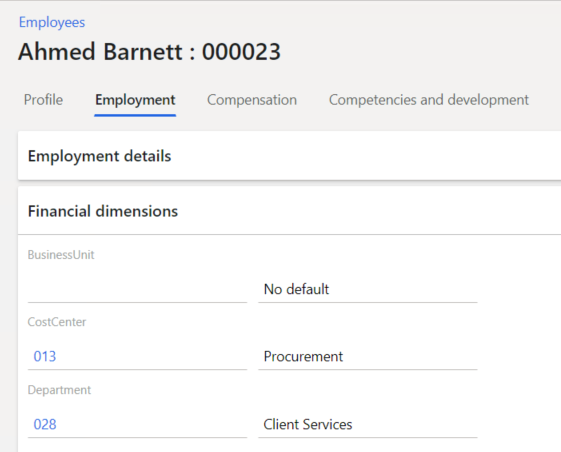
Then, say, we need to replace Department from Operations to Client Services for Ahmed Barnett in USMF.


static void setNewFinDimValueForEmployee(HcmWorkerRecId _worker, CompanyInfoRecId _legalEntity, Name _dimensionName, DimensionValue _dimensionValue)
    {
        HcmEmployment hcmEmployment = HcmEmployment::findByWorkerLegalEntity(_worker, _legalEntity);
        ttsbegin;
        hcmEmployment.selectForUpdate(true);
        hcmEmployment.validTimeStateUpdateMode(ValidTimeStateUpdate::Correction);
        DimensionDefault newDim = DimensionHelper::setValueToDefaultDimension(hcmEmployment.DefaultDimension, DimensionAttribute::findByName(_dimensionName).RecId, _dimensionValue);
        hcmEmployment.DefaultDimension = newDim;
        if(hcmEmployment.validateWrite())
        {
            hcmEmployment.update();
        }
        ttscommit;
    }
Here you go.


public static void main(Args _args)
    {
        HcmWorkerRecId              _worker         = 22565420995; //Ahmed Barnett
        CompanyInfoRecId            _legalEntity    = 22565422580; //USMF
        Name                        _dimensionName  = 'Department';
        DimensionValue              _dimensionValue = '028'; //Currently 026
        DimensionHelper::setNewFinDimValueForEmployee(_worker, _legalEntity, _dimensionName, _dimensionValue);
        Info(strFmt("Employee fin dim value changed!"));
    }


Saturday, January 4, 2020

How a Dev can be provisioned as admin in D365

If you don't have Windows administrator privileges, you can nevertheless open visual studio and run a debugging session. So you can simply import your Windows user and assign admin role to it. 

Saturday, November 30, 2019

How D365FO debugging really looks like


BTW, jokes aside, where can I see the TTS level during debugging?

Wednesday, November 27, 2019

Enum extensions case in D365

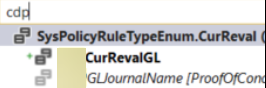
Added two new values to an enum in the same model but in two different extensions.


The first one is looped perfectly (see code snippet below), and nothing but an index for the second. However, its value is present in a combobox.


[ExtensionOf(formStr(SysPolicyParameters))]
final public class mySysPolicyParametersForm_Extension
{
    public void populateTree()
    {
        DictEnum          policyRuleTypeEnum;
        int               i;
        policyRuleTypeEnum = new DictEnum(enumNum(SysPolicyRuleTypeEnum));


        for(i = 0; i < policyRuleTypeEnum.values(); i++)
        {
            str sym = policyRuleTypeEnum.value2Symbol(i);
            info(strFmt("%1 %2 %3", i, policyRuleTypeEnum.value2Name(i), sym));
        }


        next populateTree();
    }
} 
Already built and synchronized the whole world. What else can it be?

Take a look from the SQL side.


There are some old values that I created before but deleted later. All of them are still there.

I had to delete these non-synced values manually from SQL, then added needed values in AOT, and synched DB.

In fact, DB sync is triggered if you have some changes in tables/views only.
Now it is correctly recreated.


BTW there are two good articles about the subject

 1) Extensible enums: Breaking change for .NET libraries that you need to be aware of
 2) Development tutorial: Extensible base enumerations in Microsoft Dynamics AX 7