Showing posts with label group. Show all posts

Friday, January 5, 2024

Check your data via SQL

 Sometimes we need to check or validate some data in a dev box. The fastest way to do that is to run a query directly in MS SQL management studio.

For example, I have hundreds legal entities and want to know in which of them I have some Purchase orders. Voila:


select
dataareaid as Company, count(RECID) as 'Number of PO'
from PURCHTABLE
group by DATAAREAID
having count(RECID) > 1

Monday, August 19, 2019

How to concatenate financial dimension values in a View for a given hierarchy

Following my previous posting How to filter existing transactions based on a financial dimension value set ,
I would like to show how we can construct a view with all financial dimension values for a given hierarchy, including placeholders for those values are absent.

In the aforementioned example, it was CDPDimensionAttributeValuesUnionConcatView view as depicted.


Instead of a series of dependant views, we can create one view as follows (CDPDimAttrSelectedView is just a set of selected attributes; explained in the previous link)


The key point is a computed column method, which creates a final string in the same sequence of attributes as selected in the hierarchy.


private static server str finDimValues()   // X++
    {
        return @"STUFF((SELECT '-' +
                        ISNULL(
                            STUFF((SELECT '-' + t3.DisplayValue
                                    from DimensionAttributeValueSetItemView as t3
                                    JOIN DimensionHierarchyLevel as t17
                                    on t17.DIMENSIONATTRIBUTE = t3.DIMENSIONATTRIBUTE
                                    join myFinDimAttrForAggr t25
                                        on
                                            t17.DIMENSIONHIERARCHY = t25.DIMENSIONHIERARCHY
                                    where
                                    t1.DimensionAttributeValueSet = t3.DimensionAttributeValueSet
                                    and t7.DIMENSIONATTRIBUTE = t3.DIMENSIONATTRIBUTE
                                    order by t17.LEVEL_
                                    FOR XML path('')
                                   ), 1, 1, '')
                            , 'N/A')
     
                    FROM DIMENSIONATTRIBUTE t6
                        JOIN DimensionHierarchyLevel as t7
                                on t7.DIMENSIONATTRIBUTE = t6.RECID
                                join myFinDimAttrForAggr t15
                                    on
                                        t7.DIMENSIONHIERARCHY = t15.DIMENSIONHIERARCHY
                    FOR XML PATH('')), 1, 1, '')";

    }


Thanks a lot for all participants on the forum thread, and especially to Kair84 who helped me with SQL command.


Friday, August 9, 2019

How to filter existing transactions based on a financial dimension value set

Let's assume that we want to see our bank accounts balances grouped by a financial set, which may be different than that set up for your transactions.


For example, existing transactions presume to have values for the following dimension attributes.


However, our selection can be different. For this exercise sake I opted for Business unit and Department.


So, instead of one balance for the whole bank account, we want to get it distributed per every combination of Business unit and Department values.


Another point to consider is the fact that these attributes are not mandatory; in other words, we don't have values for all attributes in all transactions.


It can be easily achieved if we find a way to create a column with all sought dimension attribute values concatenated as depicted.


Generally speaking this is a job a BI solution; however, it is possible to do in D365 by means of Views.

Let's solve this problem step by step.

Fisrt view is for all selected attributes that we should populate values for, exist them or not.


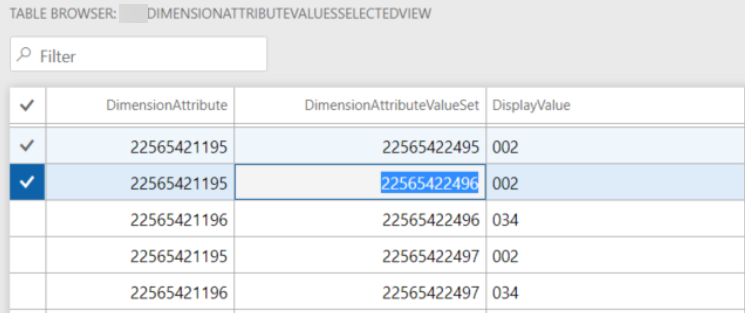
Second, collect all existing values which match our selected attributes.


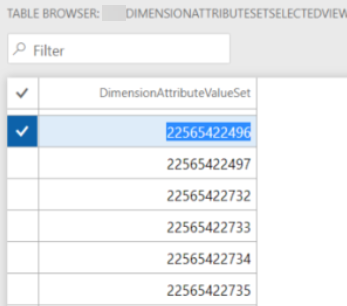
Then, group all found dimension attribute sets.


Now we create a view based on the latter and sought attributes without relation in outer join. By that we will get a Cartesian product of all possible combinations between them.


At this step we outer join the latter with the found (existing) values. Here we can add a computed column if we want to see something else than just an empty value.


private static server str displayValueWithNA()   // X++
{
    str         sRet;
    tableName   viewName                = viewstr(myDimensionAttributeValuesUnionView);
    str         cDisplayValue  = SysComputedColumn::comparisonField(viewName,
                                                                                viewstr(myDimensionAttributeValuesSelectedView),
                                                                                fieldStr(myDimensionAttributeValuesSelectedView, DisplayValue));
    
    sRet =
        SysComputedColumn::if(SysComputedColumn::isNotNullExpression(cDisplayValue),
                                cDisplayValue,
                                SysComputedColumn::returnLiteral('n/a')
                            );
 
    return sRet;
}


Final view will contain all the values found on the previous step grouped by dimension attribute value set so that in a computed column all values be concatenated in the required order.


private static server str finDimValues()   // X++
{
    return @"STUFF((SELECT '-' + t3.DisplayValue
                from myDimensionAttributeValuesUnionView as t3
                where
                t1.DimensionAttributeValueSet = t3.DimensionAttributeValueSet
                order by t3.DIMENSIONATTRIBUTE
                for xml path('')), 1, 1, '')";
}


Having this view in inner join combination allows you to filter any transactional data by a set of dimensions without coding.


Saturday, October 3, 2015

How to create SSRS report with multiple independent groupings

Let's say we need to print for selected sales orders all their items with sales prices and barcodes. It means our report must look like this.


One page by SalesId, some kind of a card with all items presented in the related SalesLine table. Then for each ItemId we group all its sales prices, first, and all its barcodes, second.

As suggested by Best Practice, we can create one flat temporary table (regular in my case just to ease debugging) to merge all data into one data source for our report.


Additional GroupType field is populated with different values for each table: SalesLine, Barcode, or SalesLine (could be done as enum). They will be used in report design for filtering tablix elements.

As to design we would need the main TablixSalesId with grouping by SalesId and breaking page for each instance.


Then nested TablixItemId grouped by ItemId.


Now we need to add two new ones - TablixBarcode and TablixSalesPrice without any additional grouping but with filters as follows.


This approach with adding "artificial" field to a flat table let to distinguish data and easily group and filter them.


Feel free to download the full project here.

This is the code of two principal methods of  Report data provider class.

Wednesday, June 18, 2014

How to count query loops number

Amongst our other mundane chores, counting of a query loops is not the trickiest one but, unfortunately, still clumsy developed even in AX 2012.

 Not only is it strange to have two different methods for one only and multiple data sources, but it takes long time and returns incorrect results when it comes to groupings.

 SysQuery::countTotal and SysQuery::countLoops use the private method SysQuery::countPrim, which can be redone in a way suggested here (in Russian).

private server static container сountPrim(container _queryPack)
{
    Query                   countQuery;
    QueryRun                countQueryRun;
    QueryBuildDataSource    qbds;
    QueryBuildFieldList     qbfl;
    Common                  common;
    Integer                 counter;
    Integer                 loops;
    
    Integer                 tmxGroupNumber;
    Integer                 tmxDataSourceNumber;
    ;
    countQueryRun   = new QueryRun(_queryPack);
    countQuery      = countQueryRun.query();
    tmxGroupNumber  = countQuery.groupByFieldCount(); //<-- this guarantees number of groupings

    for (tmxDataSourceNumber = 1; tmxDataSourceNumber <= countQuery.dataSourceCount(); tmxDataSourceNumber++)
    {
        qbds = countQuery.dataSourceNo(tmxDataSourceNumber);
         qbds.update(false);
        //qbds.sortClear();

        //tmxGroupNumber +=(qbds.orderMode()==orderMode::GroupBy); 
        qbfl = qbds.fields();
        qbfl.dynamic(false);
        qbfl.clearFieldList();
         qbds.addSelectionField(fieldNum(Common,RecId),SelectionField::Count);
    }
  
    countQueryRun   = new QueryRun(countQuery);

    while (countQueryRun.next())
    {
         common  = countQueryRun.getNo(1);
        counter += common.RecId;
        loops++;
    }
    //return [counter,loops];
    return [counter,(tmxGroupNumber ? loops : counter)];
 }