Wednesday, January 22, 2014

Initial parameter default with SysOperation (initParmDefault)

With the new SysOperation framework in AX2012 I bumped into a simple question on how to set default value for one parameter in the data contract as I did by using initParmDefault with RunBase class.

Here are two ways to do that: we can initialize any values inside of new() method in the data contract class or, alternatively, override initializeServiceParameter() in the service controller class for a particular data contract type.


The latter always overrides initial default values coming with the data contract.

I used information from this article (in German).

Thursday, January 16, 2014

How to change Batch caption dialog field in run time. RunBaseBatch sample

This is an example of a RunBaseBatch class that demonstrates how to change another dialog fields in run time.

Let's say we have a parameter of enum type, which selects the right business logic inside of Run method.

It is a good idea to change the main static text of the dialog as well as the batch caption that serves as a description for an eventual batch job (and tasks).

After adding this field in Dialog method we need to override Modified method for this field.


protected Object dialog()
{
    FormComboBoxControl  combobox;
    dlg                 = super();

    dialogEventType = dlg.addFieldValue(EnumStr(uapInterfaceEventType), eventType );
    // to add details to the caption and task description in batch tasks
    dialogEventType.registerOverrideMethod(methodstr(FormStringControl, modified), methodstr(tmxRunBaseBatchSample, eventType_modified), this);
    // to avoid user input in the field
    combobox = dialogEventType.control();
    combobox.comboType(1);

    return dlg;
}

In eventType_modified method we call two additional methods to apply the user input respectively for BatchCaption and MainInstruction fields.

private boolean eventType_modified(FormStringControl _control)
{
    boolean ret = _control.modified();
    if(ret)
    {
        this.setBatchCaption();
        this.setMainInstruction();
    }
    return ret;
}

To get access to these dialog fields we use two different approaches. We find BatchCaption form control recursively inside of batch tab page based on its type.

private void setBatchCaption()
{
    FormStringControl                  batchCaptionControl;

    // to get the batch caption control; any of them if many
    batchCaptionControl = this.getBatchCaptionControl(dlg);

    if (batchCaptionControl)
    {
        batchCaptionControl.text(this.caption());
    }
}
// returns the batch caption form control if any in the dialog
private FormStringControl getBatchCaptionControl(DialogRunbase _dialog)
{
    FormStringControl                  batchCaptionControl;

    // recursive routine to look for the right form control of BatchCaption EDT
    Object findBatchCaptionControl(Object _parentObject)
    {
        int         i;
        Object      childControl;
        Object      foundControl;


        for (i = 1; i <= _parentObject.controlCount(); i++)
        {
            childControl = _parentObject.controlNum( i );

            // this is our boy
            if( childControl is FormStringControl && childControl.extendedDataType() ==  extendedTypeNum(BatchCaption))
            {
                // time to get up
                return childControl;
            }
            else
            {
                if (childControl is FormGroupControl)
                {
                    foundControl = findBatchCaptionControl(childControl);
                    if (foundControl)
                    {
                        return foundControl;
                    }
                }
            }
        }
        // just step back to check others
        return null;
    }
/////// main routine  /////////////////////////////////////////////////////////////
    if( _dialog && _dialog.batchDialogTabPage())
    {
        batchCaptionControl = findBatchCaptionControl(_dialog.batchDialogTabPage().control());
    }

    return batchCaptionControl;
}

As to MainInstruction we get it by its name.

private void setMainInstruction()
{
    FormStaticTextControl   mainInstructionControl;
    FormGroupControl        formGroup = dlg.mainFormGroup();

    // to get the main instuction static text of the dialog
    mainInstructionControl = dlg.dialogForm().runControl('MainInstruction');

    if (mainInstructionControl)
    {
        mainInstructionControl.text(this.caption());
    }
}

Now when the user changes the event type, two other fields change respectively.


You can find the whole project here.

How to set properties for the Reference Group form control from code

There is a small issue in AX 2012 with getting access to the siblings' properties of Reference Group form control - they are unavailable in AOT.

However, you still can get access to it from code during run time.

Let's say you have placed on your form a field named FilterCategory, which is a reference group, and you want to set its sibling FilterCategory_Name width to Column width value. As you can see there is no way to do that in AOT.


So you just create a method supposed to be called in the form init():

void setColumnWidthForFilterCategory()
{
    int                                 i;
    Object                              childControl;

    for (i = 1; i <= FilterCategory.controlCount(); i++) // FilterCategory is of FormReferenceGroupControl type
    {
        childControl = FilterCategory.controlNum( i );
        childControl.width( 0, FormWidth::ColumnWidth );
    }
}

And you get it!


Bug: Drag-n-Drop Creates New Element In Enums With Duplicate Values

Bug in AX 2012 R2.

When you use drag-n-drop in AOT to create a new element for a enum, it creates this element with the exactly same value.


But all enum values must be unique.


It can lead to eventual errors in run time.
Please send a bug report to Microsoft.

Saturday, January 11, 2014

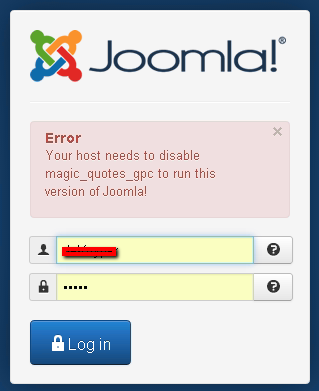
How to turn off magic quotes gpc for Joomla 3

This post is devoted to Joomla CMS.

New 3.2 Joomla version requries to make off the magic quotes option. There is a good article on how to that via php.ini and .htaccess files in local folders on your web site.

Unfortunately it does not work php parameters propagated entirely for all folders and subdomains from the server settings.


 Here is the way to change it via the control panel.

Log in to your web hosting control panel.


Go to General Options\Software.


Then press light blue button "PHP CONFIGURATION" (Now I understand why it is capitalized)


Here press "Show PHP Settings" button.

And now the time to ask your evident question "Where in the world are my PHP settings?!" Take it easy, guys! You just need to change "PHP Version" parameter to any other one and then change it back to the version you work in. Do not press "Set as current" button!


Bingo! This is the turn.

Now just change "magic_quotes_gpc" option to OFF and do not forget to save the changes. That's it. You magic quotes successfully turned off.


Happy Joomling!


Friday, January 10, 2014

Windows Admin Trick: How to restart Windows In a Remote Session

Found it useful to create a batch file:

@echo off
echo Shutting down in 10 seconds. Please type "shutdown /a" to abort.
cmd.exe /K shutdown /f /t 10 /r

Thursday, December 26, 2013

How to make your ProgressBar progress on server

In AX 2012 we deal with three types of progress bars:

  • SysOperationProgress
  • SysOperationProgressEmbedded
  • SysOperationProgressServer
that initialized in RunBase.progressInit method.

What concerns the latter that runs on the server side for batch jobs and tasks, I have never seen before that the Progress field changed during batch tasks execution. 


This is because RunbaseProgress Construct method is called without _disableProgressWithoutGUI parameter; nevertheless, it exists in its own New method. This parameter is always TRUE.

I do not know if this option is disabled by purpose having some other developing perspectives in mind, or simply by mistake.

In fact, it is not enough just to extend constructors accordingly to pass this parameter from your own processing class down to SysOperationProgressServer methods. There is another bug in Construct.

This bug does not take into account the caller class that creates its progress bars passing an empty GUID, so that Update method always refreshes the first progress bar found in SysProgress table. In other words, if you started a few batch tasks simultaneously, you will see an interesting progressing: after 100% it starts from zero and so on until the last task finishes. No progressing for the rest of the tasks.

The third bug is in Reset method, which actually run in turn by progress.Kill method (now marked as obsolete). Unfortunately, I do not inderstand the logic of this approach to reset the progress bar when my tasks is finished. From my point of view, it must be really 'killed' it in the end.

All in all, the following changes in forementioned objects fix the problem.