static void wblTableName(Args _args)
{
    tableId tableId = 175; //1962; //2954; //101377;

    info(strFmt("%1 : %2", tableId2name(tableId), tableId2pname(tableId)));
}
Friday, October 19, 2018
Get table name from its id

Wednesday, October 17, 2018
How to get all related table ids from code
We can loop all relations on a table by code.

It can be useful in cases when we need, say, to open a form with a related record.

Here you can find a more elaborated example.
static void myGetRelatedTableNames(Args _args)
{
    myInExtCodeValueTable           myInExtCodeValueTable;
    int                             mapId;
    TableName                       relatedTableName;
    TableId                         relatedTableId;
    Set                             tablesIdsSet    = new Set(Types::Integer);
    Set                             tablesNamesSet  = new Set(Types::String);
    TableId                         tableId         = tableName2id(tableStr(myInExtCodeValueTable));
    Dictionary                      dictionary      = new Dictionary();
    SysDictTable                    dictTable       = dictionary.tableObject(tableId);
    DictRelation                    dictRelation    = new DictRelation(myInExtCodeValueTable.TableId);
    int                             mapCnt          = dictTable.relationCnt();
    container                       ret ;
    str                             relationName;
    //create a maps of literals for all tables from the table relations
    // so that we could get tables names based on their ids
    // and if any new relation will be added to multiple external codes table
    // it is present automatically in this view
    for (mapId=1; mapId <= mapCnt; mapId++)
    {
        // elaborate if any table present many times
        relationName        = dictTable.relation(mapId);
        dictRelation.loadNameRelation(relationName);
        if(dictRelation)
        {
            relatedTableId      = dictRelation.externTable();
            relatedTableName    = tableId2pname(relatedTableId);
            tablesIdsSet.add(relatedTableId);
            tablesNamesSet.add(relatedTableName);
            info(strFmt("Table %1 - %2", relatedTableId, relatedTableName));
        }
    }

    ret = [tablesIdsSet.pack(), tablesNamesSet.pack()];
}
It can be useful in cases when we need, say, to open a form with a related record.

Here you can find a more elaborated example.
Wednesday, September 12, 2018
Lookup and Modified methods for FormReferenceGroup fields in D365
Let's say we need to keep in Purchase line a manufacturer code for a particular product. So each Product/Manufacturer code combination is unique.

Three tables are referenced via RecId fields.


So once Manufacturer code field is placed in the form, we end up with a FormReferenceGroup.

We can easily override its lookup method by subscribing to the relevant event on it.

But what if the user wants to create new values in appropriate tables if them do not exist yet?

We can catch the modified event in order to create new values before failing the validation.
However, given that its content may be changed, it is impossible to get access to its fields at design time.
We can do it during run-time by means of getting sought field form controls by their names and overloading then their Modified() methods. (see the similar trick for AX 2012 https://alexvoy.blogspot.com/2014/01/how-to-set-properties-for-reference.html)


The code you need to add.
Table methods
Three tables are referenced via RecId fields.
So once Manufacturer code field is placed in the form, we end up with a FormReferenceGroup.
We can easily override its lookup method by subscribing to the relevant event on it.
 [FormControlEventHandler(formControlStr(PurchTable, myEcoResManufacturerProduct_myEcoResManufacturerProductRecId), FormControlEventType::Lookup)]
    public static void myEcoResManufacturerProduct_myEcoResManufacturerProductRecId_OnLookup(FormControl sender, FormControlEventArgs e)
    {
        PurchLine                           purchLine = sender.formRun().dataSource(formDataSourceStr(PurchTable, PurchLine)).cursor() as PurchLine;
        FormControlCancelableSuperEventArgs cancelableArgs = e as FormControlCancelableSuperEventArgs;

        myEcoResManufacturerProduct::lookupByItem(sender, purchLine.itemId);

        cancelableArgs.CancelSuperCall();
    }
public client static Common lookupByItem(FormReferenceControl _formReferenceControl, ItemId _itemId)
    {
        SysReferenceTableLookup sysReferenceTableLookup;
        Query                   query;
        QueryBuildDataSource    myEcoResMan;

        sysReferenceTableLookup = SysReferenceTableLookup::newParameters(tableNum(myEcoResManufacturerProduct), _formReferenceControl);
        sysReferenceTableLookup.addLookupfield(fieldNum(myEcoResManufacturerProduct, EcoResManufacturerRecId));
        sysReferenceTableLookup.addLookupfield(fieldNum(myEcoResManufacturerProduct, EcoResManufacturerPartNbr));

        query = new Query();
        myEcoResMan = query.addDataSource(tableNum(myEcoResManufacturerProduct));
        myEcoResMan.addRange(fieldNum(myEcoResManufacturerProduct, EcoResProductRecId)).value(SysQuery::value(InventTable::find(_itemId).Product));

        sysReferenceTableLookup.parmQuery(query);

        return sysReferenceTableLookup.performFormLookup() as myEcoResManufacturerProduct;
    }
But what if the user wants to create new values in appropriate tables if them do not exist yet?
We can catch the modified event in order to create new values before failing the validation.
However, given that its content may be changed, it is impossible to get access to its fields at design time.
We can do it during run-time by means of getting sought field form controls by their names and overloading then their Modified() methods. (see the similar trick for AX 2012 https://alexvoy.blogspot.com/2014/01/how-to-set-properties-for-reference.html)

The code you need to add.
[ExtensionOf(formStr(PurchTable))]
final class myPurchTableForm_PurchTableManuf_Extension
{
    private const  str          myFieldNameDisplayProductNumber    = 'EcoResManufacturerPartNbr';
    private const  str          myFieldNameEcoResManufacturerName  = 'EcoResManufacturerName';
    private FormStringControl   myFSCDisplayProductNumber;
    private FormStringControl   myFSCEcoResManufacturerName;

    // the only way to change the standard modified method for a control inside of a dynamically populated reference group
    // is to get it by its name looping all form controls of this group during run-time. then to overload it
    [FormEventHandler(formStr(PurchTable), FormEventType::Initialized)]
    public void PurchTable_OnInitialized(xFormRun sender, FormEventArgs e)
    {
        FormDesign                      formDesign = sender.design();
        FormReferenceGroupControl       formReferenceGroupControl;
        formReferenceGroupControl = formDesign.controlName(formControlStr(PurchTable, myEcoResManufacturerProduct_myEcoResManufacturerProductRecId)) as formReferenceGroupControl;
        this.registerManufacturerNameOverload(formReferenceGroupControl);
    }

    private void registerManufacturerNameOverload(FormReferenceGroupControl _formReferenceGroupControl )
    {
        int                                 i;
        Object                              childControl;
        FormStringControl                   formStringControl;

        for (i = 1; i <= _formReferenceGroupControl.controlCount(); i++) // FilterCategory is of FormReferenceGroupControl type
        {
            childControl = _formReferenceGroupControl.controlNum( i );
            formStringControl = childControl as formStringControl;
            if(formStringControl.DataFieldName() == myFieldNameEcoResManufacturerName)
            {
                myFSCEcoResManufacturerName = formStringControl;
                formStringControl.registerOverrideMethod(methodStr(formStringControl, modified), formMethodStr(PurchTable, myEcoResManufacturerName_modified_overload),
                    this);
            }
            if(formStringControl.DataFieldName() == myFieldNameDisplayProductNumber)
            {
                myFSCDisplayProductNumber = formStringControl;
                formStringControl.registerOverrideMethod(methodStr(formStringControl, modified), formMethodStr(PurchTable, myDisplayProductNumber_modified_overload),
                this);
            }
        }
    }

    /// <summary>
    /// We have to allow the user to insert any value, even though such a value is not found in the referenced table;
    /// then we will ask whether this new value must be created in the table and set this new value for the current record
    /// </summary>
    /// <param name = "_sender">EcoResManufacturerName</param>
    public void myEcoResManufacturerName_modified_overload(FormStringControl _sender)
    {
        myEcoResManufacturer myEcoResManufacturer = myEcoResManufacturer::findOrCreateByName(_sender.text());
        _sender.modified();
    }

    /// <summary>
    /// We have to allow the user to insert any value, even though such a value is not found in the referenced table;
    /// then we will ask whether this new value must be created in the table and set this new value for the current record
    /// </summary>
    /// <param name = "_sender">EcoResManufacturerName</param>
    public void myDisplayProductNumber_modified_overload(FormStringControl _sender)
    {
        Common          comm = _sender.dataSourceObject().cursor();
        PurchLine       purchLine   =  _sender.parentControl().dataSourceObject().cursor() as PurchLine;

        myEcoResManufacturerProduct myEcoResManufacturerProduct = myEcoResManufacturerProduct::findOrCreateEcoResManufacturerProduct(
                                                                                                        purchLine.itemId,
                                                                                                        myFSCEcoResManufacturerName.text(),
                                                                                                        _sender.text());
        _sender.modified();
    }

}
Table methods
public static myEcoResManufacturer findOrCreateByName(myEcoResManufacturerName       _manufacturerName)
    {
        myEcoResManufacturer           myEcoResManufacturer = myEcoResManufacturer::findByName(_manufacturerName);
        if(!avrEcoResManufacturer)
        {
            if(Box::confirm("Do you want to creare new manufacturer?", strFmt(myEcoResManufacturer::txtNotExist(), _manufacturerName)))
            {
                try
                {
                    myEcoResManufacturer.EcoResManufacturerName = _manufacturerName;
                    if(myEcoResManufacturer.validateWrite())
                    {
                        myEcoResManufacturer.insert();
                    }
                }
                catch
                {
                    Error("Failed to create new manufacturer");
                }
            }
        }
        return myEcoResManufacturer;
    }
public static myEcoResManufacturerProduct findOrCreateEcoResManufacturerProduct(ItemId                         _itemId,
                                                                                    myEcoResManufacturerName       _manufacturerName,
                                                                                    myEcoResManufacturerPartNbr    _manufacturerPartNbr)
    {
        myEcoResManufacturerProduct    myEcoResManufacturerProduct;
        myEcoResManufacturer           myEcoResManufacturer;
        InventTable                     inventTable = InventTable::find(_itemId);
        // item and part number are given and exist
        if(inventTable.Product && _manufacturerPartNbr)
        {
            // such a manufacturer exists, so just try to find it for given combination
            myEcoResManufacturer           = myEcoResManufacturer::findOrCreateByName(_manufacturerName);
            myEcoResManufacturerProduct    = myEcoResManufacturerProduct::find(inventTable.Product, myEcoResManufacturer.RecId);
            if(!myEcoResManufacturerProduct)
            {
                if(Box::confirm("Do you want to create new part number", strFmt(myEcoResManufacturerProduct::txtNotExist(), _manufacturerPartNbr)))
                {
                    try
                    {
                        myEcoResManufacturerProduct.EcoResProductRecId         = inventTable.Product;
                        myEcoResManufacturerProduct.EcoResManufacturerRecId    = myEcoResManufacturer.RecId;
                        myEcoResManufacturerProduct.EcoResManufacturerPartNbr  = _manufacturerPartNbr;
                        myEcoResManufacturerProduct.EcoResManufacturerDefault  = NoYes::Yes;
                        if(myEcoResManufacturerProduct.validateWrite())
                        {
                            myEcoResManufacturerProduct.insert();
                        }
                    }
                    catch
                    {
                        Error("Failed to create new part number");
                    }
                }
            }
        }
        return myEcoResManufacturerProduct;
    }
Friday, August 17, 2018
TECH SALARIES IN TORONTO, MONTREAL, VANCOUVER REVEALED (2018)
KOVASYS have published a short article on IT salaries in Canadian cities based on Randstad report; it is worth reading.
For example, about Montreal
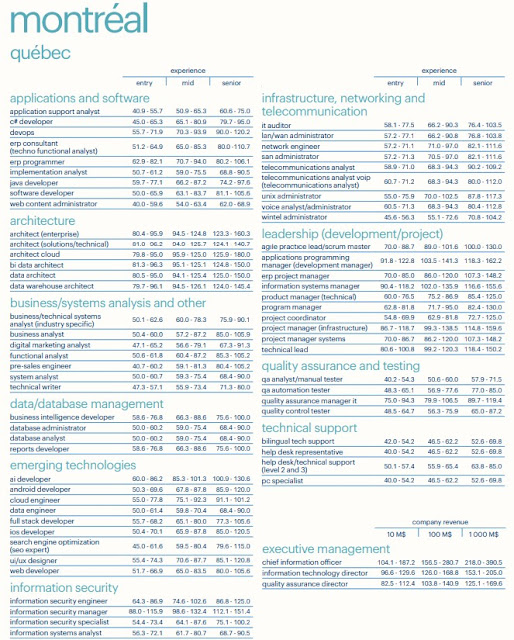
For example, about Montreal

Tuesday, July 31, 2018
MICROSOFT DYNAMICS SALARY SURVEY 2018 by Nigel Frank
Yeah! They did it again! Tenth time in a row!
I entered Microsoft Dynamics world ten years ago - almost at the same time when Nigel Frank started this great project. I always believed that knowing others salary can help us - hired workers and freelancers - better position ourselves on the market. More than 14000 data respondents make this survey report a valuable guide for those wondering about modern trends.
It is interesting how consultant and developer have been racing these years. It happens probably because of Microsoft efforts to ease development by moving to Visual Studio and to add more and more complex functionality to their products.

Once I got my Microsoft Dynamics AX certification, I was told that this is mutually beneficial to me and to the company and cannot be a reason for my salary increase. As we can see it happens in 70% of cases.

At the same time the most reasons why specialists start flirting with the idea to change their current job are lack of salary increase (57%) and lack of promotional perspectives (54%). A good point to think about!
More than a half of respondents said being ready to consider to relocate even to another country! And, yes, Canada is the destination number one!
Now, being a father of two toddlers, I really appreciate that I am allowed to work from home: until recent days it was three days a week.

As in previous years, Dynamics AX is still in the top 3 all together with CRM and NAV. Let's take a look at USA and Canada salaries.


I have made my notes just about a few points, but you can find a lot of other interesting analytics provided by Nigel Frank in this report. Great job!
As an improvement suggestion, it would be amazing to get time line trends by other Microsoft products as well as by region, occupancy etc. They already got all needed data; therefore, it is just a few hours of Microsoft Power BI developer work! :)
previous post about the report
I entered Microsoft Dynamics world ten years ago - almost at the same time when Nigel Frank started this great project. I always believed that knowing others salary can help us - hired workers and freelancers - better position ourselves on the market. More than 14000 data respondents make this survey report a valuable guide for those wondering about modern trends.
It is interesting how consultant and developer have been racing these years. It happens probably because of Microsoft efforts to ease development by moving to Visual Studio and to add more and more complex functionality to their products.

Once I got my Microsoft Dynamics AX certification, I was told that this is mutually beneficial to me and to the company and cannot be a reason for my salary increase. As we can see it happens in 70% of cases.

At the same time the most reasons why specialists start flirting with the idea to change their current job are lack of salary increase (57%) and lack of promotional perspectives (54%). A good point to think about!
More than a half of respondents said being ready to consider to relocate even to another country! And, yes, Canada is the destination number one!
Now, being a father of two toddlers, I really appreciate that I am allowed to work from home: until recent days it was three days a week.

As in previous years, Dynamics AX is still in the top 3 all together with CRM and NAV. Let's take a look at USA and Canada salaries.


I have made my notes just about a few points, but you can find a lot of other interesting analytics provided by Nigel Frank in this report. Great job!
As an improvement suggestion, it would be amazing to get time line trends by other Microsoft products as well as by region, occupancy etc. They already got all needed data; therefore, it is just a few hours of Microsoft Power BI developer work! :)
previous post about the report
Tuesday, July 24, 2018
Find your changes and code fragments inside of extension project in D365
New D365 is enabled with powerful object search. These two tricks will help you to find even more inside of you extensions.
To find any text fragment you can use VSTS search tool.

To find all changes done in an extension you can simply take a look at the XML file behind.

To find any text fragment you can use VSTS search tool.
To find all changes done in an extension you can simply take a look at the XML file behind.
Wednesday, July 18, 2018

Subscribe to:
Posts (Atom)

_1074.jpg)


 Posts
Posts

