Thursday, January 16, 2014

Bug: Drag-n-Drop Creates New Element In Enums With Duplicate Values

Bug in AX 2012 R2.

When you use drag-n-drop in AOT to create a new element for a enum, it creates this element with the exactly same value.


But all enum values must be unique.


It can lead to eventual errors in run time.
Please send a bug report to Microsoft.

Saturday, January 11, 2014

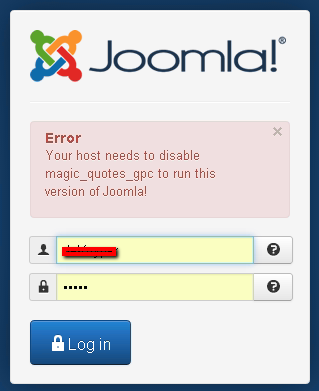
How to turn off magic quotes gpc for Joomla 3

This post is devoted to Joomla CMS.

New 3.2 Joomla version requries to make off the magic quotes option. There is a good article on how to that via php.ini and .htaccess files in local folders on your web site.

Unfortunately it does not work php parameters propagated entirely for all folders and subdomains from the server settings.


 Here is the way to change it via the control panel.

Log in to your web hosting control panel.


Go to General Options\Software.


Then press light blue button "PHP CONFIGURATION" (Now I understand why it is capitalized)


Here press "Show PHP Settings" button.

And now the time to ask your evident question "Where in the world are my PHP settings?!" Take it easy, guys! You just need to change "PHP Version" parameter to any other one and then change it back to the version you work in. Do not press "Set as current" button!


Bingo! This is the turn.

Now just change "magic_quotes_gpc" option to OFF and do not forget to save the changes. That's it. You magic quotes successfully turned off.


Happy Joomling!


Friday, January 10, 2014

Windows Admin Trick: How to restart Windows In a Remote Session

Found it useful to create a batch file:

@echo off
echo Shutting down in 10 seconds. Please type "shutdown /a" to abort.
cmd.exe /K shutdown /f /t 10 /r

Thursday, December 26, 2013

How to make your ProgressBar progress on server

In AX 2012 we deal with three types of progress bars:

  • SysOperationProgress
  • SysOperationProgressEmbedded
  • SysOperationProgressServer
that initialized in RunBase.progressInit method.

What concerns the latter that runs on the server side for batch jobs and tasks, I have never seen before that the Progress field changed during batch tasks execution. 


This is because RunbaseProgress Construct method is called without _disableProgressWithoutGUI parameter; nevertheless, it exists in its own New method. This parameter is always TRUE.

I do not know if this option is disabled by purpose having some other developing perspectives in mind, or simply by mistake.

In fact, it is not enough just to extend constructors accordingly to pass this parameter from your own processing class down to SysOperationProgressServer methods. There is another bug in Construct.

This bug does not take into account the caller class that creates its progress bars passing an empty GUID, so that Update method always refreshes the first progress bar found in SysProgress table. In other words, if you started a few batch tasks simultaneously, you will see an interesting progressing: after 100% it starts from zero and so on until the last task finishes. No progressing for the rest of the tasks.

The third bug is in Reset method, which actually run in turn by progress.Kill method (now marked as obsolete). Unfortunately, I do not inderstand the logic of this approach to reset the progress bar when my tasks is finished. From my point of view, it must be really 'killed' it in the end.

All in all, the following changes in forementioned objects fix the problem.

Wednesday, October 9, 2013

Beginner, Expert, or Both? from sqlservercentral.com

This short notice by Steve Jones on sqlservercentral.com drew my attention because, even though he talks about SQL, but in fact, this is the exactly same question that I always pose to myself working with AX.


It seems that there's no shortage of interviewers complaining about the lack of qualified candidates for open positions. It seems to me that the best thing you could do to get a better job is work through all the articles and lots of forum posts from SQLServerCentral, complete all the exercises in your favorite SQL Server book, and improve your skills so that you shine in an interview. If most candidates are really that bad, it can't be that hard to make yourself stand out with a little work.
However it seems few people do that. In fact, it seems that quite often we find people that have 5 years of experience with SQL Server really have 2-4 months of experience repeated 15-30 times. What's more disconcerting is that they don't realize how much knowledge they lack.
This article might provide some of the reasons why people think they're more experienced than they are. They're expert beginners, and since they can accomplish the things they're asked to do at their jobs, they think they're competent and become complacent. They have success because they're not asked to do more, perhaps because their employer only needs a small fraction of SQL Server knowledge to keep their systems running along.
I think this is a hard trend to break. Employers don't want to pay you to learn skills that aren't important to them, and they certainly don't want to pay you to learn things that will move you to a new employer. However that doesn't mean you should have the same attitude.
I think you should continue to expand your skills, grow your knowledge, and try new techniques. The best people in all professions continually question their current skills and techniques, looking for better ways to accomplish tasks. It's good to use what you know works, have experience with, and ensure stability in your systems, but always be prepared to evolve if you find something that works better. 
And keep looking for ways to do better.


The discussion may be of your interest too. 

Wednesday, September 18, 2013

Caching display methods with Client modifier

Caching display methods can increase performance in some cases. But be cautious when you are adding them in datasource Init method. If by mistake you add one method that defined with Client modifier on the table, it will fail right calculations for them all for the first line in the grid.

For example, you have one method on the table with Client modifier:

display client Integer isLineChanged()
{
    #ResAppl

    if (this.Changed)
    {
        return #ImageInfo;
    }

    return 0;
}

On the form you add this method amongst others in cache (not the last one!):

// Form DataSource Init method
public void init()
{
    super();
    this.cacheAddMethod(tablemethodstr(myTable, errorExist));
    this.cacheAddMethod(tablemethodstr(myTable, isLineChanged));
    this.cacheAddMethod(tablemethodstr(myTable, itemName));
    this.cacheAddMethod(tablemethodstr(myTable, categoryName));
    this.cacheAddMethod(tablemethodstr(myTable, subCategoryName));
}

You will get the following result because all of these methods will be calculated based on client side buffer that is not fetched yet.


It does not matter if you place a cached display method in the form or not -- it is calculated anyway.

Friday, September 13, 2013

How to compare two records of the same table

Amongst other mundane chores, from time to time AX consultants and programmers need to check if two table records are indentical and what the difference is if they are not.

Here is a small project for AX 2012 with tmxTableBufferOperation class that provides the following static methods: 
  • getOneRecordFieldList(Common _record1) 
  • getTwoRecordsFieldList(Common _record1, Common _record2) 
  • areIdentical(Common _record1, Common _record2)
  • getDifference(Common _record1, Common _record2)
Their names are mnemonical so you won't misunderstand what they do.

There is also a batch demonstrating how to use them:


The main idea is to use reflection DictTable class to enumerate all the fields of the given table buffer and then populate containers with its field ids, names and values.


static public List getTwoRecordsFieldList(Common _record1, Common _record2)
{
    Common              buffer1;
    Common              buffer2;

    List                list        = new List(Types::Container);   //list of all the fields, field names and values
    List                bufferList  = new List(Types::Container);   //final list of all the fields, field names and values of these two records
    ListEnumerator      le;

    int                 i;
    fieldId             fieldId;
    DictTable           dictTable;
    DictField           dictField;

    container           c;

    if(_record1.TableId != _record2.TableId)
    {
        error(strFmt('Both records are supposed to be of the same table type!'));
    }

    dictTable = new DictTable(_record1.TableId);

    if (dictTable)
    {
        // create the list of all the fields in the table
        for (i = dictTable.fieldCnt(); i; i--)
        {
            fieldId = dictTable.fieldCnt2Id(i);
            dictField = new DictField(dictTable.id(), fieldId);
            list.addEnd([fieldId, fieldId2name(dictTable.id(), fieldId)]);
        }

        buffer1 = dictTable.makeRecord();
        buffer2 = dictTable.makeRecord();

        select buffer1 where buffer1.RecId == _record1.recId;
        select buffer2 where buffer2.RecId == _record2.recId;

        le = list.getEnumerator();
        while (le.moveNext())
        {
            c = le.current();
            bufferList.addEnd([[conPeek(c,1), conPeek(c,2), buffer1.(conPeek(c,1))],
                               [conPeek(c,1), conPeek(c,2), buffer2.(conPeek(c,1))]]);
        }
    }
    return bufferList;
}

And how you can use it.

static void tmxCompareFixedAssets(Args _args)
{
    #define.FA1('MACH10DMO-000018')
    #define.FA2('MACH20DMO-000009')
    
    List                    list;
    ListEnumerator          le;
    container               c;
    
    list = TmxTableBufferOperation::getDifference(AssetTable::find(#FA1), AssetTable::find(#FA2));
    le      = list.getEnumerator();
    info('Difference 1 <> 2');
    while (le.moveNext())
    {
        c = le.current();
        info(strFmt("%1: %2 <> %3", conPeek(conPeek(c,1), 2), conPeek(conPeek(c,1), 3),  conPeek(conPeek(c,2), 3)));
    }
    
}

Result: