Friday, February 11, 2022

Additional parameters in RunBaseBatch class extension

 Old good pack/unpack patterns with SysPackExtension call. Say, we need to augment RunBaseBatch based class <ClassName>.


/// <summary>
/// We are going to use a new additional parameter
/// </summary>
[ExtensionOf(classStr(<ClassName>))]
public final class My<ClassName>_Extension
{
    private boolean     myNewParm;   
    #define.CurrentVersion(1)
    #localmacro.CurrentList
        myNewParm
    #endmacro

    
    /// <summary>
    /// myNewParm access
    /// </summary>
    /// <param name = "_parm">boolean</param>
    /// <returns>boolean</returns>
    public boolean parmMyNewParm(boolean _parm = myNewParm)
{ myNewParm= _parm;
return myNewParm;
} /// <summary> /// Extends Pack /// </summary> /// <returns>container</returns> public container pack() { container packedClass = next pack(); return SysPackExtensions::appendExtension(packedClass, classStr(My<ClassName>_Extension), this.myPack());
} /// <summary> /// Extends Unpack /// </summary> /// <param name = "packedClass">container</param> /// <returns>boolean</returns> private boolean myUnpack(container packedClass) { Integer version = RunBase::getVersion(packedClass); switch (version) { case #CurrentVersion: [version, #currentList] = packedClass; break; default: return false; } return true; } /// <summary> /// Packs my locals /// </summary> /// <returns>container</returns> private container myPack() { return [#CurrentVersion, #CurrentList]; } /// <summary> /// Extends unpack /// </summary> /// <param name = "_packedClass">container</param> /// <returns>boolean</returns> public boolean unpack(container _packedClass) { boolean result = next unpack(_packedClass); if (result) { container myState = SysPackExtensions::findExtension(_packedClass, classStr(My<ClassName>_Extension));
//Also unpack the extension if (!this.myUnpack(myState)) { result = false; } } return result; } }

Thursday, February 10, 2022

Overload a method for a new button in Form extension

 This can be used as a copy-paste pattern, when you need to change a standard method for new form controls added as a form extensions.

At the form initialization step we can overload any form control methods with registerOverrideMethod.

[ExtensionOf(formStr(<FormName>))]
public final class my<FormName>_MyNewButton_Extension
{
   public void init()
    {
        next init();
		// MyNewButton button added in an extension to <FormName>
        FormButtonControl myButton = this.design().controlName(formControlStr(<FormName>, myNewButton));
		// Here we can overload its standard clicked() method in run-time		
        myButton.registerOverrideMethod(methodStr(FormButtonControl, clicked), formMethodStr(<FormName>, myNewButtonClicked), this);
    }

    public void myNewButtonClicked(FormButtonControl _sender)
    {
		<run some logic>
        _sender.clicked();
    }
}

Check this article for more complicated scenario https://alexvoy.blogspot.com/2018/09/lookup-and-modified-methods-for.html

Tuesday, February 8, 2022

How to validate filename with regular expressions

 I took the idea from this forum https://stackoverflow.com/questions/62771/how-do-i-check-if-a-given-string-is-a-legal-valid-file-name-under-windows

We can use regular expressions to check if a given file name is valid.


    /// <summary>
    /// Validates a filename for incorrect characters
    /// </summary>
    /// <param name = "_fileName"></param>
    /// <returns></returns>
    public boolean checkFileName(Filename _fileName)
    {
        var bad = System.IO.Path::GetInvalidFileNameChars();
        var esc = System.Text.RegularExpressions.Regex::Escape(new System.String(bad));
        var exp = new System.Text.RegularExpressions.Regex("[" + esc + "]");
        
        if (exp.IsMatch(_fileName))
        {
            return checkFailed(strFmt("@SYS339524")); // The specified filename is invalid.
        }
        return true;
    }

Wednesday, January 26, 2022

Up and Down lines form example

 It's useful to have existing forms and classes for common tasks to duplicate and customized them. 

There is a good example of such a form with Up and Down buttons for the grid lines in standard D365.

Check it by its display menu item ElectronicMessageProcessing

Tuesday, December 14, 2021

PowerShell and SQL scripts for Database Refreshing in a Devbox

 Say you created a new database AxDB_TEST2 and restored a test environment backup there.

Now you need to change the databases names so that D365FO would target a restored data.

First, you need to stop D365FO services, for example, with a similar PowerShell script.

function StopD365RelevantService()
{
    $services = "DynamicsAxBatch","Microsoft.Dynamics.AX.Framework.Tools.DMF.SSISHelperService.exe","MR2012ProcessService","LCSDiagnosticClientService"
    foreach ($item in $services)
    {
      Set-Service -Name $item -StartupType Disabled  
    }
    Stop-Service -Name Microsoft.Dynamics.AX.Framework.Tools.DMF.SSISHelperService.exe -ErrorAction SilentlyContinue
    Stop-Service -Name DynamicsAxBatch -ErrorAction SilentlyContinue
    Stop-Service -Name W3SVC -ErrorAction SilentlyContinue
    Stop-Service -Name MR2012ProcessService -ErrorAction SilentlyContinue
    Stop-Service -Name LCSDiagnosticClientService -ErrorAction SilentlyContinue

    Set-Service -Name W3SVC -StartupType Automatic
}


Then you can use the following SQL script to 'exchange' two databases.

use master
ALTER DATABASE AxDB SET SINGLE_USER WITH ROLLBACK IMMEDIATE    
ALTER DATABASE AxDB MODIFY NAME = AxDB_ORIG
ALTER DATABASE AxDB_ORIG SET MULTI_USER

ALTER DATABASE AxDB_TEST2 SET SINGLE_USER WITH ROLLBACK IMMEDIATE    
ALTER DATABASE AxDB_TEST2 MODIFY NAME = AxDB
ALTER DATABASE AxDB SET MULTI_USER

Once it is done, get the services back to life

function StartD365RelevantService()
{
    #Set-Service -Name "DynamicsAxBatch","Microsoft.Dynamics.AX.Framework.Tools.DMF.SSISHelperService.exe","W3SVC","MR2012ProcessService" -StartupType Automatic
    $services = "DynamicsAxBatch","Microsoft.Dynamics.AX.Framework.Tools.DMF.SSISHelperService.exe","W3SVC","MR2012ProcessService","LCSDiagnosticClientService"
    foreach ($item in $services)
    {
      Set-Service -Name $item -StartupType Automatic  
    }
    #Set-Service -Name 'DynamicsAxBatch' -StartupType Automatic
    Start-Service -Name Microsoft.Dynamics.AX.Framework.Tools.DMF.SSISHelperService.exe -ErrorAction SilentlyContinue
    Start-Service -Name DynamicsAxBatch -ErrorAction SilentlyContinue
    Start-Service -Name W3SVC -ErrorAction SilentlyContinue
    Start-Service -Name MR2012ProcessService -ErrorAction SilentlyContinue
    Stop-Service -Name LCSDiagnosticClientService -ErrorAction SilentlyContinue
}

Saturday, December 11, 2021

Multiple enum values selection in forms and tables

Previously I posted three supporting functions to work with multiple enum values selection. Now, let's see how they can be used in real scenarios.

With these functions you can easily expose enum values in selection lists and then save the user selection in tables.

Enum lists in a form

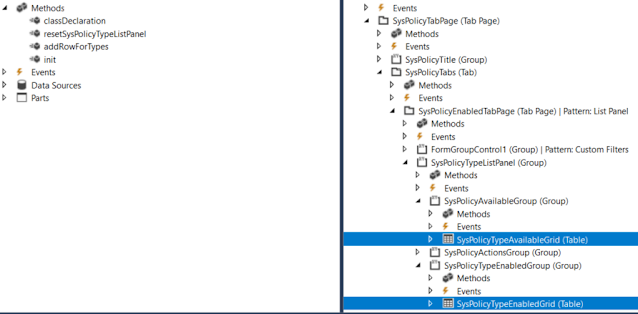
Check first how to show two grids in a form; so that the user could move enum values from one to another.


[Form]
public class SysPolicyTypesOneCompanyActiveOnly extends FormRun
{

    private Map                 policyTypes = wzhTest::createMapForEnum(enumStr(SysPolicyTypeEnum));
    private SysPolicyTypeEnum   type;
 
    private void resetSysPolicyTypeListPanel()
    {
        SysPolicyTypeAvailableGrid.deleteRows(0, SysPolicyTypeAvailableGrid.rows());
        SysPolicyTypeEnabledGrid.deleteRows(0, SysPolicyTypeEnabledGrid.rows());

        var mapEnumerator = policyTypes.getEnumerator();
        while (mapEnumerator.moveNext())
        {
            type        = mapEnumerator.currentKey();
            
            if (SysPolicyTypesOneCompanyActiveOnly::exist(type))
            {
                this.addRowForTypes(SysPolicyTypeEnabledGrid, type);
            }
            else
            {
                this.addRowForTypes(SysPolicyTypeAvailableGrid, type);
            }
        }

        SysPolicyTypeAvailableGrid.row(SysPolicyTypeAvailableGrid.rows() ? 1 : 0);
        SysPolicyTypeEnabledGrid.row(SysPolicyTypeEnabledGrid.rows() ? 1 : 0);
    }

    private int addRowForTypes(FormTableControl _table, SysPolicyTypeEnum _type)
    {
        int i;
        // Insert it into the data set in sorted order.
        for (i = _table.rows(); i >= 1; i--)
        {
            SysPolicyTypeEnum typeIdTmp = _table.cell(1, i).data();
            
            if (strCmp(enum2Str(typeIdTmp), enum2Str(_type)) < 0)
            {
                // We need to insert after the current item.
                break;
            }
        }

        // Insert the new item, i is equal to the index of the item we need to insert after.
        _table.insertRows(i, 1);
        _table.cell(1, i + 1).data(_type);

        return i + 1;
    }
...
}

Multiple enum values in a table

In order to save user's selection of particular Enum values in a table, you can add a string type field there. 

The rest is to convert these selected values from string to a list or a container to present them in a form.

Say, we need to let the user to select particular FiscalPeriodStatus values.


First, we add a new string field FiscalPeriodStatusSelection to our table.


We can show the currently saved selection via a display method

    /// <summary>
    /// Returns Fiscal period statuses string values
    /// </summary>
    /// <param name = "_parm">container</param>
    /// <returns>string values of selected period statuses</returns>
    [SysClientCacheDataMethodAttribute(true)]
    public display LedgerExchAdjFiscalPeriodStatusSelection fiscalPeriodStatusSelectionDisp()
    {
        return wzhTest::enumValuesStr2EnumStrStr(this.FiscalPeriodStatusSelection, enumName2Id(enumStr(FiscalPeriodStatus)));
}

And updates this field via AnotherClass which treats the user's selection (in a form, for example)

    this.FiscalPeriodStatusSelection = con2Str(AnotherClass.getFiscalPeriodStatusSelectionCont(), wzhTest::ContSeparator);

    /// <summary>
    /// Gets FiscalPeriodStatus selection as a container
    /// </summary>
    /// <returns>container</returns>
    public container getFiscalPeriodStatusSelectionCont()
    {
        container                               cont;
        
        while (...)
        {
            cont += SomeBufferOrList.FiscalPeriodStatus;
        }
                
        return cont;
    }

Supporting functions to work with multiple selection of Enum values

There a couple of custom static methods you can use to facilitate your job with Enum values in tables and forms.

class wzhTest
{
    public const str contSeparator = ';';
    /// <summary>
    /// Populates a map for all enum's values
    /// </summary>
    /// <param name = "_enumName">Enum name</param>
    /// <returns>Map object</returns>
    public static Map createMapForEnum(EnumName _enumName)
    {
        Map             map          = new Map(Types::Enum, Types::String);
        DictEnum        dictEnum = new DictEnum(enumName2Id(_enumName));
        for(int i = 0; i < dictEnum.values(); i++)
        {
            map.insert(dictEnum.index2Value(i), dictEnum.index2Symbol(i));
        }
        return map;
    }
    /// <summary>
    /// Creates a container with enum values from a given string values container
    /// </summary>
    /// <param name = "_cont">string values container</param>
    /// <param name = "_enumType">enum variable for defining its type</param>
    /// <returns>Container with enum value</returns>
    public static container enumValuesCont2EnumStrCont(container _cont, int _enumId)
    {
        container       ret;
        str             s;
        int             idx = 0;
        int             len = conLen(_cont);
        while (idx < len)
        {
            idx += 1;
            s           = conPeek(_cont, idx);
            if(s)
            {
                ret += enum2Symbol(_enumId, conPeek(_cont, idx));
            }
        }
        return ret;
    }

    /// <summary>
    /// Creates a string with enum values string
    /// </summary>
    /// <param name = "_s">string values separated with ; sign</param>
    /// <param name = "_enumType">enum variable for defining its type</param>
    /// <returns>String with enum values separated with ; sign</returns>
    public static str enumValuesStr2EnumStrStr(str _s, int _enumId)
    {
        container c = str2con(_s, wzhTest::contSeparator);
        c = wzhTest::enumValuesCont2EnumStrCont(c, _enumId);
        return con2Str(c, wzhTest::ContSeparator);
    }
}

Let's see how they work with AccessControlledType enum type.

 static public void main(Args _args)
    {
        AccessControlledType enumEDT;
        //AccessControlledType::MenuItemDisplay / 0
        //AccessControlledType::MenuItemOutput / 1
        //AccessControlledType::MenuItemAction /2
        //AccessControlledType::WebUrlItem /3
        //AccessControlledType::WebActionItem /4
        //AccessControlledType::WebManagedContentItem / 5
        //AccessControlledType::Table / 6
        // AccessControlledType::TableField / 7
        EnumId      id      = enumName2Id(enumStr(AccessControlledType));
        str         name    = enumId2Name(id); //enumStr(AccessControlledType)

Basically, they convert a enum values list from string and vice-versa by using standard functions.

Check the output of each static method.

        //createMapForEnum
        Info("Test createMapForEnum");
        Info(strFmt("%1 : %2 values", id, name));
        Map         m = wzhTest::createMapForEnum(name);
        MapIterator mi = new MapIterator(m);
        int i;
        while(mi.more())
        {
            Info(strFmt("%1 : '%2'", i, mi.value()));
            mi.next();
            i++;
        }


        //enumValuesCont2EnumStrCont
        Info("Test enumValuesCont2EnumStrCont");
        setPrefix('');
        container   c1 = [AccessControlledType::WebActionItem, AccessControlledType::MenuItemOutput];
        container   c2 = wzhTest::enumValuesCont2EnumStrCont(c1, id);

        for(i=1;i<=conLen(c2);i++)
        {
            Info(strFmt("%1 => '%2'", conPeek(c1,i), conPeek(c2,i)));
        }


        //enumValuesStr2EnumStrStr
        Info("Test enumValuesStr2EnumStrStr");
        str         s1 = con2Str([AccessControlledType::Table, AccessControlledType::TableField], wzhTest::contSeparator);
        str         s2 = wzhTest::enumValuesStr2EnumStrStr(s1, id);
        Info(strFmt("'%1' => '%2'", s1, s2));