Say, we need to print a Vendor payment advice in the vendor's language, whic is es (Spanish) in the example below. Once the report parameter AX_RenderingCulture is set to 'es', all related number formatting will be applied to amounts cells.
However, the payment may be made in different currencies; thus its currency symbol $ must be used instead of Euro.
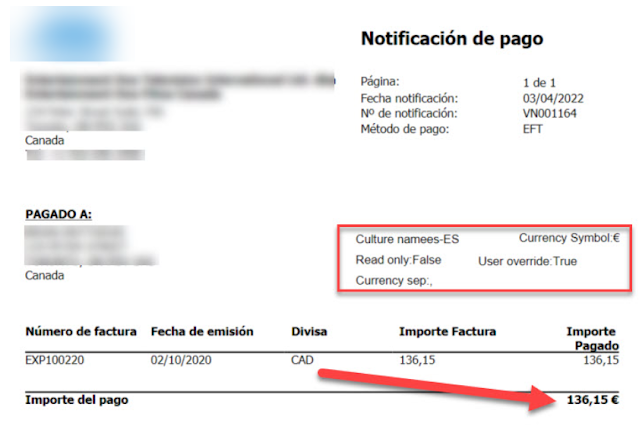
Basically, such parameters, like currency symbol etc, can be changed through System.Globalization.CultureInfo class created for the rendering culture. I did not find a way how to achieve it for a particular textbox in SSRS design. So, I formatted the amount directly in X++.
I used Global::strFmtByLanguage method as a basis for my method to replace the culture number format currency symbol to a given one. There are a few other interesting methods you can check to see how to deal with formatting dates and numbers.
    public str myChangeCurSymbolForAmountStr(LanguageId _languageId, System.Double _amountCur, CurrencySymbol _currencySymbol)
    {
        System.Globalization.CultureInfo    culture;
        str                                 res;
        System.Exception                    e;
        str                                 curSymbol;

        culture = new System.Globalization.CultureInfo(_languageId);

        try
        {
            res         = _amountCur.ToString("C", culture);
            curSymbol   = culture.NumberFormat.CurrencySymbol;
            res         = strReplace(res, curSymbol, _currencySymbol);
        }
        catch(Exception::CLRError)
        {
            e = CLRInterop::getLastException();
            while( e )
            {
                error( e.get_Message() );
                e = e.get_InnerException();
            }
            throw Exception::Error;
        }
        return res;
    }

    public myAmountStringWithCurrencySymbol myAmountStringWithCurrencySymbol(AmountCur _amountCur, CurrencyCode _currency, LanguageId _languageId)
    {
        Currency                            currency = Currency::find(_currency);

        return this.myChangeCurSymbolForAmountStr(_languageId, _amountCur, currency.Symbol);;
    }

    protected void insertBankPaymAdviceTmp()
    {
        BankPaymAdviceVendTmp bankPaymAdviceVendTmp;
        str                   email;

        next insertBankPaymAdviceTmp();

        bankPaymAdviceVendTmp = this.bankPaymAdviceTmp as BankPaymAdviceVendTmp;

        if (bankPaymAdviceVendTmp.RecId)
        {
            ttsbegin;
            bankPaymAdviceVendTmp.selectForUpdate(true);
            bankPaymAdviceVendTmp.myBalance01Total+=bankPaymAdviceVendTmp.Balance01;
            bankPaymAdviceVendTmp.myAmountStringWithCurrencySymbol  = this.myAmountStringWithCurrencySymbol(bankPaymAdviceVendTmp.EOGBalance01Total, bankPaymAdviceVendTmp.CurrencyCode, VendTable::find(bankPaymAdviceVendTmp.AccountNum).languageId());
            bankPaymAdviceVendTmp.update();
            ttscommit;
        }
    }
The final string can be referenced in Total textbox as Last(bankPaymAdviceVendTmp.myAmountStringWithCurrencySymbol) and with default format.


 ===>
===> 


_1074.jpg)


 Posts
Posts

