
Thursday, December 21, 2017

Friday, December 15, 2017
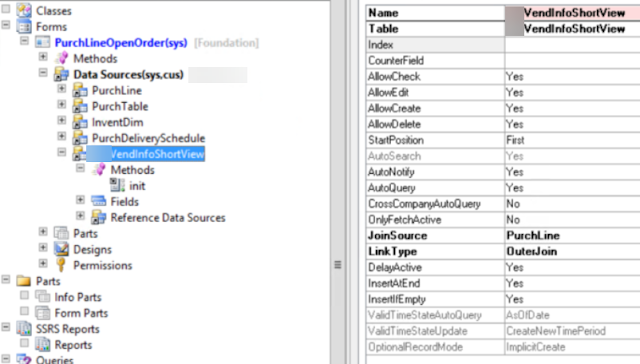
How to link two tables on the form via DynaLink
public void init()
{
    QueryBuildDataSource    qbdsPurchLine;
    super();

    qbdsPurchLine = PurchLine_DS.query().dataSourceName(tableStr(PurchLine));
    qbdsPurchLine.clearDynalinks();
    qbdsPurchLine.addDynalink(fieldNum(PurchLine, VendAccount), myVendInfoShortView, fieldNum(myVendInfoShortView, AccountNum));
}
Tuesday, December 12, 2017
Table-Group-All pattern filtering in forms
When we need to support business scenarios with different types of relations for the same table, it comes to using enums like Table-Group-All. You can find the biggest example, I believe, in PriceDiscTable.
This post is to explain the same approach in a simpler way.
Say, we have a table with two fields defining different possible values for two other relation value fields.

The whole idea is in adding a range with an expression to the form query.

The challenge here is to support correct filtering on the form and combine it with the user filters, after it is open for a particular record. In our case it is a customer that can have a value in Sales commission group (or not) and some matching ZIP code in its primary business address.
This method is supposed to be triggered from linkActive() of the data source. First we clear the original query from possible dynamic links and ranges and create our new range for an expression. You can make it visible to see the final expression for debugging.
Then we create a complex range expression for two fields in two methods.
We add Group based condition only if Sales commission value is set up for a given customer.
You can easily adapt this code to your own scenario. Just be meticulous with the syntax of the extended range expression.
This post is to explain the same approach in a simpler way.
Say, we have a table with two fields defining different possible values for two other relation value fields.
The whole idea is in adding a range with an expression to the form query.

The challenge here is to support correct filtering on the form and combine it with the user filters, after it is open for a particular record. In our case it is a customer that can have a value in Sales commission group (or not) and some matching ZIP code in its primary business address.
void  reSelect()
{
    str filter;

    element.cleanDSQuery();
    filter = this.buildViewAllCustomerFilter();
    blockCustomerGroupRelation.value(filter);

    mySalesGroupAssignation_DS.executeQuery();
    mySalesGroupAssignation_DS.queryRun().saveUserSetup(false);
    mySalesGroupAssignation_DS.refresh();
}
This method is supposed to be triggered from linkActive() of the data source. First we clear the original query from possible dynamic links and ranges and create our new range for an expression. You can make it visible to see the final expression for debugging.
private void cleanDSQuery()
{
    mySalesGroupAssignation_DS.query().dataSourceTable(tableNum(mySalesGroupAssignation)).clearDynalinks();

    mySalesGroupAssignation_DS.query().dataSourceTable(tableNum(mySalesGroupAssignation)).clearRanges();
    blockCustomerGroupRelation  = mySalesGroupAssignation_ds.query().dataSourceTable(tableNum(mySalesGroupAssignation)).addRange(fieldNum(mySalesGroupAssignation, myCustomerTableGroupAll));
    blockCustomerGroupRelation.status(RangeStatus::Hidden);
}
Then we create a complex range expression for two fields in two methods.
private str buildViewAllCustomerFilter()
{
    str viewAllAgreementFilter;


    viewAllAgreementFilter = '((';
    viewAllAgreementFilter += element.buildFilterCustomer();
    viewAllAgreementFilter += ') && (';
    viewAllAgreementFilter += element.buildFilterZipCode();
    viewAllAgreementFilter += '))';

    return viewAllAgreementFilter;
}
We add Group based condition only if Sales commission value is set up for a given customer.
private str buildFilterCustomer()
{
    str                 filter;
    // (
    filter = '(';
    // (myCustomerTableGroupAll = Table and myCustomerGroupRelation = account code)
    // OR
    // (myCustomerTableGroupAll = All)
    // AND
    //

    filter += strFmt('((%1.%2==%5) && (%1.%3=="%4")) || (%1.%2==%6)',
                        mySalesGroupAssignation_DS.queryRun().query().dataSourceTable(tableNum(mySalesGroupAssignation)).name(),  // 1
                        fieldStr(mySalesGroupAssignation, myCustomerTableGroupAll),                                               // 2
                        fieldStr(mySalesGroupAssignation, myCustomerGroupRelation),                                               // 3
                        queryValue(custTableFrom.AccountNum),                                                                       // 4
                        any2int(TableGroupAll::Table),                                                                              // 5
                        any2int(TableGroupAll::All)                                                                                 // 6
                        );

    if(custTableFrom.CommissionGroup)
    {
        // OR
        // (myCustomerTableGroupAll = Group and myCustomerGroupRelation = sales commission group)

        filter += strFmt(' || ((%1.%2==%5) && (%1.%3=="%4"))',
                        mySalesGroupAssignation_DS.queryRun().query().dataSourceTable(tableNum(mySalesGroupAssignation)).name(),  // 1
                        fieldStr(mySalesGroupAssignation, myCustomerTableGroupAll),                                               // 2
                        fieldStr(mySalesGroupAssignation, myCustomerGroupRelation),                                               // 3
                        queryValue(custTableFrom.CommissionGroup),                                                                  //4
                        any2int(TableGroupAll::GroupId)                                                                              // 5
                        );
    }

    filter += ')';
    return filter;

}
private str buildFilterZipCode()
{
    str                 filter;
    // (
    // (myZipCodeTableGroupAll = GroupId and myZipCodeGroupRelation = myBusinessAddressZipCode)
    // OR
    // (myZipCodeTableGroupAll = All)

    filter = strFmt('(((%1.%2==%5) && (%1.%3=="%4")) || (%1.%2==%6))',
                        mySalesGroupAssignation_DS.queryRun().query().dataSourceTable(tableNum(mySalesGroupAssignation)).name(),  // 1
                        fieldStr(mySalesGroupAssignation, myZipCodeTableGroupAll),                                               // 2
                        fieldStr(mySalesGroupAssignation, myZipCodeGroupRelation),                                               // 3
                        queryValue(custTableFrom.myBusinessAddressZipCode().myZipGroupId),                                       // 4
                        any2int(myGroupAll::GroupId),                                                                              // 5
                        any2int(myGroupAll::All)                                                                                 // 6
                        );                                                                               // 6

    return filter;

}
You can easily adapt this code to your own scenario. Just be meticulous with the syntax of the extended range expression.
Saturday, December 9, 2017
EDT and tables wizard for AX 2012
AX 2012 Wizard allows to create new Extended data types and new tables with relations, delete actions, indexes and find methods, based on a simple Excel file. Two sample Excel files are included in the zip-package.
Just import two classes (ADO class is to support Excel import).
You can set up new types (if needed) and new tables with all bells and whistles, then run the Wizard and can go fishing until it does its job.
Happy fishing!

It creates:
first
- all new types based on basic types; (ignores if exists)
- all new labels for US-EN and FR-CA or finds existing one for US-EN;
second
- new tables;
- new fields;
- new field group with all new fields and the same label as for table;
- new index based on the first field and set is as cluster index;
- normal relation to the main table if given (one only);
- cascade delete action for all new relations from subordinated tables;
- method find based on the first field.

If it fails to open Excel file, check your currently installed Excel version and adapt the connection string.
How to create an AOT table field for a given Extended data type
As you can see from the following code, we have to get the primitive or container type for a given EDT. It comes from method AOTtpeStr() as an abbreviation. Then you should call an appropriate method to create a new field.

private void createFieldInTableInAOT()
{
    TreeNode            treeNode = treenode::findNode(#ExtendedDataTypesPath);
    TreeNode            treeNodeEDT2extend  = treeNode.AOTfindChild(edtType);
    AOTTableFieldList   fieldNode;
    str                 typeStrCode = treeNodeEDT2extend.AOTtypeStr();

    if(!treeNodeEDT2extend)
    {
        warning(funcName() + ".\n Extended data type "+ edtType + " not exists in AOT!");
        return ;
    }

    switch (typeStrCode)
    {
        // string
        case 'UTS':
            treeNodeFields.addString(edtName);
            break;
        // real
        case 'UTR':
            treeNodeFields.addReal(edtName);
            break;
        // integer
        case 'UTI':
            treeNodeFields.addInteger(edtName);
            break;
        // int64
        case 'UTW':
            treeNodeFields.addInt64(edtName);
            break;
        // date
        case 'UTD':
            treeNodeFields.addDate(edtName);
            break;
        // time
        case 'UTT':
            treeNodeFields.addTime(edtName);
            break;
        // datetime
        case 'UTZ':
            treeNodeFields.addDateTime(edtName);
            break;
        // enum
        case 'UTE':
            treeNodeFields.addEnum(edtName);
            break;
        // container
        case 'UTQ':
            treeNodeFields.addContainer(edtName);
            break;
        // GUID
        case 'UTG':
            treeNodeFields.addGuid(edtName);
            break;
        default:
                throw error(funcName());
    }

    fieldNode       = treeNodeFields.AOTfindChild(edtName);
    fieldNode.AOTsetProperty(#PropertyExtendeddatatype, edtType);
    fieldNode.AOTsave();
    currentFieldGroupTreeNode.AOTadd(edtName);

    info(strfmt("Field '%1' of type '%2' created", edtName, edtType));
}

Tuesday, October 3, 2017
D365: passing through public method by means of Pre- and Post-event handlers
Let's say we need to change the logic of a standard public method in terms of Extensions approach in D367 (AX7).
The whole idea is basically in saving values provided by XppPrePostArgs parameter in Pre-event handler method in new parameters and then restoring them in Post- one from the latter.
pre()>Save
standard method()
post()>Restore
For example, our business scenario is to allow the user to select Default company without selecting a Project while creating a new Purchase requisition. (I added a new parameter to the module)

Therefore, we have to change the logic of validateCoexistenceOfProjectAndBuyingLegalEntity method, which is called inside of PurchReqTable.validateWrite().
Standard, it does not allow to have an empty Project once Default company is chosen.

First, we create Pre- and Post-event handlers.

Then we put them into a new class and add new "by-passing" logic.
class PurchReqTableHandler
{
    #define.CompanyInfoDefaultArgName('CompanyInfoDefaultArgName')

    [PreHandlerFor(tableStr(PurchReqTable), tableMethodStr(PurchReqTable, validateCoexistenceOfProjectAndBuyingLegalEntity))]
    public static void PurchReqTable_Pre_validateCoexistenceOfProjectAndBuyingLegalEntity(XppPrePostArgs _args)
    {
        RefRecId        companyInfoDefault;
        PurchReqTable   purchReqTable   = _args.getThis();

        if(PurchParameters::find().PurchReqAllowCmpInfoDefWithoutProjId)
        {

            // if the user opted for setting Company without a project
            // we have to save it and use after this standard validation process
            if ( !purchReqTable.ProjId && purchReqTable.CompanyInfoDefault)
            {
                companyInfoDefault                  = purchReqTable.CompanyInfoDefault;
                purchReqTable.CompanyInfoDefault    = 0;
            }
            // make it zero to pass through the standard validation
            _args.setArg(#CompanyInfoDefaultArgName, companyInfoDefault);
        }
    }


    [PostHandlerFor(tableStr(PurchReqTable), tableMethodStr(PurchReqTable, validateCoexistenceOfProjectAndBuyingLegalEntity))]
    public static void PurchReqTable_Post_validateCoexistenceOfProjectAndBuyingLegalEntity(XppPrePostArgs _args)
    {
        boolean         ret;
        RefRecId        companyInfoDefault;
        PurchReqTable   purchReqTable   = _args.getThis();

        if(PurchParameters::find().PurchReqAllowCmpInfoDefWithoutProjId)
        {
            ret                 = _args.getReturnValue();
            companyInfoDefault  = _args.getArg(#CompanyInfoDefaultArgName);
            purchReqTable       = _args.getThis();
            // restore it
            if (ret && companyInfoDefault && !purchReqTable.CompanyInfoDefault)
            {
                purchReqTable.CompanyInfoDefault = companyInfoDefault;
            }
        }
    }

}
Thursday, June 8, 2017
How to change user font
static void tmxSetUserFont(Args _args)
{
    #define.fontName('Arial')
    #define.fontSize(8)
    UserInfo userInfo;

    select forUpdate userInfo
        where userInfo.id == curUserId();
    if(userInfo)
    {
        ttsBegin;
        userInfo.formFontName = #fontName;
        userInfo.formFontSize = #fontSize;
        userInfo.update();
        info(strFmt("New user '%3' font set to '%1' of '%2' size", userInfo.formFontName, userInfo.formFontSize, userInfo.id));
        ttsCommit;
    }
    else
    {
        error(strFmt("User '%1' not found!", curUserId()));
    }

}
Subscribe to:
Posts (Atom)



 Posts

