Showing posts with label Wizard. Show all posts

Wednesday, May 6, 2020

If you do not see your new Number sequence in Segments

You created a new number sequence, say BNR close - extension, for example, as decribed here . But neither does it appear in Segment configuration form nor in the list of Generate Wizard.

To overcome this issue, you can simply reset number sequences by the following menu item.
Go to Organization administration > Number sequences > Number sequences.


Then it appears in Segment configuration.


Now you can generate your new number sequence in Wizard.


Thursday, May 30, 2019

Overcome 'The natural key for the table TableName was not found' while creating data entity

When we need to create a data entity for a table without a natural key, say VendTrans, Data entity Wizard shows the following error.
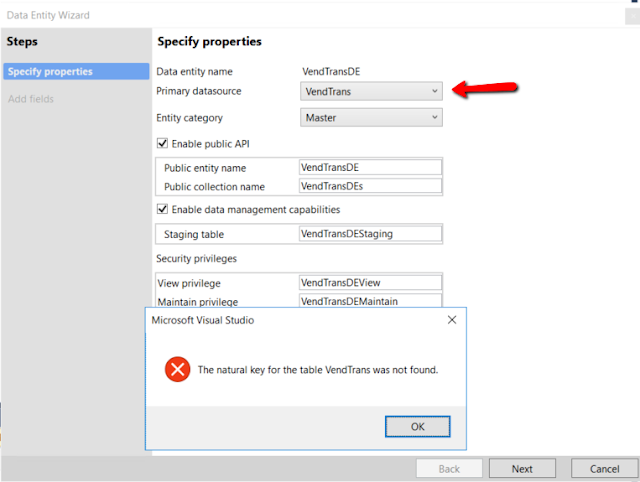


In order to overcome this limitation, we can simply feed the wizard with a copy of a query table with a natural key added. Lately we can just replace one field and its related relation and index in the data entity and staging table.

So, find VendTrans table and create a copy into your model. Delete all methods, add new String field f, make a new unique index based on this field and make this index primary and clustered. You do not need either build or synchronize your solution yet.


Now run the Wizard again with VendTransCopy as a source, and you will get all needed objects created.

Go to data entity view and change its query data source to VendTrans table.


Then rename field f to something meaningful as VendTrans_RecId and point it to VendTrans.RecId.


Add a new Int64 field with the same name in the related staging table


Then use it instead of field f in the index and relation.


You can delete field f as well as VendTransCopy table.

That is it! Now build and synchronize the solution. The new data entity is ready for use.


Saturday, December 9, 2017

EDT and tables wizard for AX 2012

AX 2012 Wizard allows to create new Extended data types and new tables with relations, delete actions, indexes and find methods, based on a simple Excel file. Two sample Excel files are included in the zip-package.

Just import two classes (ADO class is to support Excel import).

You can set up new types (if needed) and new tables with all bells and whistles, then run the Wizard and can go fishing until it does its job.

Happy fishing!


It creates:
first
- all new types based on basic types; (ignores if exists)
- all new labels for US-EN and FR-CA or finds existing one for US-EN;
second
- new tables;
- new fields;
- new field group with all new fields and the same label as for table;
- new index based on the first field and set is as cluster index;
- normal relation to the main table if given (one only);
- cascade delete action for all new relations from subordinated tables;
- method find based on the first field.


If it fails to open Excel file, check your currently installed Excel version and adapt the connection string.

