If you, like me, are still trying to understand how to use a TempDB table in a form and update it as many times as you need, or you are getting the error
"Cannot execute the required database operation.The method is only applicable to TempDB table variables that are not linked to existing physical table instance."
then you would better read the following short explanation.
Let's say your tempDB table is meant to be populated by request from a form on the server side.
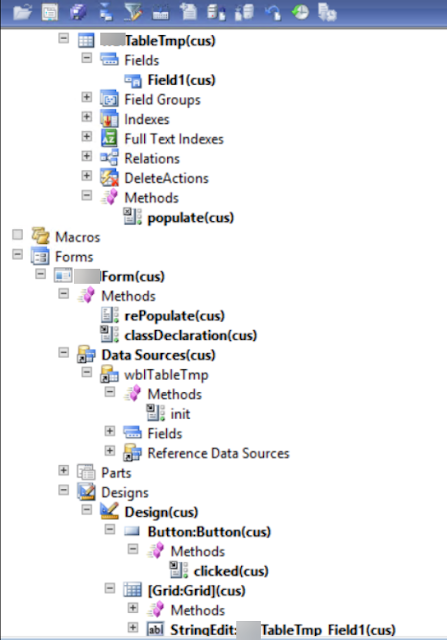
In the form data source Init() we just initialize another tempDB buffer of the same type and link its physical instance to the current data source buffer.
Any time you need to update its content, just re-populate it in a method by providing the linked temporary buffer from the form.
Populating method defined on the table, for example.
All credits for this trick are for Iulian Cordobin.
"Cannot execute the required database operation.The method is only applicable to TempDB table variables that are not linked to existing physical table instance."
then you would better read the following short explanation.
Let's say your tempDB table is meant to be populated by request from a form on the server side.
In the form data source Init() we just initialize another tempDB buffer of the same type and link its physical instance to the current data source buffer.
public void init()
{
    super();
    myTableTmpLocal.doInsert();
    delete_from myTableTmpLocal;
    //myTableTmp::populate(myTableTmpLocal); // <-- no need at this step!
    // if you need to populate it here by default, then comment the two previous lines
    myTableTmp.linkPhysicalTableInstance(myTableTmpLocal);
}
Any time you need to update its content, just re-populate it in a method by providing the linked temporary buffer from the form.
void clicked()
{
    super();
    element.rePopulate();
}
public void rePopulate()
{
    myTableTmp::populate(myTableTmpLocal);
    myTableTmp.linkPhysicalTableInstance(myTableTmpLocal);
    myTableTmp_DS.research();
}
Populating method defined on the table, for example.
static server void populate(myTableTmp _myTableTmp)
{
    int k;

    delete_from _myTableTmp; //<-- important to not have duplicates!

    for (k = 1; k<=4; k++)
    {
        _myTableTmp.Field1 = int2str(k);
        _myTableTmp.insert();
    }
}
All credits for this trick are for Iulian Cordobin.





 Posts

