We have multiple options to provide additional information to records in grids. Some of them, like display methods, are easy to implement. Some of them, like a temporary table, are not.
Let's consider a scenario when our lovely user wants to see reservation info directly in the transaction grid as filterable columns.

Evidently, we cannot use display methods because they cannot be filterable. Given the way this info calculated behind the curtain, there is no way to create a view to join InventTrans on InventTransItem form. So, the last feasible option is to create a temporary table and join it to the main form data source.
In order to populate this TempDB table (it is not enough to create an InMemory one) as much fast as possible, we have to run the logic in CIL.
The following shows how to work with such tables by passing their physical names.
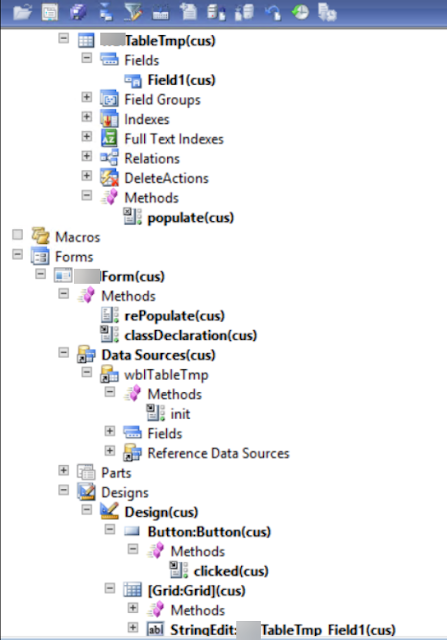
First, create a TempDB table.

Then add it to the form data source so that it would be outer joined to InventTrans table

and place its Init() method, which links the local buffer with a populated TempDB on the SQL server side.
We also need to init its populating engine and calculate its data at least once when the form opens and maybe later via Refresh button for all or one particular item.
Now let's take a look at the populating class. It has parameters for showing elapsed time and run for a particular item id only.
As you can see the tricky point is to provide tables physical names to CIL and back in calc() and calcIL() methods.
Now you get it.

Do not forget to build CIL and check it in your Development user options.
Let's consider a scenario when our lovely user wants to see reservation info directly in the transaction grid as filterable columns.
Evidently, we cannot use display methods because they cannot be filterable. Given the way this info calculated behind the curtain, there is no way to create a view to join InventTrans on InventTransItem form. So, the last feasible option is to create a temporary table and join it to the main form data source.
In order to populate this TempDB table (it is not enough to create an InMemory one) as much fast as possible, we have to run the logic in CIL.
The following shows how to work with such tables by passing their physical names.
First, create a TempDB table.
Then add it to the form data source so that it would be outer joined to InventTrans table
and place its Init() method, which links the local buffer with a populated TempDB on the SQL server side.
We also need to init its populating engine and calculate its data at least once when the form opens and maybe later via Refresh button for all or one particular item.
final class FormRun extends ObjectRun
{
    myInventSumFormEngine              myInventSumFormEngine;
}

void init()
{
    super();
    element.myInitParameters();
}

private void myInitParameters()
{
    myInventSumFormEngine               = new  myInventSumFormEngine(element);
}

//myTmpInventSum_DS.Init
public void init()
{
    myTmpInventSum                  myTmpInventSumLoc;
    myTmpInventSumLoc.doInsert();
    delete_from myTmpInventSumLoc;
    super();
    myTmpInventSum.linkPhysicalTableInstance(myTmpInventSumLoc);
}

public void run()
{
    super();
    element.myRecalcData();
}

public void myRecalcData(boolean _forCurrentItemOnly = false)
{
    myInvenTransByItemDimView  myInvenTransByItemDimView;

    if(_forCurrentItemOnly)
    {
        myInventSumFormEngine.parmItemIdCalcFor(InventTrans.ItemId);
        myInventSumFormEngine.run();
    }
    else
    {
        myInventSumFormEngine.parmItemIdCalcFor('');
        // todo: uncomment if needed to measure the execution time
        //myInventSumFormEngine.parmShowCalcInfo(true);
        startLengthyOperation();
        myInventSumFormEngine.run();
        endLengthyOperation();
    }
}
Now let's take a look at the populating class. It has parameters for showing elapsed time and run for a particular item id only.
/// <summary>
/// Populating TempDB tables in CIL
/// </summary>
/// <remarks>
/// Passing physical table names between CIL and form
/// </remarks>

public class myInventSumFormEngine
{
 // add more data sources to support multiple TempDB tables populating
 FormDataSource                      fdsTmpInventSum;
 myTmpInventSum                     myTmpInventSum;
 ItemId                              itemIdCalcFor;
 boolean                             showCalcInfo;
}

/// <summary>
/// Gets TempDB tables physical names
/// </summary>
/// <returns>
/// Container with names
/// </returns>
/// <remarks>
/// Creates buffers if not exist yet
/// </remarks>
private container getTempTablesNames()
{
 if(!myTmpInventSum.getPhysicalTableName())
 {
  select firstOnly myTmpInventSum;
 }
 return [myTmpInventSum.getPhysicalTableName()];
}

/// <summary>
/// Creates new populating engine for a given form
/// </summary>
/// <param name="_formRun">
/// Caller form
/// </param>
/// <remarks>
/// Looks for a particular data sources to link TempDB tables
/// </remarks>
public void new(FormRun _formRun = null)
{
 Object formObject = _formRun;

 if (_formRun)
 {
  fdsTmpInventSum      = _formRun.dataSource(tableId2Name(tableNum(myTmpInventSum)));
 }
}

/// <summary>
/// To calculate TempDB table for a particular item only
/// </summary>
/// <param name="_parm">
/// Item id to calculate data
/// </param>
/// <returns>
/// Item id
/// </returns>
/// <remarks>
/// If empty, then calculate for all items
/// </remarks>
public ItemId parmItemIdCalcFor(ItemId _parm = itemIdCalcFor)
{
 itemIdCalcFor = _parm;
 return itemIdCalcFor;
}

/// <summary>
/// Show consumed time to populate TempDB tables
/// </summary>
/// <param name="_parm">
/// Shows if True
/// </param>
public boolean parmShowCalcInfo(boolean _parm = showCalcInfo)
{
 showCalcInfo = _parm;
 return showCalcInfo;
}

public void run()
{
 str                     myTmpInventSumTempDBTableName;
 // add here more tempDB tables if needed
 [myTmpInventSumTempDBTableName] = this.getTempTablesNames();
 [myTmpInventSumTempDBTableName] = myInventSumFormEngine::calc([itemIdCalcFor, myTmpInventSumTempDBTableName, showCalcInfo]);
 // push calculated data back to the form data source
 if(fdsTmpInventSum)
 {
  // this assignment works only on the client tier outside of the populating method
  fdsTmpInventSum.cursor().linkPhysicalTableInstance(myTmpInventSum);
  fdsTmpInventSum.research();
 }
}

/// <summary>
/// Launcher for CIL
/// </summary>
/// <param name="_cont">
/// Container with parameters and all TempDB tables physical names to populate
/// </param>
/// <returns>
/// Container with all populated TempDB tables physical names
/// </returns>
private static server container calc(container _cont)
{
 container               cont;
 XppILExecutePermission  xppILExecutePermission;
 FromTime                startTime               = timeNow();
 ItemId                  itemIdCalcFor           = conPeek(_cont, 1);
 boolean                 showCalcInfo            = conPeek(_cont, 3);

 xppILExecutePermission = new XppILExecutePermission();
 xppILExecutePermission.assert();

 cont = runClassMethodIL(
         classStr(myInventSumFormEngine),
         staticMethodStr(myInventSumFormEngine, calcIL),
         _cont
        );
 CodeAccessPermission::revertAssert();

 if(showCalcInfo)
 {
  info(strFmt("Refreshed for %1 in %2",  itemIdCalcFor ? itemIdCalcFor : "all items", timeConsumed(startTime, timeNow())));
 }

 return cont;
}

/// <summary>
/// Implements the calculating logic and populating TempDB tables
/// </summary>
/// <param name="_con">
/// Container with parameters and all TempDB tables physical names to populate
/// </param>
/// <returns>
/// Container with all populated TempDB tables physical names
private static server container calcIL(container _con)
{
 WHSInventReserve                    whsInventReserve;
 myTmpInventSum                      myTmpInventSum;
 ItemId                              itemIdCalcFor                   = conPeek(_con, 1);
 str                                 myTmpInventSumTempDBTableName  = conPeek(_con, 2);
 myInvenTransByItemDimView           myInvenTransByItemDimView;
 // Link to an exiting table
 myTmpInventSum.useExistingTempDBTable(myTmpInventSumTempDBTableName);
 // empty existing data
 myInventSumFormEngine::cleanTmpInventSum(myTmpInventSum, itemIdCalcFor);
 /***** Implements the calculating logic here *****/
 while select whsInventReserve
  join RecId from myInvenTransByItemDimView
  where
   (!itemIdCalcFor || whsInventReserve.ItemId == itemIdCalcFor) &&
   myInvenTransByItemDimView.ItemId == whsInventReserve.ItemId &&
   myInvenTransByItemDimView.InventDimId == whsInventReserve.InventDimId
 {
  myTmpInventSum.clear();
  myTmpInventSum.Itemid                  = whsInventReserve.itemId;
  myTmpInventSum.InventDimId             = whsInventReserve.InventDimId;
  myTmpInventSum.AvailOrdered            = whsInventReserve.AvailOrdered;
  myTmpInventSum.AvailPhysical           = min(whsInventReserve.displayPhysAvailUpHierarchy(), whsInventReserve.AvailPhysical);
  // here you can add any other method calls to get more info about reservation
  myTmpInventSum.AvailReservDelta        = myTmpInventSum.AvailPhysical - myTmpInventSum.AvailOrdered;
  myTmpInventSum.insert();
 }
 // send tables physical names back to the form
 return [myTmpInventSum.getPhysicalTableName()];
}

/// <summary>
/// Empties the whole table or for given item id only
/// </summary>
/// <param name="_myTmpInventSum">
/// TempDB table buffer to empty
/// </param>
/// <param name="_itemIdCalcFor">
/// Item id
/// </param>
static private void cleanTmpInventSum(myTmpInventSum _myTmpInventSum, ItemId _itemIdCalcFor = '')
{
 delete_from _myTmpInventSum
 where
  (!_itemIdCalcFor || _myTmpInventSum.ItemId == _itemIdCalcFor);
}
As you can see the tricky point is to provide tables physical names to CIL and back in calc() and calcIL() methods.
Now you get it.
Do not forget to build CIL and check it in your Development user options.






 Posts

