Showing posts with label security. Show all posts

Friday, July 28, 2023

XDS in action: How to restraint access to data based on the current user employee

Extensible Data Security (XDS) policies allow restraint access to D365FO data in a very flexible way.

Business case: a user can see those purchase orders and their related confirmations only if he or she is Requester. The whole project can basically contain three objects: role, query, and policy.


After creating a specific security role, we need to create a query with HCMWorker table so that it is filtered for the current user.


All constrained tables should be added to the policy by referencing a particular relation (PurchTable, for example, has two relations with HCMWorker table; thus, we need to pick up the required one related to Requester field)


Note: we can create a join expression if a required relation does not exist for a given table.

Once the project built and synchronized, we can assign this new role along with some standard ones to a user. For example sake, I added Ada to my user.


Saturday, January 4, 2020

How a Dev can be provisioned as admin in D365

If you don't have Windows administrator privileges, you can nevertheless open visual studio and run a debugging session. So you can simply import your Windows user and assign admin role to it. 

Thursday, December 1, 2016

Access denied to method processReport in class whateverReportDP

If after all sorts of checking your security settings you still have the subject error, please just re-import the problematic SSRS report.

As explained by Nicolas GRANJON, under the hood, I quote, re-importing the report (re)generate data in the ModelSecurityPermission table of the model database, especially the permissions links between the report and the tables that it uses, and the data provider class.

Monday, October 17, 2016

Restrict access to group form control in the grid

Basically to restrict access to a field group it is enough just to set its NeededPermission property, say, to Manual and then you can provide your users with a special privilege on this form control.

However, when it comes to a grid, it is not enough: you also need to change the same property and needed permission on all included fields or, like in my scenario, display methods.


Some helpful articles

Security Permissions Properties for a Form

How to restrict access to a button


Wednesday, April 27, 2016

Update access to Financial dimensions on Project Wizard form

Thanks André I found very fast how to fix access issue to Financial dimensions on Project Wizard form. He explained how to solve a similar problem in this thread https://community.dynamics.com/ax/f/33/t/138100

All detail could be found in MSDN article https://msdn.microsoft.com/en-us/library/gg879980.aspx

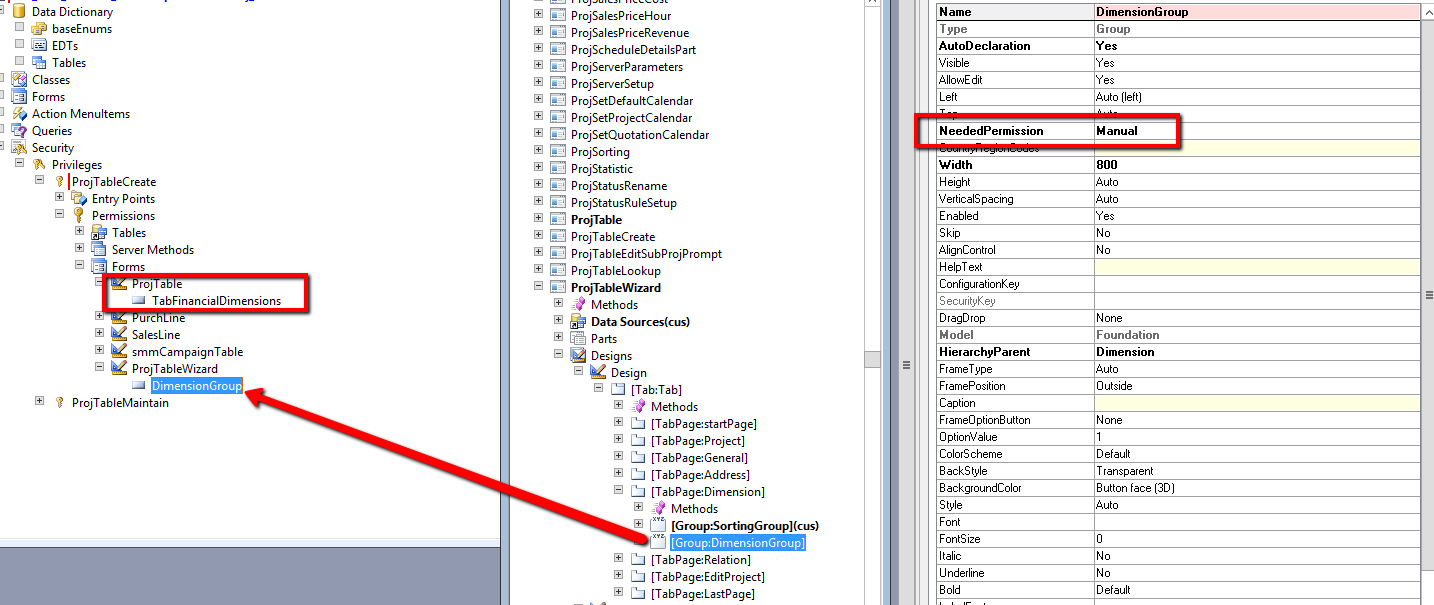
Briefly we need to add associated form and their form controls to appropriate security privileges or directly to roles.


As we can see DimensionGroup control requires manually set permission. so let's add it in the same way as it done for ProjTable form.


Now Project manager and other roles containing the same privileges will be able not only to view but also to update financial dimensions in the Project Wizard.
