Showing posts with label SSRS. Show all posts

Friday, August 4, 2023

How to get rid of a stuck report design in SSRS

It is difficult to say if your recent changes to an SSRS report design are really deployed. I suggest that any textbox be colored to visualize it (you can revert it in the end).

However, sometimes previous design is stuck on the server, and you still see no changes deployed, nevertheless, you already restarted Reporting services. Fortunately, there is a direct way to delete such a stubborn report from the server.

Open Report Server configuration manager as administrator and apply Portal URL setting if it is not done yet.


Then go for your report and delete it.

Next deployment should be OK.


Sunday, April 9, 2023

Two outer joined tables in a report without duplicates from both sides

 I cannot find a particular term for this type of join; so I called it 'hanging left outer join'.


Let's state the problem.


We have two tables:

- LedgerJournalTrans (trans) with a field mgcProjId, which is a reference to ProjTable.

- myDetails (details), which may have 0..N records for certain records from ProjTable.


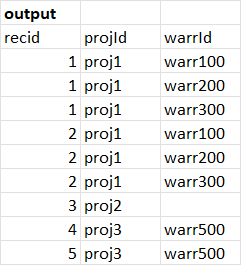
Examples of data in both may look like the following:


If we apply standard outer join, the output will be as follows


But we need to print all details records by 'hanging' them against the same projId, like this


So, no duplicates from both tables must be present in the merged table myDetailsTmp.


This is how you can achieve it. 

/// <summary>
    /// Process report data.
    /// </summary>
    public void processReport()
    {
        Query                   query;
        QueryRun                qr;
        myDetails               details;
        LedgerJournalTrans      trans;
        ProjId                  prevProjId;
        // merge trans and detail even if details are empty
        void insertWithTrans()
        {
            myDetailsTmp.clear();
myDetailsTmp.RefRecId = trans.RecId;
myDetailsTmp.JournalNum = trans.JournalNum;
myDetailsTmp.TransDate = trans.TransDate;
myDetailsTmp.Voucher = trans.Voucher;
myDetailsTmp.ProjId = trans.mgcProjId;
myDetailsTmp.DetailId = details.DetailId;
myDetailsTmp.WithPrice = details.WithPrice;
myDetailsTmp.insert();
} // merge empty trans and detail; it will be 'a hanging' detail void insertDetails() { myDetailsTmp.clear();
myDetailsTmp.ProjId = details.ProjId;
myDetailsTmp.DetailId = details.DetailId;
myDetailsTmp.WithPrice = details.WithPrice;
myDetailsTmp.insert();
} // process warrants for the previous projId // 'hanging' details on the right side of the report void processRestOfDetails() { // if there are still some warrants we found for the previous projId if (details) { // as we do not have enough rows from trans with the same previous projId, // let's add them with empty part from trans side next details; while(details) { insertWarrants(); next details; } } } // Get the query from the runtime using a dynamic query. query = this.parmQuery(); qr = new QueryRun(query); // we suppose that trans sorted by projId // each projId may have 0..N of warrants (details) while(qr.next()) { // get next transaction trans = qr.get(tablenum(LedgerJournalTrans)); // projId changes if(prevProjId != trans.mgcProjId) { // if there are still some warrants we found for the previous projId processRestOfDetails(); // get the first warrant for the new projId select details where details.ProjId == trans.mgcProjId; // keep the new as a previous for the next iteration prevProjId = trans.mgcProjId; } // if this is a trans with the same projId, then we can merge it with the next warrant else if (details) { next details; } // merge trans with warrants insertWithTrans(); } // if there are still some warrants we found for the previous projId processRestOfDetails(); }

Raw outer joined data


Ascending ProjId


Descending ProjId


Saturday, April 9, 2022

Multiple company selection in an SSRS report (LedgerLegalEntityLookup)

If you need to provide an SSRS report with a multiple company selection, you can opt for a cross-company query. In this case, such an option will be maintained by the system automatically. (You can try this [SrsReportQuery(queryStr(LogisticsEntityLocationUnion))])

But what if you need to do that without the former? In this case you'll need to use LedgerLegalEntityLookup class as follows. Say we deal with some mySalesBySegment report, which is meant to return some data for a given selection of legal entities.


I hid some not relevant code; so that you can get the gist.

Data contract mySalesBySegmentContract: we keep the user selection of companies as a string.

[DataContract]
[SysOperationContractProcessing(classstr(mySalesBySegmentUIBuilder), SysOperationDataContractProcessingMode::CreateUIBuilderForRootContractOnly)]

class mySalesBySegmentContract implements SysOperationValidatable
{
    ...
    str                                 legalEntityOptionsStr;
    ...
 
    [
        DataMember('legalEntityOptions')
        ,
        SysOperationGroupMember('Grouping'),
        SysOperationDisplayOrder('5')
    ]
    public str parmLegalEntityOptions(str _legalEntityOptions = legalEntityOptionsStr)
    {
        legalEntityOptionsStr = _legalEntityOptions;

        return legalEntityOptionsStr;
    }

}

Report controller mySalesBySegmentController: if no companies selected, let's set it to the user's context.

public class mySalesBySegmentController extends SrsReportRunController
{
 
    protected void prePromptModifyContract()
    {
        mySalesBySegmentContract   dc = this.parmReportContract().parmRdpContract() as mySalesBySegmentContract;

       ...
        if (!dc.parmLegalEntityOptions())
        {
            // Set the default value for the legal entity selection
            dc.parmLegalEntityOptions(con2str([curExt()]));
        }
    }

   
    protected void preRunModifyContract()
    {
        mySalesBySegmentContract   dc;
        container                   legalEntityOptions;

        dc                  = this.parmReportContract().parmRdpContract() as mySalesBySegmentContract;
        legalEntityOptions  = str2con(dc.parmLegalEntityOptions());

        // Default current company if there were no company specifications provided to the API.
        if (legalEntityOptions == conNull())
        {
            legalEntityOptions = [curExt()];
            dc.parmLegalEntityOptions(con2str(legalEntityOptions));
        }
  
    }

    public static void main(Args _args)
    {
        mySalesBySegmentController controller = new mySalesBySegmentController();

        controller.parmReportName(ssrsReportStr(mySalesBySegment, Report));
        controller.parmArgs(_args);
         controller.startOperation();
    }

}

User interface builder mySalesBySegmentUIBuilder: when an SSRS report runs, it shows its dialog twice: the second time in the report viewer, when the report is rendered. Thus we have to override dialog methods in the UIBuilder class to avoid the lovely 'Object reference not set to an instance of an object' error.

public class mySalesBySegmentUIBuilder extends SrsReportDataContractUIBuilder
{
    mySalesBySegmentContract   dc;
    // Legal entity lookup controls
    FormStringControl           dialogLegalEntitySelection;
    LedgerLegalEntityLookup     legalEntityLookup;
    int                         dialogLegalEntityLookupId;
    str                         userLegalEntityRange;
    container                   legalEntityOptions;

    /// <summary>
    /// Override this method in order to initialize the dialog fields after the fields are built.
    /// </summary>
    public void postBuild()
    {
        DialogField dialogField;

        super();
        // parmCompanySelection
        dialogField = this.bindInfo().getDialogField(this.dataContractObject(), methodStr(mySalesBySegmentContract, parmLegalEntityOptions));
        this.setInVisible(dialogField);

        this.constructLegalEntityControl(dialog);
        
    }

    /// <summary>
    /// post runs
    /// </summary>
    public void postRun()
    {
        super();
        
        this.constructLegalEntityLookup(dialog);
        Set userLegalEntitySet = LedgerSecurityHelper::ledgersWithMinimumSecurityAccess(menuItemActionStr(LedgerExchAdj), AccessRight::Edit, MenuItemType::Action);
        userLegalEntityRange = LedgerLegalEntityLookup::getLegalEntityRangeFromLegalEntitySet(userLegalEntitySet);
    }

    /// <summary>
    /// Contstruct
    /// </summary>
    /// <param name = "_dialog">Dialog</param>
    private void constructLegalEntityControl(Dialog _dialog)
    {
        FormBuildGroupControl currentGroup = _dialog.form().design().control(_dialog.curFormGroup().name());
        FormBuildStringControl dialogLegalEntityLookup = currentGroup.addControl(FormControlType::String, 'LegalEntityLookup');
        dialogLegalEntityLookup.extendedDataType(extendedTypeNum(LedgerLegalEntitySelection));
        dialogLegalEntityLookup.lookupOnly(true);
        dialogLegalEntityLookupId = dialogLegalEntityLookup.id();
    }

    /// <summary>
    /// Constructs the lookup for the legal entity selection.
    /// </summary>
    /// <param name = "_control">The <c>FormStringControl</c> object.</param>
    private void legalEntityLookup(FormStringControl _control)
    {
        legalEntityLookup.lookup(_control.text(), userLegalEntityRange);
    }

    /// <summary>
    /// Lookup override
    /// </summary>
    /// <param name = "_dialog">dialog</param>
    private void constructLegalEntityLookup(Dialog _dialog)
    {
        dialoglegalEntitySelection = _dialog.formRun().design().control(dialogLegalEntityLookupId);
        legalEntityLookup = LedgerLegalEntityLookup::construct(_dialog.formRun(), dialoglegalEntitySelection);
        // populates it from the packed paramater
        legalEntityLookup.setSelection(str2con(dc.parmLegalEntityOptions()));
        // let's have our own lookup
        dialoglegalEntitySelection.registerOverrideMethod(methodstr(FormStringControl, lookup), methodstr(mySalesBySegmentUIBuilder, legalEntityLookup), this);
    }

    /// <summary>
    /// prebuilds
    /// </summary>
    public void preBuild()
    {
        dc = this.dataContractObject() as mySalesBySegmentContract;
        super();
    }

    /// <summary>
    /// Gets it back from the dialog
    /// </summary>
    public void getFromDialog()
    {
        super();
        dc.parmLegalEntityOptions(con2Str(legalEntityLookup.getLegalEntitySelection()));
    }

}

Report data provider mySalesBySegmentDP: we need just to convert the saved string back to a container, then we can loop through it as required by the report logic.

[SRSReportParameterAttribute(classStr(mySalesBySegmentContract))] 
public class mySalesBySegmentDP extends SRSReportDataProviderPreProcessTempDB
{
    container                       legalEntityOptions;
    
    public void processReport()
    {
        mySalesBySegmentContract        dc;
        List                            legalEntityList;
        ListEnumerator                  legalEntityListEnumerator;
        SelectableDataArea              companyId;
        str                             companyName;

        dc                          = this.parmDataContract() as mySalesBySegmentContract;
     
        this.setUserConnection(tmp);
        
        // getting all selected companies from the report query
        legalEntityList             = con2List(str2con(dc.parmLegalEntityOptions()));
        legalEntityListEnumerator   = legalEntityList.getEnumerator();

        while (legalEntityListEnumerator.moveNext())
        {
            companyId   = legalEntityListEnumerator.current();
            companyName = CompanyInfo::findDataArea(companyId).name();
            changecompany(companyId)
            {
                // Populate the base processing table with data from the appropriate source table
                ...
            }
        }
    }
}

Sunday, April 3, 2022

How to change currency symbol in a given number format

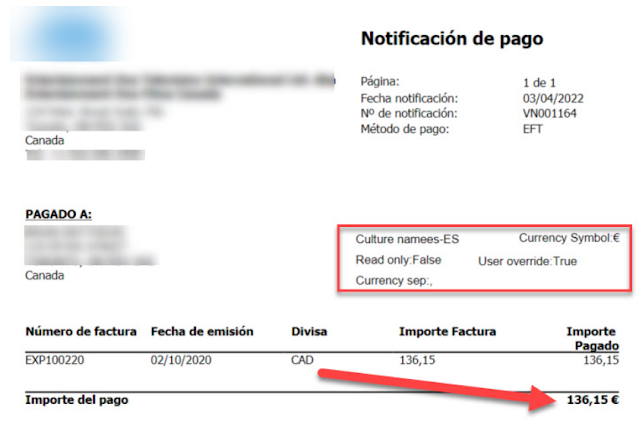
Say, we need to print a Vendor payment advice in the vendor's language, whic is es (Spanish) in the example below. Once the report parameter AX_RenderingCulture is set to 'es', all related number formatting will be applied to amounts cells. 

However, the payment may be made in different currencies; thus its currency symbol $ must be used instead of Euro.


Basically, such parameters, like currency symbol etc, can be changed through System.Globalization.CultureInfo class created for the rendering culture. I did not find a way how to achieve it for a particular textbox in SSRS design. So, I formatted the amount directly in X++.


I used Global::strFmtByLanguage method as a basis for my method to replace the culture number format currency symbol to a given one. There are a few other interesting methods you can check to see how to deal with formatting dates and numbers.

    public str myChangeCurSymbolForAmountStr(LanguageId _languageId, System.Double _amountCur, CurrencySymbol _currencySymbol)
    {
        System.Globalization.CultureInfo    culture;
        str                                 res;
        System.Exception                    e;
        str                                 curSymbol;

        culture = new System.Globalization.CultureInfo(_languageId);

        try
        {
            res         = _amountCur.ToString("C", culture);
            curSymbol   = culture.NumberFormat.CurrencySymbol;
            res         = strReplace(res, curSymbol, _currencySymbol);
        }
        catch(Exception::CLRError)
        {
            e = CLRInterop::getLastException();
            while( e )
            {
                error( e.get_Message() );
                e = e.get_InnerException();
            }
            throw Exception::Error;
        }
        return res;
    }

    public myAmountStringWithCurrencySymbol myAmountStringWithCurrencySymbol(AmountCur _amountCur, CurrencyCode _currency, LanguageId _languageId)
    {
        Currency                            currency = Currency::find(_currency);
        
        return this.myChangeCurSymbolForAmountStr(_languageId, _amountCur, currency.Symbol);;
    }

    protected void insertBankPaymAdviceTmp()
    {
        BankPaymAdviceVendTmp bankPaymAdviceVendTmp;
        str                   email;

        next insertBankPaymAdviceTmp();

        bankPaymAdviceVendTmp = this.bankPaymAdviceTmp as BankPaymAdviceVendTmp;
                
        if (bankPaymAdviceVendTmp.RecId)
        {          
            ttsbegin;
            bankPaymAdviceVendTmp.selectForUpdate(true);
            bankPaymAdviceVendTmp.myBalance01Total+=bankPaymAdviceVendTmp.Balance01;
            bankPaymAdviceVendTmp.myAmountStringWithCurrencySymbol  = this.myAmountStringWithCurrencySymbol(bankPaymAdviceVendTmp.EOGBalance01Total, bankPaymAdviceVendTmp.CurrencyCode, VendTable::find(bankPaymAdviceVendTmp.AccountNum).languageId());          
            bankPaymAdviceVendTmp.update();
            ttscommit;
        }
    }

The final string can be referenced in Total textbox as Last(bankPaymAdviceVendTmp.myAmountStringWithCurrencySymbol) and with default format.


Wednesday, March 31, 2021

Corrupted copy of SSRS report

Sometimes after copying an existing SSRS report or even just a part of its design, parser starts encountering strange errors. For example:

Unidentifiable substring 'Value' in expression. the parser reported error message

There must be something wrong in the mechanism responsible for copying text boxes. In most case, it replaces simple function names with predicates like Microsoft.Value etc. In my case it turned out to be even worse: some bug in strings concatenation; no matter what.

The problem here is that you have no hint about the object name, where such a non-conform string was added. You can try your textboxes one by one by checking all their properties with functions inside: visibility, font, border etc, even labels for its placeholder! And it can become a nightmare when your report contains dozens of them.

Fortunately there is a some workaround. You can open XML files for both of the original report and your copy of it in Notepad++ and run Compare over them (Install this Compare plugin).

Then scroll down to the first bad guy: a couple of strings above you will see its name.

Go back to the editor, find this textbox.

Now check its corrupted property function expressions and fix it.


Wednesday, June 6, 2018

How to add a new report for a business document in D365

My colleague Rod showed it to me when I needed to add a new report to Project Invoice Proposal with billing rules to be present in Print management settings.


    /// <summary>
    /// Subscribes to print mgmt report format publisher to populate custom reports
    /// </summary>
    [SubscribesTo(classstr(PrintMgmtReportFormatPublisher), delegatestr(PrintMgmtReportFormatPublisher, notifyPopulate))]
    public static void notifyPopulate()
    {
        #PrintMgmtSetup

        void addFormat(PrintMgmtDocumentType _type, PrintMgmtReportFormatName _name, PrintMgmtReportFormatCountryRegionId _countryRegionId = #NoCountryRegionId)
        {
            myPrintMgtDocType_ProjInvReport_Handler::addPrintMgmtReportFormat(_type, _name, _name, _countryRegionId);
        }

        addFormat(PrintMgmtDocumentType::myProjInvoiceWithBR, ssrsReportStr(myPSAContractLineInvoice, Report));
    }

    /// <summary>
    /// Adds a report format to the printMgtReportFormat table
    /// </summary>
    /// <param name = "_type">PrintMgmtDocumentType value</param>
    /// <param name = "_name">Name of the report (ie. reportname.Report)</param>
    /// <param name = "_description">Description of the report (ie. reportname.Report)</param>
    /// <param name = "_countryRegionId">Country or default (#NoCountryRegionId)</param>
    /// <param name = "_system">True if this is a system report</param>
    /// <param name = "_ssrs">SSRS report or another type</param>
    private static void addPrintMgmtReportFormat(
        PrintMgmtDocumentType _type,
        PrintMgmtReportFormatName _name,
        PrintMgmtReportFormatDescription _description,
        PrintMgmtReportFormatCountryRegionId _countryRegionId,
        PrintMgmtReportFormatSystem _system = false,
        PrintMgmtSSRS _ssrs = PrintMgmtSSRS::SSRS)
    {
        PrintMgmtReportFormat printMgmtReportFormat;

        select firstonly printMgmtReportFormat
            where printMgmtReportFormat.DocumentType == _type
                && printMgmtReportFormat.Description == _description
                && printMgmtReportFormat.CountryRegionId == _countryRegionId;

        if (!printMgmtReportFormat)
        {
            // Add the new format
            printMgmtReportFormat.clear();
            printMgmtReportFormat.DocumentType = _type;
            printMgmtReportFormat.Name = _name;
            printMgmtReportFormat.Description = _description;
            printMgmtReportFormat.CountryRegionId = _countryRegionId;
            printMgmtReportFormat.System = _system;
            printMgmtReportFormat.ssrs = _ssrs;
            printMgmtReportFormat.insert();
        }
    }

Then I can pick it up in Print management settings in Project module.


It may be a good idea to delete records from PrintMgmtReportFormat table; all its records will be recreated the next time you open Print management form.


Thursday, December 1, 2016

Access denied to method processReport in class whateverReportDP

If after all sorts of checking your security settings you still have the subject error, please just re-import the problematic SSRS report.

As explained by Nicolas GRANJON, under the hood, I quote, re-importing the report (re)generate data in the ModelSecurityPermission table of the model database, especially the permissions links between the report and the tables that it uses, and the data provider class.

Saturday, October 3, 2015

How to create SSRS report with multiple independent groupings

Let's say we need to print for selected sales orders all their items with sales prices and barcodes. It means our report must look like this.


One page by SalesId, some kind of a card with all items presented in the related SalesLine table. Then for each ItemId we group all its sales prices, first, and all its barcodes, second.

As suggested by Best Practice, we can create one flat temporary table (regular in my case just to ease debugging) to merge all data into one data source for our report.


Additional GroupType field is populated with different values for each table: SalesLine, Barcode, or SalesLine (could be done as enum). They will be used in report design for filtering tablix elements.

As to design we would need the main TablixSalesId with grouping by SalesId and breaking page for each instance.


Then nested TablixItemId grouped by ItemId.


Now we need to add two new ones - TablixBarcode and TablixSalesPrice without any additional grouping but with filters as follows.


This approach with adding "artificial" field to a flat table let to distinguish data and easily group and filter them.


Feel free to download the full project here.

This is the code of two principal methods of  Report data provider class.

Tuesday, April 29, 2014

How to get rid of hyper links in SSRS report

As we remember AX 2012 allows us to jump directly to the details based on EDT or table relations. Sometimes this weight a report that supposed to be saved in Excel, for example.

It is easy to suppress hyper links in Visual Studio by changing field property in design.


Happy DAXing!