Monday, April 12, 2021

Switch in View Computed column

 If you need to compare multiple fields in your view while populating a computed column, take into consideration that the standard implementation of method SysComputedColumn::switch uses a map enumerator. 

public static client server str switch(str _controlExpression, Map _comparisonExpressionMap, str _defaultExpression)
    {
        MapEnumerator  mapEnumerator;
        str caseExpression = '';

        caseExpression ='CASE ' + _controlExpression;
        mapEnumerator = _comparisonExpressionMap.getEnumerator();
        while (mapEnumerator.moveNext())
        {
            caseExpression += ' WHEN ' + mapEnumerator.currentKey() + ' THEN ' + mapEnumerator.currentValue();
        }
        caseExpression += ' ELSE ' + _defaultExpression;
        caseExpression += ' END';

        return caseExpression;
    }

It means that your given order will be replaced in final SQL clause by alphabetical one of your keys.

CASE  
	WHEN (T4.PROJID1) != ('') THEN T4.PROJNAME1 
	WHEN (T4.PROJID2) != ('') THEN T4.PROJNAME2 
	WHEN (T4.PROJID3) != ('') THEN T4.PROJNAME3 
	ELSE T4.PROJNAME END

For example, we want to populate field mgcProjInvoiceGLTransView.ParentProjectName for a given project id up to three level up in the project hierarchy. Let's assume that they are prepopulated in mgcProjInvoiceOnAccView view: projId1 is the parent of projId, projId2 is the parent of projId1, and so on.

Once we reference this computed column to the following method, we will get a new order in CASE construction on the SQL side.

 private static str projNameParent()
    {
        str         ret;
        SysComputedColumnBase::switch cannot keep a given order while using Map enumerator; so we put the SQL string as a string constant
        tableName   viewName                    = identifierStr(mgcProjInvoiceGLTransView);
        tableName   tableName                   = identifierStr(mgcProjInvoiceOnAccView);
        str         compareValue                = '';


        Map         comparisonExpressionMap     = SysComputedColumn::comparisionExpressionMap();
        str         fieldNameProjName3          = SysComputedColumn::returnField(viewName, tableName, fieldStr(mgcProjInvoiceOnAccView, ProjName3));
        str         fieldNameProjName2          = SysComputedColumn::returnField(viewName, tableName, fieldStr(mgcProjInvoiceOnAccView, ProjName2));
        str         fieldNameProjName1          = SysComputedColumn::returnField(viewName, tableName, fieldStr(mgcProjInvoiceOnAccView, ProjName1));
        str         fieldNameProjName           = SysComputedColumn::returnField(viewName, tableName, fieldStr(mgcProjInvoiceOnAccView, ProjName));

        comparisonExpressionMap.insert(
        SysComputedColumn::notEqualExpression(
            SysComputedColumn::comparisonField(viewName, tableName, fieldStr(mgcProjInvoiceOnAccView, ProjId3)),
            SysComputedColumn::comparisonLiteral(compareValue)),
        fieldNameProjName3);

        comparisonExpressionMap.insert(
        SysComputedColumn::notEqualExpression(
            SysComputedColumn::comparisonField(viewName, tableName, fieldStr(mgcProjInvoiceOnAccView, ProjId2)),
            SysComputedColumn::comparisonLiteral(compareValue)),
        fieldNameProjName2);

        comparisonExpressionMap.insert(
        SysComputedColumn::notEqualExpression(
            SysComputedColumn::comparisonField(viewName, tableName, fieldStr(mgcProjInvoiceOnAccView, ProjId1)),
            SysComputedColumn::comparisonLiteral(compareValue)),
        fieldNameProjName1);

        ret       = SysComputedColumn::switch(
                                                '',
                                                comparisonExpressionMap,
                                                fieldNameProjName);
        return ret;
    }

Of course, it always returns  the name of the parent on the first level, even though it had its own parent, which is incorrect result. 

Therefore, the easiest way is to replace the aforementioned construction with a simple string.

 private static str projNameParent()
    {
        str         ret;
        ret = "CASE WHEN (T4.PROJID3) != ('') THEN T4.PROJNAME3 WHEN (T4.PROJID2) != ('') THEN T4.PROJNAME2 WHEN (T4.PROJID1) != ('') THEN T4.PROJNAME1 ELSE T4.PROJNAME END";
        return ret;
    }

Wednesday, March 31, 2021

Corrupted copy of SSRS report

Sometimes after copying an existing SSRS report or even just a part of its design, parser starts encountering strange errors. For example:

Unidentifiable substring 'Value' in expression. the parser reported error message

There must be something wrong in the mechanism responsible for copying text boxes. In most case, it replaces simple function names with predicates like Microsoft.Value etc. In my case it turned out to be even worse: some bug in strings concatenation; no matter what.

The problem here is that you have no hint about the object name, where such a non-conform string was added. You can try your textboxes one by one by checking all their properties with functions inside: visibility, font, border etc, even labels for its placeholder! And it can become a nightmare when your report contains dozens of them.

Fortunately there is a some workaround. You can open XML files for both of the original report and your copy of it in Notepad++ and run Compare over them (Install this Compare plugin).

Then scroll down to the first bad guy: a couple of strings above you will see its name.

Go back to the editor, find this textbox.

Now check its corrupted property function expressions and fix it.


Friday, January 22, 2021

D365FO data entities with financial dimension requires special field names

 While creating data entities using financial dimensions, do not forget that those are backed in background by special classes via SysDataEntityPersister class


Those latter help resolving selected values (similar to what we see in segmented entry in forms). 


Each class is meant to serve a particular EDT, for example


/// <summary>
/// The <c>LedgerAccountDimensionDataEntityResolver</c> class resolves data entity ledger account values.
/// </summary>
[
System.ComponentModel.Composition.ExportMetadataAttribute("DimensionSFKType", identifierstr(LedgerDimensionAccount)),
System.ComponentModel.Composition.ExportAttribute("Microsoft.Dynamics.AX.DimensionDataEntitySFKFieldResolver")
]
public class LedgerAccountDimensionDataEntityResolver extends DimensionDataEntitySFKFieldResolver
{
    Name accountStructure;
...


In order to let it work correctly, some fields in your data entity must have particular names.


public class DimensionDataEntityConstants
{
    public static const str HasDimensionDataSourcesCustomPropertyName = '__HasDimensionDataSources__';
    public static const str ProviderCacheName = 'DimensionDataEntitySFKProviderCacheName';
    public static const str AccountStructureSuffix = 'AccountStructure';
    public static const str DisplayValueSuffix = 'DisplayValue';
    public static const str DisplayValueTypeName = 'DimensionDisplayValue';
}


Friday, January 15, 2021

How to delete obsolete values in ENUMVALUETABLE table X++

Following up this old issue with extensions to enums, I propose to run this class, if you cannot delete added values (grr* in my case) directly in SQL Studio. I am not sure if it is going to work in PROD. Please use it at your own risk.


class ENUMVALUETABLEDelete
{
   
    public static void main(Args _args)
    {
        if(!Box::confirm("Would you like to delete all grr* values of SysPolicyRuleTypeEnum type in ENUMVALUETABLE? (If not, just print them"))
        {
            ENUMVALUETABLEDelete::printRecords();
            return;
        }
        ENUMVALUETABLEDelete::deleteRecords();
        info("all related records have been deleted. Synchonize DB now!");
    }

    private static void deleteRecords()
    {
        Connection                      conn;
        SqlStatementExecutePermission   permission;

        str sqlSelect = 
@"SELECT
t.RECID
 from ENUMVALUETABLE as t
 join ENUMIDTABLE
 on enumid = id
 and ENUMIDTABLE.NAME = 'SysPolicyRuleTypeEnum'
 and t.NAME like 'grr%'";
        str sqlDelete = strFmt("%1 (%2)", "DELETE FROM ENUMVALUETABLE WHERE RECID IN ", sqlSelect);

        permission  = new SqlStatementExecutePermission(sqlDelete);
        conn        = new Connection();
        permission.assert();
        //conn.transactionScopeBegin();
        Statement statement = conn.createStatement();
        
        int result  = statement.executeUpdate(sqlDelete);
        str errText = statement.getLastErrorText();
        if(errText)
        {
            Info(errText);
        }

        // the permissions needs to be reverted back to original condition.
        CodeAccessPermission::revertAssert();
    }

    private static void printRecords()
    {
        Connection                      conn;
        SqlStatementExecutePermission   permission;

        str sqlSelect =
@"SELECT
t.RECID,
t.ENUMID,
t.ENUMVALUE,
t.NAME
 from ENUMVALUETABLE as t
 join ENUMIDTABLE
 on enumid = id
 and ENUMIDTABLE.NAME = 'SysPolicyRuleTypeEnum'
 and t.NAME like 'grr%'";

        permission  = new SqlStatementExecutePermission(sqlSelect);
        conn        = new Connection();
        permission.assert();

        Statement statement = conn.createStatement();
        
        ResultSet results = statement.executeQuery(sqlSelect);
        str errText = statement.getLastErrorText();
        if(errText)
        {
            Info(errText);
        }

        int enumId;
        str name;
        int i = 1;
        while (results.next())
        {
            enumId  = results.getInt(3);
            name    = results.getString(4);
            Info(strFmt("Found %1) %2 : %3", i, enumId, name));
            i++;
        }
        // the permissions needs to be reverted back to original condition.
        CodeAccessPermission::revertAssert();
    }

}

Do not forget to build your models and full DB sync after!

Wednesday, September 2, 2020

GUID based Data contract fields are not available for SysOperationAutomaticUIBuilder

In order to play with Data Contract fields before or after running dialog in terms of SysOperation framework, we have to implement a SysOperationAutomaticUIBuilder based class.

And it works well, until you try to get access to GUID based fields via BindInfo() method: they are not allowed to be there!

Therefore, we get an exception in this case, alas.


Wednesday, July 29, 2020

How to get a list of the Tables maintained by Change Tracking in SQL

Thanks to Brent Ozar and Dave Phillips who showed us how to get a list of the Tables maintained by Change Tracking directly in MS SQL Server Management Studio. It works for both AX2012 and D365 versions.


SET TRANSACTION ISOLATION LEVEL READ UNCOMMITTED;
GO
SELECT
   sct1.name AS CT_schema,
   sot1.name AS CT_table,
   ps1.row_count AS CT_rows,
   ps1.reserved_page_count*8./1024. AS CT_reserved_MB,
   sct2.name AS tracked_schema,
   sot2.name AS tracked_name,
   ps2.row_count AS tracked_rows,
   ps2.reserved_page_count*8./1024. AS tracked_base_table_MB,
   change_tracking_min_valid_version(sot2.object_id) AS min_valid_version
FROM sys.internal_tables it
JOIN sys.objects sot1 ON it.object_id=sot1.object_id
JOIN sys.schemas AS sct1 ON sot1.schema_id=sct1.schema_id
JOIN sys.dm_db_partition_stats ps1 ON it.object_id = ps1. object_id AND ps1.index_id in (0,1)
LEFT JOIN sys.objects sot2 ON it.parent_object_id=sot2.object_id
LEFT JOIN sys.schemas AS sct2 ON sot2.schema_id=sct2.schema_id
LEFT JOIN sys.dm_db_partition_stats ps2 ON sot2.object_id = ps2. object_id AND ps2.index_id in (0,1)
WHERE it.internal_type IN (209, 210)
order by tracked_name
;

GO


Thursday, July 9, 2020

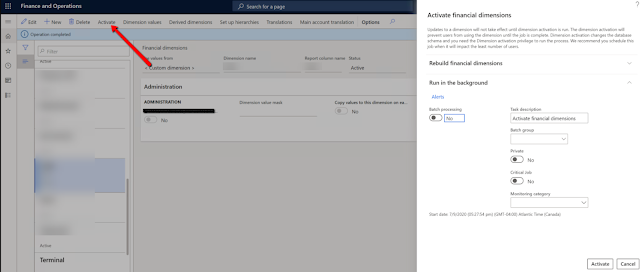
How to activate a financial dimension

First, run the following script over your DB via SQL Management Studio.


update SQLSYSTEMVARIABLES SET VALUE = 1 where PARM = 'CONFIGURATIONMODE'

select value from SQLSYSTEMVARIABLES  where PARM = 'CONFIGURATIONMODE'


Then restart IIS from inside of Visual Studio.


Activate your financial dimension.


Now, run the same script but by setting the variable to zero, and restart IIS again.


update SQLSYSTEMVARIABLES SET VALUE = 0 where PARM = 'CONFIGURATIONMODE'

select value from SQLSYSTEMVARIABLES  where PARM = 'CONFIGURATIONMODE'