Showing posts with label computed column. Show all posts

Monday, April 12, 2021

Switch in View Computed column

 If you need to compare multiple fields in your view while populating a computed column, take into consideration that the standard implementation of method SysComputedColumn::switch uses a map enumerator. 

public static client server str switch(str _controlExpression, Map _comparisonExpressionMap, str _defaultExpression)
    {
        MapEnumerator  mapEnumerator;
        str caseExpression = '';

        caseExpression ='CASE ' + _controlExpression;
        mapEnumerator = _comparisonExpressionMap.getEnumerator();
        while (mapEnumerator.moveNext())
        {
            caseExpression += ' WHEN ' + mapEnumerator.currentKey() + ' THEN ' + mapEnumerator.currentValue();
        }
        caseExpression += ' ELSE ' + _defaultExpression;
        caseExpression += ' END';

        return caseExpression;
    }

It means that your given order will be replaced in final SQL clause by alphabetical one of your keys.

CASE  
	WHEN (T4.PROJID1) != ('') THEN T4.PROJNAME1 
	WHEN (T4.PROJID2) != ('') THEN T4.PROJNAME2 
	WHEN (T4.PROJID3) != ('') THEN T4.PROJNAME3 
	ELSE T4.PROJNAME END

For example, we want to populate field mgcProjInvoiceGLTransView.ParentProjectName for a given project id up to three level up in the project hierarchy. Let's assume that they are prepopulated in mgcProjInvoiceOnAccView view: projId1 is the parent of projId, projId2 is the parent of projId1, and so on.

Once we reference this computed column to the following method, we will get a new order in CASE construction on the SQL side.

 private static str projNameParent()
    {
        str         ret;
        SysComputedColumnBase::switch cannot keep a given order while using Map enumerator; so we put the SQL string as a string constant
        tableName   viewName                    = identifierStr(mgcProjInvoiceGLTransView);
        tableName   tableName                   = identifierStr(mgcProjInvoiceOnAccView);
        str         compareValue                = '';


        Map         comparisonExpressionMap     = SysComputedColumn::comparisionExpressionMap();
        str         fieldNameProjName3          = SysComputedColumn::returnField(viewName, tableName, fieldStr(mgcProjInvoiceOnAccView, ProjName3));
        str         fieldNameProjName2          = SysComputedColumn::returnField(viewName, tableName, fieldStr(mgcProjInvoiceOnAccView, ProjName2));
        str         fieldNameProjName1          = SysComputedColumn::returnField(viewName, tableName, fieldStr(mgcProjInvoiceOnAccView, ProjName1));
        str         fieldNameProjName           = SysComputedColumn::returnField(viewName, tableName, fieldStr(mgcProjInvoiceOnAccView, ProjName));

        comparisonExpressionMap.insert(
        SysComputedColumn::notEqualExpression(
            SysComputedColumn::comparisonField(viewName, tableName, fieldStr(mgcProjInvoiceOnAccView, ProjId3)),
            SysComputedColumn::comparisonLiteral(compareValue)),
        fieldNameProjName3);

        comparisonExpressionMap.insert(
        SysComputedColumn::notEqualExpression(
            SysComputedColumn::comparisonField(viewName, tableName, fieldStr(mgcProjInvoiceOnAccView, ProjId2)),
            SysComputedColumn::comparisonLiteral(compareValue)),
        fieldNameProjName2);

        comparisonExpressionMap.insert(
        SysComputedColumn::notEqualExpression(
            SysComputedColumn::comparisonField(viewName, tableName, fieldStr(mgcProjInvoiceOnAccView, ProjId1)),
            SysComputedColumn::comparisonLiteral(compareValue)),
        fieldNameProjName1);

        ret       = SysComputedColumn::switch(
                                                '',
                                                comparisonExpressionMap,
                                                fieldNameProjName);
        return ret;
    }

Of course, it always returns  the name of the parent on the first level, even though it had its own parent, which is incorrect result. 

Therefore, the easiest way is to replace the aforementioned construction with a simple string.

 private static str projNameParent()
    {
        str         ret;
        ret = "CASE WHEN (T4.PROJID3) != ('') THEN T4.PROJNAME3 WHEN (T4.PROJID2) != ('') THEN T4.PROJNAME2 WHEN (T4.PROJID1) != ('') THEN T4.PROJNAME1 ELSE T4.PROJNAME END";
        return ret;
    }

Monday, August 19, 2019

How to concatenate financial dimension values in a View for a given hierarchy

Following my previous posting How to filter existing transactions based on a financial dimension value set ,
I would like to show how we can construct a view with all financial dimension values for a given hierarchy, including placeholders for those values are absent.

In the aforementioned example, it was CDPDimensionAttributeValuesUnionConcatView view as depicted.


Instead of a series of dependant views, we can create one view as follows (CDPDimAttrSelectedView is just a set of selected attributes; explained in the previous link)


The key point is a computed column method, which creates a final string in the same sequence of attributes as selected in the hierarchy.


private static server str finDimValues()   // X++
    {
        return @"STUFF((SELECT '-' +
                        ISNULL(
                            STUFF((SELECT '-' + t3.DisplayValue
                                    from DimensionAttributeValueSetItemView as t3
                                    JOIN DimensionHierarchyLevel as t17
                                    on t17.DIMENSIONATTRIBUTE = t3.DIMENSIONATTRIBUTE
                                    join myFinDimAttrForAggr t25
                                        on
                                            t17.DIMENSIONHIERARCHY = t25.DIMENSIONHIERARCHY
                                    where
                                    t1.DimensionAttributeValueSet = t3.DimensionAttributeValueSet
                                    and t7.DIMENSIONATTRIBUTE = t3.DIMENSIONATTRIBUTE
                                    order by t17.LEVEL_
                                    FOR XML path('')
                                   ), 1, 1, '')
                            , 'N/A')
     
                    FROM DIMENSIONATTRIBUTE t6
                        JOIN DimensionHierarchyLevel as t7
                                on t7.DIMENSIONATTRIBUTE = t6.RECID
                                join myFinDimAttrForAggr t15
                                    on
                                        t7.DIMENSIONHIERARCHY = t15.DIMENSIONHIERARCHY
                    FOR XML PATH('')), 1, 1, '')";

    }


Thanks a lot for all participants on the forum thread, and especially to Kair84 who helped me with SQL command.


Wednesday, August 14, 2019

How to get running totals in view

Let's say we need to see bank account balances per day with running totals.

A running totals query is a query in which the total for each record is a summation of that record and any previous records. This type of query is useful for displaying cumulative totals over a group of records (or over a period of time) in a graph or report.

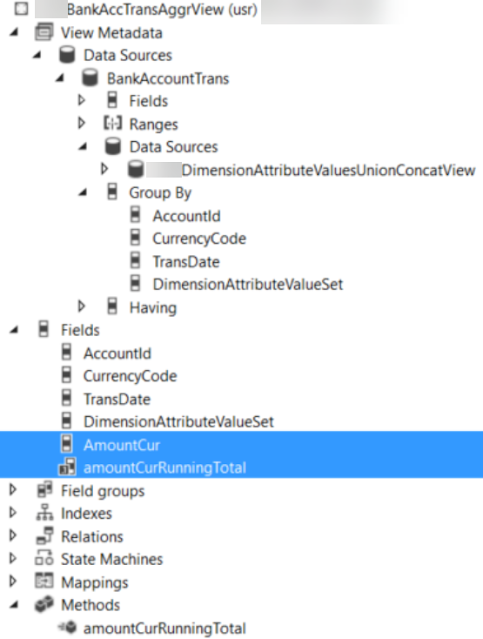
The simplest way to achieve it is to create a view for BankAccountTrans table and add any groupings you need.


In my example, these are Bank account, transaction currency, financial dimension set, and, of course, transaction date.


I use standard aggregation Sum for my daily total and a computed column for running total.


The computed column method reads as follows


public class myBankAccTransAggrView extends common
{
    private static server str amountCurRunningTotal()   // X++
    {
        return "sum(sum(t1.AMOUNTCUR)) OVER (PARTITION by t1.DATAAREAID, t1.ACCOUNTID, t1.CURRENCYCODE  order by t1.TransDate)";
    }

}

It is ready for consumption; enjoy your BI inside of D365!


Friday, August 9, 2019

How to filter existing transactions based on a financial dimension value set

Let's assume that we want to see our bank accounts balances grouped by a financial set, which may be different than that set up for your transactions.


For example, existing transactions presume to have values for the following dimension attributes.


However, our selection can be different. For this exercise sake I opted for Business unit and Department.


So, instead of one balance for the whole bank account, we want to get it distributed per every combination of Business unit and Department values.


Another point to consider is the fact that these attributes are not mandatory; in other words, we don't have values for all attributes in all transactions.


It can be easily achieved if we find a way to create a column with all sought dimension attribute values concatenated as depicted.


Generally speaking this is a job a BI solution; however, it is possible to do in D365 by means of Views.

Let's solve this problem step by step.

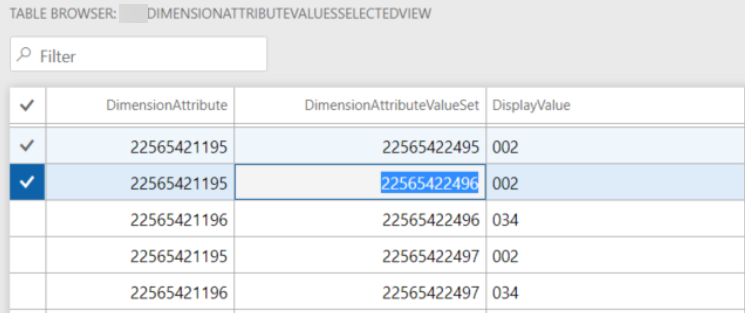
Fisrt view is for all selected attributes that we should populate values for, exist them or not.


Second, collect all existing values which match our selected attributes.


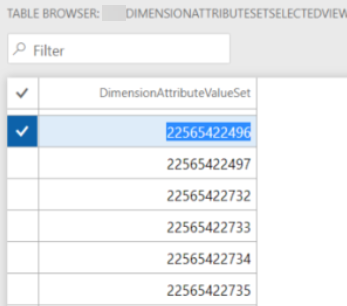
Then, group all found dimension attribute sets.


Now we create a view based on the latter and sought attributes without relation in outer join. By that we will get a Cartesian product of all possible combinations between them.


At this step we outer join the latter with the found (existing) values. Here we can add a computed column if we want to see something else than just an empty value.


private static server str displayValueWithNA()   // X++
{
    str         sRet;
    tableName   viewName                = viewstr(myDimensionAttributeValuesUnionView);
    str         cDisplayValue  = SysComputedColumn::comparisonField(viewName,
                                                                                viewstr(myDimensionAttributeValuesSelectedView),
                                                                                fieldStr(myDimensionAttributeValuesSelectedView, DisplayValue));
    
    sRet =
        SysComputedColumn::if(SysComputedColumn::isNotNullExpression(cDisplayValue),
                                cDisplayValue,
                                SysComputedColumn::returnLiteral('n/a')
                            );
 
    return sRet;
}


Final view will contain all the values found on the previous step grouped by dimension attribute value set so that in a computed column all values be concatenated in the required order.


private static server str finDimValues()   // X++
{
    return @"STUFF((SELECT '-' + t3.DisplayValue
                from myDimensionAttributeValuesUnionView as t3
                where
                t1.DimensionAttributeValueSet = t3.DimensionAttributeValueSet
                order by t3.DIMENSIONATTRIBUTE
                for xml path('')), 1, 1, '')";
}


Having this view in inner join combination allows you to filter any transactional data by a set of dimensions without coding.


Wednesday, March 6, 2019

Computed column for union values from multiple outer joined data sources in view

Let's say you have a multiple outer joined data sources with similar fields, which can be merged by union to one target field.

PSAActualEntity  data entity (in D365) can be a good example, if you add ProjCostTrans, ProjItemTrans, and ProjEmplTrans to its root data source table ProjTransPosting, which has appropriate relations to each of them.


All aforementioned have CategoryId field, which can be present in one table only at a time.


 Let's place a new computed string field with the following static method with a nested if.


private static server str transCategoryId()
    {
        str         sRet;
        tableName   viewName                = identifierStr(avrPSAActualEntity);
        str         cCategoryProjCostTrans  = SysComputedColumn::comparisonField(viewName,
                                                                                    identifierStr(ProjCostTrans),
                                                                                    fieldStr(ProjCostTrans, CategoryId));
        str         cCategoryProjItemTrans  = SysComputedColumn::comparisonField(viewName,
                                                                                    identifierStr(ProjItemTrans),
                                                                                    fieldStr(ProjItemTrans, CategoryId));
        str         cCategoryProjEmplTrans  = SysComputedColumn::comparisonField(viewName,
                                                                                    identifierStr(ProjEmplTrans),
                                                                                    fieldStr(ProjEmplTrans, CategoryId));
        str         sCategoryProjCostTrans  = SysComputedColumn::returnField(viewName,
                                                                                    identifierStr(ProjCostTrans),
                                                                                    fieldStr(ProjCostTrans, CategoryId));
        str         sCategoryProjItemTrans  = SysComputedColumn::returnField(viewName,
                                                                                    identifierStr(ProjItemTrans),
                                                                                    fieldStr(ProjItemTrans, CategoryId));
        str         sCategoryProjEmplTrans  = SysComputedColumn::returnField(viewName,
                                                                                    identifierStr(ProjEmplTrans),
                                                                                    fieldStr(ProjEmplTrans, CategoryId));
        sRet =
            SysComputedColumn::if(SysComputedColumn::isNotNullExpression(cCategoryProjCostTrans),
                                    cCategoryProjCostTrans, 
                                    SysComputedColumn::if(SysComputedColumn::isNotNullExpression(cCategoryProjItemTrans),
                                                            sCategoryProjItemTrans,
                                                            SysComputedColumn::if(SysComputedColumn::isNotNullExpression(cCategoryProjEmplTrans),
                                                                                sCategoryProjEmplTrans,
                                                                                SysComputedColumn::returnLiteral('')
                                                                                )
                                                        )
                                );

        return sRet;
    }


Wednesday, January 30, 2019

View computed column to get OR for two flags

Nothing new, just to reiterate the basics.

Say, we need to add a computed column as a result of OR function over two other columns of Boolean type:myPPOFirmDisableForSalesLine and myPPOFirmDisableForTransferLine.


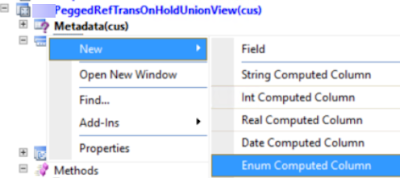
Create a new field myPPOFirmDisable as Enum Computed field


and point it to the following method.


private static server str myPPOFirmDisable(int _tableNum)
{
    DictView    ctView      = new DictView(tableNum(myPeggedRefTransOnHoldUnionView));
    str         sTransType1 = SysComputedColumn::comparisonField(identifierStr(myPeggedRefTransOnHoldUnionView), identifierStr(mySalesTableOnHoldView),  fieldStr(mySalesTableOnHoldView, myPPOFirmDisableForSalesLine));
    str         sTransType2 = SysComputedColumn::comparisonField(identifierStr(myPeggedRefTransOnHoldUnionView), identifierStr(mySalesTableOnHoldView),  fieldStr(mySalesTableOnHoldView, myPPOFirmDisableForTransferLine));
    str     sRet        = '';

    sRet =
            SysComputedColumn::or2
            (
                SysComputedColumn::equalExpression(sTransType1, SysComputedColumn::returnLiteral(NoYes::Yes)),
                SysComputedColumn::equalExpression(sTransType2, SysComputedColumn::returnLiteral(NoYes::Yes))
            );
    sRet =
        SysComputedColumn::if(sRet, SysComputedColumn::returnLiteral(NoYes::Yes), SysComputedColumn::returnLiteral(NoYes::No));

    return sRet;
}
The whole point is to create a string with an SQL statement as a result in static method. There are a lot of standard functions in SysComputedColumn class aiming to help with syntax.

As you can see in this example it is not enough to get a logical comparison result at the first sRet assigning. The latter must be converted explicitly to an SQL string as it goes at the second step.

Finally we get the following string as a part of the whole SQL statement.

CASE WHEN (T1.MYPPOFIRMDISABLEFORSALESLINE = 1) OR (T1.MYPPOFIRMDISABLEFORTRANSFERLINE = 1) THEN 1 ELSE 0 END