Thursday, April 20, 2023

X++ to run XIRR

I created a small X++ wrapper to call XIRR function from the C# project provided by https://github.com/klearlending/XIRR (Thank you!) 

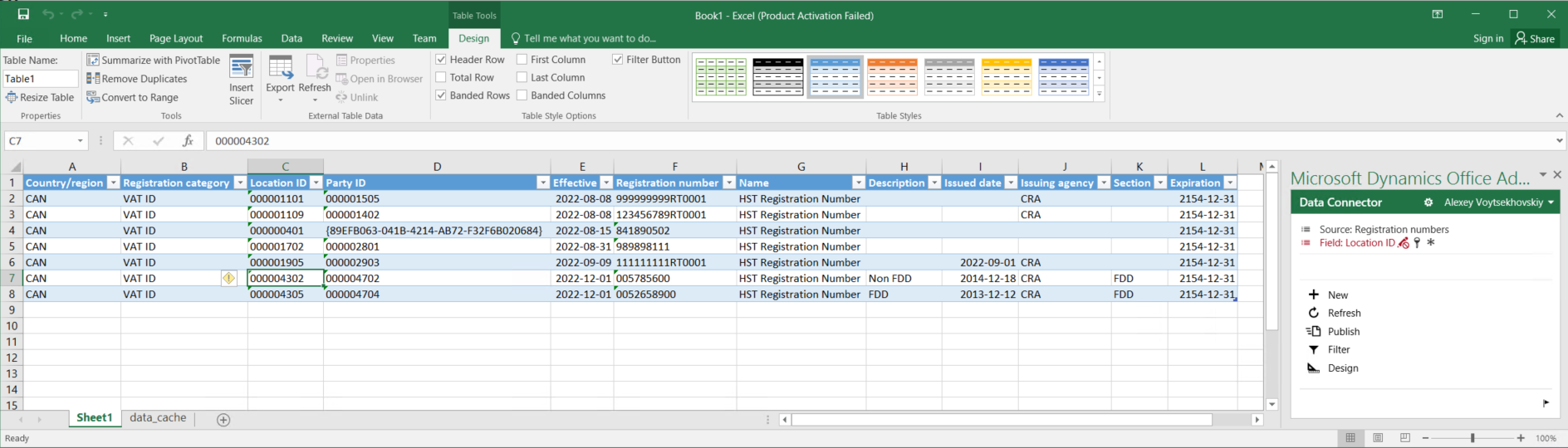
You can test XIRR function in Excel, btw.

using tmxExcelFinance;
/// <summary>
/// Implements various financial functions
/// </summary>
public final class myFinanceFunction
{
    /// <summary>
    /// Calculates XIRR value
    /// </summary>
    /// <param name = "_cashFlows">List of containers kind [cashflow amount, its date]</param>
    /// <param name = "_decimals">how many decimals to calculate</param>
    /// <param name = "_maxRate">Maximum rate</param>
    /// <returns>XIRR value</returns>
    public static real calculateXIRR(List _cashFlows, int _decimals, real _maxRate = 1000000)
    { 
         
        var                                 cashFlows       = new System.Collections.Generic.List<CashFlowDates>();
        System.Collections.IEnumerable      cashFlowsI;
        ListEnumerator                      leC             = _cashFlows.getEnumerator();
        System.Double                       dbl;
        System.DateTime                     dt;

        while(leC.moveNext())
        {
            [dbl, dt] = leC.current();
            cashFlows.Add(new CashFlowDates(dbl, dt));
        }
        // convert to iterable
        cashFlowsI = cashFlows;

        return XIRR::Calc(cashFlowsI, _decimals, _maxRate);
    }

}

This is how we can call the wrapper

 public static void calculateXIRRFromInvestmentDetailsLineTmp(RefRecId _projTableRecId, myInvestmentDetailsLineTmp _myInvestmentDetailsLineTmp)
    {
        List listCashFlowsDates = new List(Types::Container);

        myInvestmentDetailsLineTmp myInvestmentDetailsLineTmpLocal;

        myInvestmentDetailsLineTmpLocal.linkPhysicalTableInstance(_myInvestmentDetailsLineTmp);

        while select myInvestmentDetailsLineTmpLocal
        {
            listCashFlowsDates.addEnd([myInvestmentDetailsLineTmpLocal.TransactionCurrencyAmount, DateTimeUtil::newDateTime(myInvestmentDetailsLineTmpLocal.LineDate, 0)]);
        }
        myProjXIRRTable.XIRRValue = myFinanceFunction::calculateXIRR(listCashFlowsDates, 4);
...

Or

 cashFlows1 = new List (Types::Container);
        
        cashFlows1.addEnd([-10000,str2Date("01/01/2008", 123)]);
        cashFlows1.addEnd([2750, str2Date("01/03/2008", 123)]);
        cashFlows1.addEnd([4250, str2Date("30/10/2008", 123)]);
        cashFlows1.addEnd([3250, str2Date("15/02/2009", 123)]);
        cashFlows1.addEnd([2750, str2Date("01/04/2009", 123)]);

res = myFinanceFunction::calculateXIRR(cashFlows1, 10);

Notes about the solution creation.


D365FO project must be <TargetFrameworkVersion>v4.6</TargetFrameworkVersion>


Last remark. I tried to implemented the same algorithm in X++, but I bumped into two limitations.

First, there is a limit for recursion depth - 400 levels; we can flatten it, though. 

Second, real loses required decimals and ends up with division by zero.

Sunday, April 9, 2023

Two outer joined tables in a report without duplicates from both sides

 I cannot find a particular term for this type of join; so I called it 'hanging left outer join'.


Let's state the problem.


We have two tables:

- LedgerJournalTrans (trans) with a field mgcProjId, which is a reference to ProjTable.

- myDetails (details), which may have 0..N records for certain records from ProjTable.


Examples of data in both may look like the following:


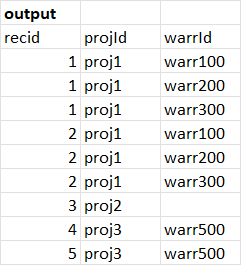
If we apply standard outer join, the output will be as follows


But we need to print all details records by 'hanging' them against the same projId, like this


So, no duplicates from both tables must be present in the merged table myDetailsTmp.


This is how you can achieve it. 

/// <summary>
    /// Process report data.
    /// </summary>
    public void processReport()
    {
        Query                   query;
        QueryRun                qr;
        myDetails               details;
        LedgerJournalTrans      trans;
        ProjId                  prevProjId;
        // merge trans and detail even if details are empty
        void insertWithTrans()
        {
            myDetailsTmp.clear();
myDetailsTmp.RefRecId = trans.RecId;
myDetailsTmp.JournalNum = trans.JournalNum;
myDetailsTmp.TransDate = trans.TransDate;
myDetailsTmp.Voucher = trans.Voucher;
myDetailsTmp.ProjId = trans.mgcProjId;
myDetailsTmp.DetailId = details.DetailId;
myDetailsTmp.WithPrice = details.WithPrice;
myDetailsTmp.insert();
} // merge empty trans and detail; it will be 'a hanging' detail void insertDetails() { myDetailsTmp.clear();
myDetailsTmp.ProjId = details.ProjId;
myDetailsTmp.DetailId = details.DetailId;
myDetailsTmp.WithPrice = details.WithPrice;
myDetailsTmp.insert();
} // process warrants for the previous projId // 'hanging' details on the right side of the report void processRestOfDetails() { // if there are still some warrants we found for the previous projId if (details) { // as we do not have enough rows from trans with the same previous projId, // let's add them with empty part from trans side next details; while(details) { insertWarrants(); next details; } } } // Get the query from the runtime using a dynamic query. query = this.parmQuery(); qr = new QueryRun(query); // we suppose that trans sorted by projId // each projId may have 0..N of warrants (details) while(qr.next()) { // get next transaction trans = qr.get(tablenum(LedgerJournalTrans)); // projId changes if(prevProjId != trans.mgcProjId) { // if there are still some warrants we found for the previous projId processRestOfDetails(); // get the first warrant for the new projId select details where details.ProjId == trans.mgcProjId; // keep the new as a previous for the next iteration prevProjId = trans.mgcProjId; } // if this is a trans with the same projId, then we can merge it with the next warrant else if (details) { next details; } // merge trans with warrants insertWithTrans(); } // if there are still some warrants we found for the previous projId processRestOfDetails(); }

Raw outer joined data


Ascending ProjId


Descending ProjId


Friday, March 10, 2023

How to export/import Tax registration numbers for Vendors

 D365FO contains a special data entity which can be used for both DMF export/import and also in Excel Add-in, but... 

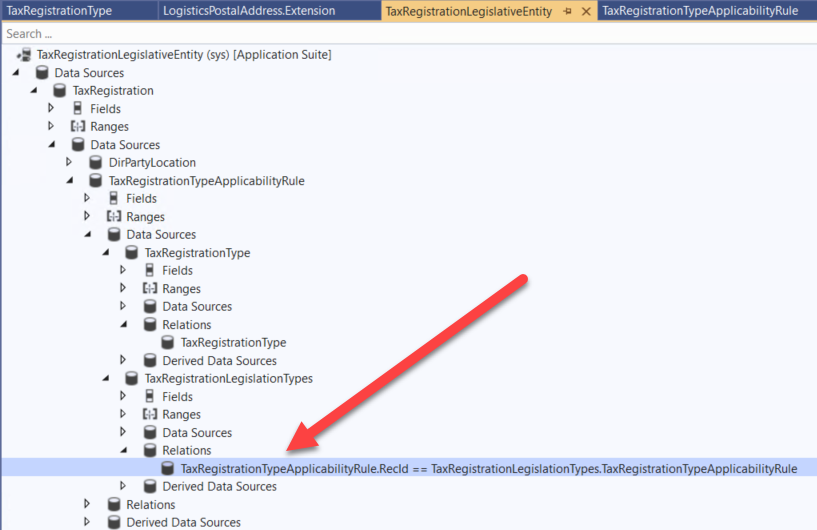
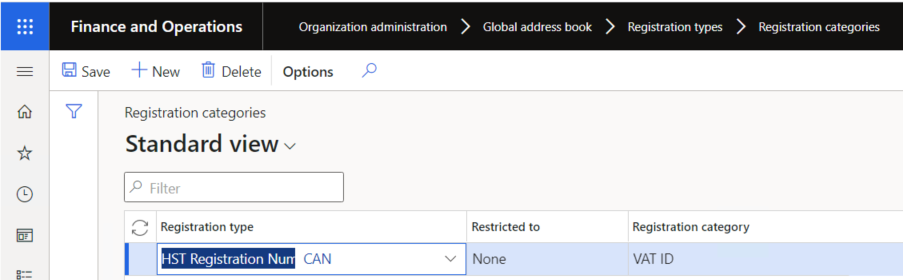
There is an interesting InnerJoin inside of this data entity, which may be a hurdle for understanding why you still have no records exported; nevertheless, you have some in TaxRegistration table.


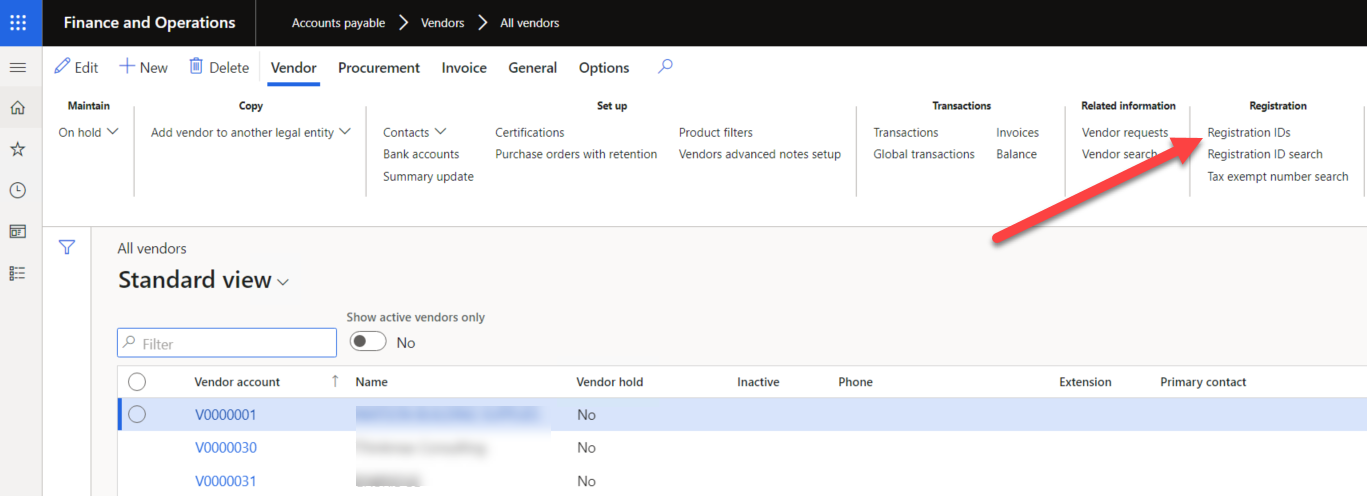
In fact, when you create records in Vendor Registration IDs form, it does not tell you about this constraint.


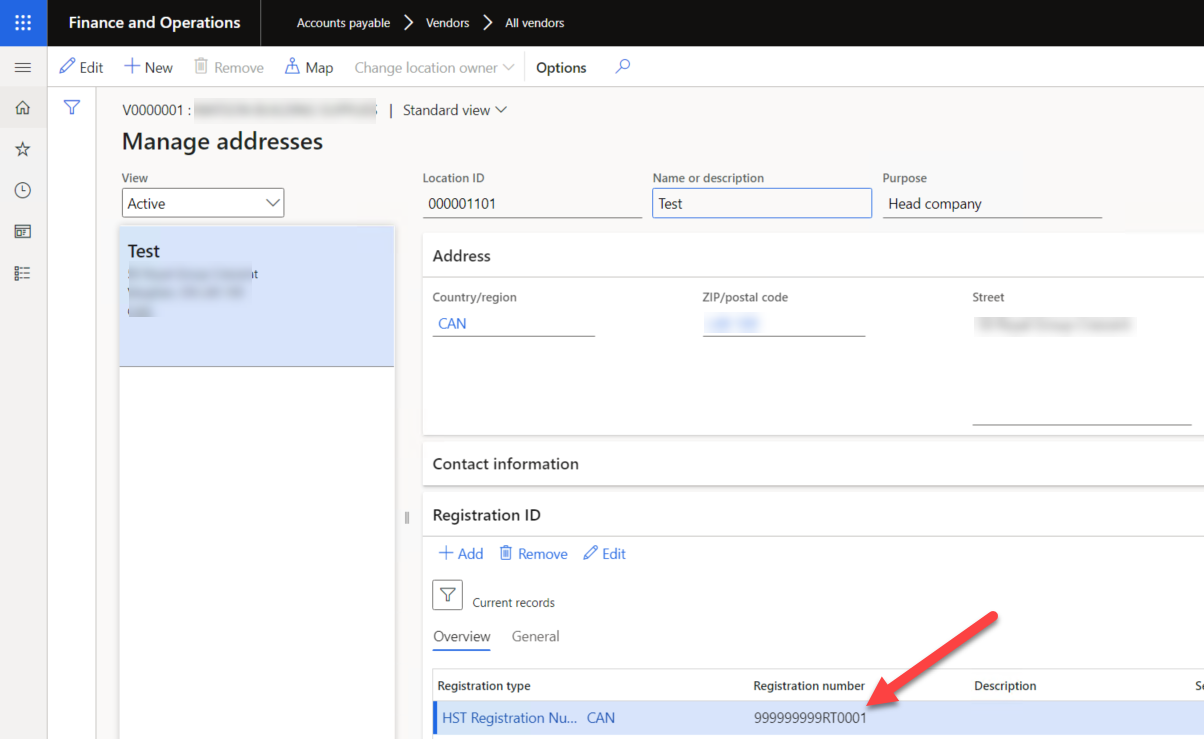
To get these records exported, you simply need to add it in Registration categories.


and voila!


Monday, March 6, 2023

How to open multiple Purchase orders in new browser tabs

static public void initFromPurchTable(FormDataSource _formDS)
{​
	PurchTable      currentPurchTable;
	Browser         browser = new Browser();
	for (currentPurchTable = _formDS.getFirst(true) ? _formDS.getFirst(true): _formDS.cursor();
	currentPurchTable;
	currentPurchTable= _formDS.getnext())
	{​
		var generator     = new Microsoft.Dynamics.AX.Framework.Utilities.UrlHelper.UrlGenerator();
		var currentHost   = new System.Uri(UrlUtility::getUrl());
		generator.HostUrl = currentHost.GetLeftPart(System.UriPartial::Authority);
		generator.Company = curext();
		generator.MenuItemName = 'PurchTableListPage';
		generator.Partition = getCurrentPartition();
		// repeat this segment for each datasource to filter
		var requestQueryParameterCollection = generator.RequestQueryParameterCollection;
		requestQueryParameterCollection.AddRequestQueryParameter(
																'PurchTable',
																'PurchId', currentPurchTable.PurchId
																);
		System.Uri fullURI = generator.GenerateFullUrl();
		browser.navigate(fullURI.AbsoluteUri, true);
	}​
}​

Saturday, November 26, 2022

Get Infolog as a string

/// <summary>
/// Gets infolog content
/// </summary>
/// <returns>infolog string</returns>
public static str getErrorStr(container _cont)
{
	SysInfologEnumerator        enumerator;
	SysInfologMessageStruct     myStruct;
	Exception                   exception;
	str                         error;

	enumerator = SysInfologEnumerator::newData(_cont);

	while (enumerator.moveNext())
	{
		myStruct = new SysInfologMessageStruct(enumerator.currentMessage());
		exception = enumerator.currentException();

		error = strfmt('%1 %2', error, myStruct.message());
	}

	return error;
}

Monday, October 31, 2022

Code Review

Disclaimer: this is just a short recap of what Martin Dráb explained in his article https://dev.goshoom.net/2012/08/purpose-of-code-reviews/.

Purpose of code reviews

  • Internal quality:
    1. Overall approach – does the code do the right thing by proper means? 
    2. Maintainability/extensibility – are we able to easily extend the solution, fix bugs etc.? 
    3. Testability – are we able to test the code?
    4. Documentation – are we able to understand why the code was made and what it does?
    5. Performance – is the design correct from performance perspective? 
  • Functional testing: Some bugs are much more visible when looking into code
  • Knowledge sharing: Discussions between the developer and the reviewer

Tools

  • BP check 
  • xppbp.exe
  • DevOps code review request

Top 10 issues discovered from Dynamics AX Code Review

https://www.linkedin.com/pulse/top-10-issues-discovered-from-dynamics-ax-code-review-caillet/

Wednesday, June 29, 2022

Union query for Project transactions

Union query may be a very efficient and useful option when you need to fetch similar data fields from different tables. A good example of this may be the case when you to gather information about project related transactions as they can be of different types, like, expenses, fees, items, etc. 

Say, we need to render some report collecting all these different types of transaction that can be posted against a given project and group them by a given financial dimension value in Project group. Let's see how Union query can help us.

In order to better understand the goal, you can take a look to the standard form ProjInvoiceJournal which perfectly explains how all these table relate to each other. 

Most of them contain the same set of fields, and we simply need to get some of them into one view to populate by the report data provider.

So, at the first step, let's create all necessary queries for the source Project transaction related tables. Pick up the first and create a simple query as depicted. 

Then create a view based on this query. 

Then pick up the next and do the same.

Complete these two steps for all necessary transaction types.

Now you can create a Union query and add all your views together as they have the same set of fields.

If you need to distinguish them later who is who, say, in computed column methods, you can use  unionAllBranchId field, but this is out of the current focus.

Finally you can elaborate it by adding a new view based on the latter with a simple SUM aggregation for Amount field.

Basically, you achieve your goal with no coding.

I am not going into details about the whole project, which you can get by this URL https://github.com/wojzeh/tmxProjectSalesPerSegment. Ping me, if you have any questions.


Related topics: 

Computed column for union values from multiple outer joined data sources in view