Tuesday, November 29, 2016

How to see beginning balance journals from your projects

There is a bug in AX 2012 R2/R3.

Beginning balance journals do not create transactions in ProjJournalTrans table; therefore, they won't be selected via the standard query.
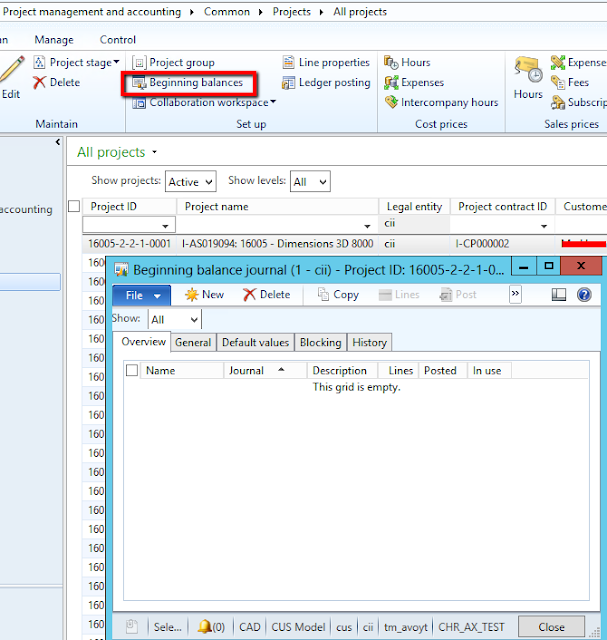


This is a small fix to show beginning balance journals from the projects forms.

In ProjJournalFormTable class we need to redo datasourceLinkActivePre() method as follows:

public void datasourceLinkActivePre()
{
    QueryBuildDataSource    qbds;
    ProjTable               callerRecord;

    if (formRun                 &&
        formRun.args()          &&
        formRun.args().record() &&
        formRun.args().dataset() == tableNum(ProjTable))
    {
        callerRecord = formRun.args().record() as ProjTable;

        // if this is a beginning balance table we have no transactions in ProjJournalTrans
        // therefore, we need to update the query so that all related journals will be shown.
        if(journalTypeId == 2) // beginning balance
        {
            SysQuery::findOrCreateRange(journalTable_ds.query().dataSourceTable(tableNum(ProjJournalTable)), fieldNum(ProjJournalTable, JournalType)).value(SysQuery::value(ProjJournalType::BegBalance));
            SysQuery::findOrCreateRange(journalTable_ds.query().dataSourceTable(tableNum(ProjJournalTable)), fieldNum(ProjJournalTable, ProjId)).value(SysQuery::value(callerRecord.ProjId));
        }
        else
        {
        // End
            qbds = journalTable_ds.query().dataSourceNo(1).addDataSource(tableNum(ProjJournalTrans));

            qbds.joinMode(JoinMode::ExistsJoin);

            qbds.addRange(fieldNum(ProjJournalTrans, ProjId)).value(callerRecord.ProjId);
            qbds.relations(true);
        }
    }

    super();
}

Saturday, November 26, 2016

Back slashing menu items

It turned out to be a wrong decision to use a back slash character in menu item label. When it is used then in a menu, nothing tells you that something is wrong.


However, no chance to run this menu item from the menu.
So, avoid this and, maybe, other illegal characters for labeling your menu items.

Wednesday, November 16, 2016

Automate Error 351

From time to time we get the lovely CIL compilation Error:351. As suggested by many, for example, by André Arnaud de Calavon, we have to recreate XppIL folder with all its guts.

The sequence is the following (quotation)

1. Stop the AOS.
2. Rename the XppIL folder (C:\Program Files\Microsoft Dynamics AX\60\Server\MicrosoftDynamicsAX\bin\XppIL) to e.g. XppIL_old.
3. Start the AOS.
4. Perform a full CIL generation.
A new XppIL folder will be created when you start the AOS.
When the CIL has completed without problems, you can delete the renamed XppIL_old folder.

Clean and simple. However, I am too impatient to wait for the end of deleting this huge folder: Windows Explorer starts time estimation and it drags on.

So, I wrote two short batch files that can be run as administrator and spare your time and nerves.

First just to rename the existing folder.


@echo off
set folder="C:\Program Files\Microsoft Dynamics AX\60\Server\CHR_AX_DEV\bin\"
echo Rename %folder%  XppIL to XppIL_old?
pause
c:
cd %folder% 
ren XppIL XppIL_old
echo %folder%XppIL to  has been renamed to XppIL_old
pause

Second to delete all the files in the 'backed up' folder and its subfolders with no questions and infolog, then to delete the folder itself. As it said here, they must work faster than just removing the folder.

@echo off
set folder="C:\Program Files\Microsoft Dynamics AX\60\Server\CHR_AX_DEV\bin\XppIL_old\"
echo Delete all the files from %folder% and remove the folder?
pause
del /f/s/q %folder% > nul
rmdir /s/q %folder%
echo Folder %folder% removed
pause

The last remarque. Be sure that your service windows account running the AOS in question had Full permission to the C:\Program Files\Microsoft Dynamics AX folder and all its subfolders.

command line

Monday, October 17, 2016

Restrict access to group form control in the grid

Basically to restrict access to a field group it is enough just to set its NeededPermission property, say, to Manual and then you can provide your users with a special privilege on this form control.

However, when it comes to a grid, it is not enough: you also need to change the same property and needed permission on all included fields or, like in my scenario, display methods.


Some helpful articles

Security Permissions Properties for a Form

How to restrict access to a button


Wednesday, July 13, 2016

SysOperationAutomaticUIBuilder (SysOperationUIBuilder) amd Nested Data Contracts

Shame on me, but this the only way I found to get access to form controls exposed from a nested data contract.

Say, we have a data contract (blue) with a nested data contract (orange).


Both will be exposed to the dialog; however, we can have access via binding info to the main contract parameters only. For example, we can change some properties of these fields in postBuild() method in its SysOperationAutomaticUIBuilder (SysOperationUIBuilder) class like follows.


public void postBuild()
{
    DialogField                             dialogField;
    SysOperationUIBindInfo                  bindInfoLoc    = this.bindInfo();

    super();

    contract = this.dataContractObject();

    dialogField = bindInfoLoc.getDialogField(contract, methodStr(****CheckPostContract, parmJournalId));
    dialogField.allowEdit(false);
}

However, we cannot do the same way for parameters from the nested data contract. To attain this goal we can, however, iterate all the form build controls to find the one we need to change. In my example, I used the label of the exposed Currency EDT.


private void setCurrencyCodeFieldMandatory(FormBuildGroupControl _nestedContractGroup //nestedContractGroup)
{
    FormBuildStringControl                  currencyFormBuildStringControl;
    int                                     i;
    Object                                  childControl;

    for (i = 1; i <= _nestedContractGroup.controlCount(); i++) 
    {
        childControl = _nestedContractGroup.controlNum( i );
        if(childControl is FormBuildStringControl)
        {
            currencyFormBuildStringControl  = childControl;
            if(currencyFormBuildStringControl.label() == "@SYS7572")
            {
                currencyFormBuildStringControl.mandatory(true);
            }
        }
    }
}


Wednesday, April 27, 2016

Update access to Financial dimensions on Project Wizard form

Thanks André I found very fast how to fix access issue to Financial dimensions on Project Wizard form. He explained how to solve a similar problem in this thread https://community.dynamics.com/ax/f/33/t/138100

All detail could be found in MSDN article https://msdn.microsoft.com/en-us/library/gg879980.aspx

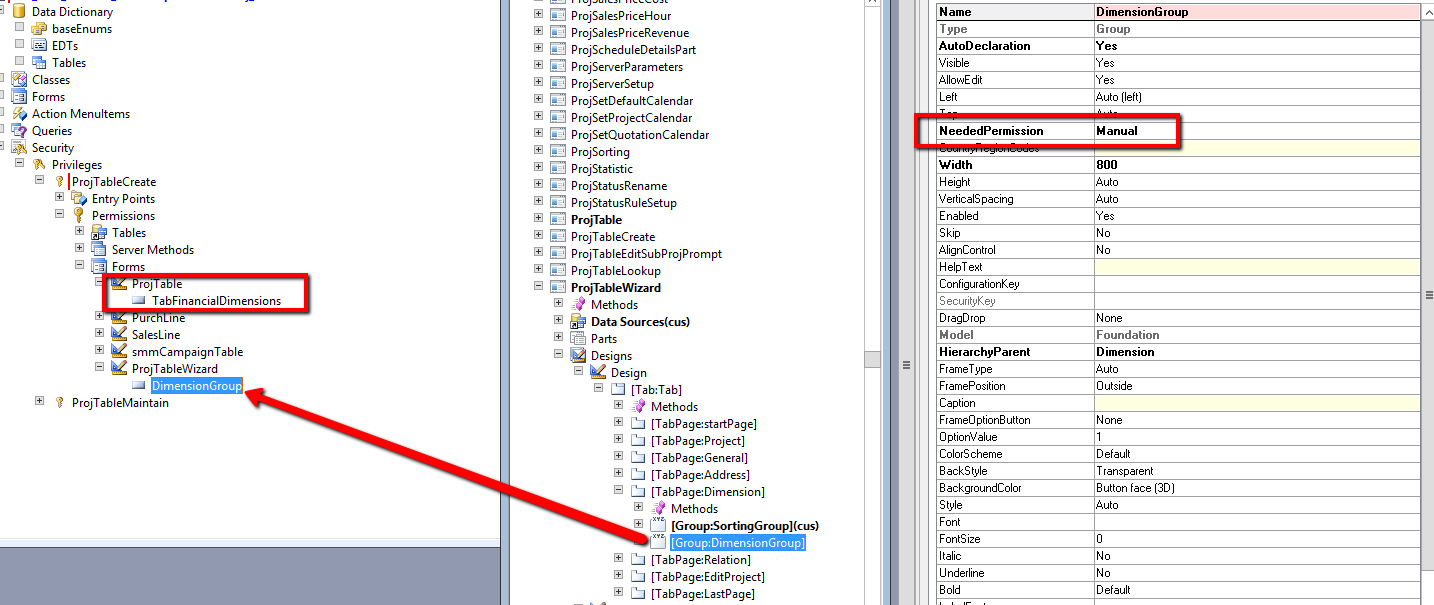
Briefly we need to add associated form and their form controls to appropriate security privileges or directly to roles.


As we can see DimensionGroup control requires manually set permission. so let's add it in the same way as it done for ProjTable form.


Now Project manager and other roles containing the same privileges will be able not only to view but also to update financial dimensions in the Project Wizard.

Thursday, March 31, 2016

Date valid fields in View and AOT Query

Unfortunately, I did not manage to select addresses effective as of today from the DirPartyPostalAddressView view.


Nevertherless, its ValidTimeStateEnabled property set to Yes.


My workaround is to use SysQueryRangeUtil class providing greaterThanUtcNow and lessThanUtcNow methods to create an extended range. So my Query looks like the following.