I found a couple questionable things in General journal log updating.
First, Log field limit of 255 characters. It is evidently not enough for relatively long information to be stored for eventual analysis.
Second, the way to update journal logs by copying lines from Infolog afterwards.
Anyway the standard methods meant to shorten the log content do not work properly. Let's see why.

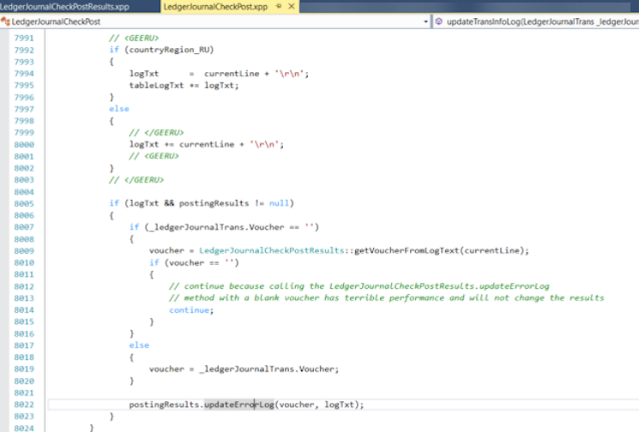
And the method to find a voucher number can speak one language only.

So, we get a poorly built journal log.

It can be fixed by two extensions.
First, let's gather all lines in a set so that they would be present once only.
Second, teach the voucher searching method to speak any language and do not return rubbish instead of a real voucher number.
Now it looks much better and contains condensed information.

For storing more information, a new memo field can be a solution.
Hope, Microsoft will eventually come up with an optimized approach.
Good logging!
First, Log field limit of 255 characters. It is evidently not enough for relatively long information to be stored for eventual analysis.
Second, the way to update journal logs by copying lines from Infolog afterwards.
Anyway the standard methods meant to shorten the log content do not work properly. Let's see why.
And the method to find a voucher number can speak one language only.
So, we get a poorly built journal log.

It can be fixed by two extensions.
First, let's gather all lines in a set so that they would be present once only.
/// <summary>
/// Extension of LedgerJournalCheckPost to fix a bug
/// </summary>
[ExtensionOf(classStr(LedgerJournalCheckPost))]
final class LedgerJournalCheckPost_Extension
{

    /// <summary>
    /// Updates the infolog for the given transaction.
    /// </summary>
    /// <param name = "_ledgerJournalTrans">The transaction.</param>
    public void updateTransInfoLog(LedgerJournalTrans _ledgerJournalTrans)
    {
        this.myUpdateTransInfoLog(_ledgerJournalTrans);
        // transLogPoint is already moved forward; therefore the next call will do no change to the log
        next updateTransInfoLog(_ledgerJournalTrans);
    }

    /// <summary>
    /// Updates the infolog for the given transaction.
    /// </summary>
    /// <param name = "_ledgerJournalTrans">The transaction.</param>
    private void myUpdateTransInfoLog(LedgerJournalTrans _ledgerJournalTrans)
    {
        #Define.UserTab('\t')

        Log             logTxt;
        Integer         x = transLogPoint;
        Integer         y = infolog.num(0);
        str             currentLine;
        str             strLine;
        Voucher         voucher;
        List            list;
        ListEnumerator  listEnumerator;
        Set             setAllLines = new Set(Types::String);
        // <GEERU>
        Log             tableLogTxt;
        #ISOCountryRegionCodes
        boolean         countryRegion_RU = SysCountryRegionCode::isLegalEntityInCountryRegion([#isoRU]);
        // </GEERU>

        if (postingResults)
        {
            postingResults.parmLedgerPostingMessageLog(ledgerPostingMessageCollection);
        }

        while (x < y)
        {
            x++;
            // parse all the lines if there are some prefixes
            currentLine     = infolog.text(x);
            list            = strSplit(currentLine, #UserTab);
            listEnumerator  = list.getEnumerator();
            while (listEnumerator.moveNext())
            {
                currentLine = listEnumerator.current();
                if(setAllLines.in(currentLine))
                {
                    continue;
                }
                setAllLines.add(currentLine);
                // <GEERU>
                if (countryRegion_RU)
                {
                    logTxt      =  currentLine + '\r\n';
                    tableLogTxt += logTxt;
                }
                else
                {
                    // </GEERU>
                    logTxt += currentLine + '\r\n';
                    // <GEERU>
                }
                // </GEERU>

                if (logTxt && postingResults != null)
                {
                    if (_ledgerJournalTrans.Voucher == '')
                    {
                        voucher = LedgerJournalCheckPostResults::getVoucherFromLogText(currentLine);
                        if (voucher == '')
                        {
                            // continue because calling the LedgerJournalCheckPostResults.updateErrorLog
                            // method with a blank voucher has terrible performance and will not change the results
                            continue;
                        }
                    }
                    else
                    {
                        voucher = _ledgerJournalTrans.Voucher;
                    }

                    postingResults.updateErrorLog(voucher, logTxt);
                }
            }
        }

        // <GEERU>
        if (countryRegion_RU)
        {
            logTxt = tableLogTxt;
        }
        // </GEERU>

        if (logTxt)
        {
            tableErrorLog += logTxt;
        }

        transLogPoint = y;
     }

}
Second, teach the voucher searching method to speak any language and do not return rubbish instead of a real voucher number.
/// <summary>
/// Extension of LedgerJournalCheckPostResults to fix a bug
/// </summary>
[ExtensionOf(classStr(LedgerJournalCheckPostResults))]
final class LedgerJournalCheckPostResults_Extension
{
    /// <summary>
    /// See the description for the standard method
    /// </summary>
    /// <param name = "_logText">log text</param>
    /// <returns>Voucher text</returns>
    public static Voucher getVoucherFromLogText(Log _logText)
    {
        // this standard function does not works correctly
        next getVoucherFromLogText(_logText);
        return LedgerJournalCheckPostResults::myGetVoucherFromLogText(_logText);
    }

    /// <summary>
    /// Finds voucher numbers as it should be in all languages
    /// </summary>
    /// <param name = "_logText">Log text</param>
    /// <returns>Voucher text</returns>
    private static Voucher myGetVoucherFromLogText(Log _logText)
    {
        List            list;
        ListEnumerator  listEnumerator;
        Voucher         voucher;
        str             strLine;
        const str       voucherText = '@GeneralLedger:Voucher';
        int             voucherLen  = strLen(voucherText);

        list = strSplit(_logText, ',');

        listEnumerator= list.getEnumerator();
        while (listEnumerator.moveNext())
        {
            strLine = listEnumerator.current();
            if (strContains(strLine, voucherText))
            {
                // delete the word VOUCHER in any language as well as all the spaces around
                voucher = strLRTrim(strDel(strLine, 1, voucherLen));
                break;
            }
        }
        return voucher;
    }

}
Now it looks much better and contains condensed information.

For storing more information, a new memo field can be a solution.
Hope, Microsoft will eventually come up with an optimized approach.
Good logging!





 Posts


