Showing posts with label export. Show all posts

Wednesday, January 20, 2016

Export-Import XPO files

Among our AX mundane chores I would highlight the promotion process. Nevertheless, this changed drastically since AX 2012 started using models and model stores; sometimes, the old good way is in demand, yet.

I am talking about promoting your projects between environments via exporting and importing XPO files. First, we export the project from, say, DEV environment to an XPO file. Then we import it to TEST environment with the Definition only option checked. After that we export the current content of this project as a back up. Finally, we re-import the project entirely.

Schematically the process goes as follows:

DEV-MyProject->DEV\MyProject.xpo
TEST<-DEV\MyProject.xpo (definition)
TEST-MyProject->\BackUp\MyProject
TEST<-DEV\MyProject.xpo

Not a big deal when it comes to one-two projects only. Everything changes when you need to cope with a dozen of them... I developed a small class that keeps me lazy by doing all these steps.

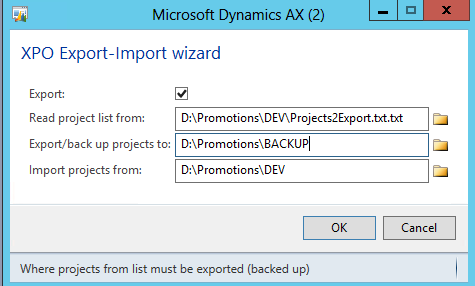
You need to set up its parameters for every environment where you need to promote projects.


It reads project names to export-import line by line from a plain text file and processes them one by one.

Note: it works on CUS layer only and without labels; however, it can be easily adapted to your context.

Here is the link to download.

Tuesday, March 16, 2010

All Lables from given Layer in given Languages

Sometimes I need to see a label translations into different languages. Sometimes it is good to see all the labels that were created during the project on a given layer - like those on USR.

This job exports all labels from a given layer in given languages to an Excel file.

Here I used the two following code examples from the AXForum.info:

Firstly, the job calculates the number of labels; then, it shows progress window; finally, it opens an Excel file saved under the name like "Labels from "+#LayerId+ " in "+#English+", "+#French+", "+#Russian+".xls".

In this particular job are SYS layer and three mentioned languages used; you can easily change them to your needs.


static void SisPrintAllLabelsOnGivenLanguages(Args _args)
{
    // needed layer
    #define.LayerId("SIS")
    // all needed languages
    #define.English("en-us")
    #define.French("fr-ca")
    #define.Russian("ru")
    // label classes
    Label   lEn = new Label(#English);
    Label   lFr = new Label(#French);
    Label   lRu = new Label(#Russian);
    // start looking every label
    str 250 lId;
    int totalLabels;
    RunbaseProgress         progress;
    #macrolib.AviFiles
    //Excel variables section
    COM rstAxa = new COM('ADODB.Recordset');    // ADO: Recordset
    COM flds   = rstAxa.Fields();
    COM fld;
    #define.LabelId("LabelId")
    COM xlApp;            
    COM wbks, wbk;        
    COM wkss, wks;        
    COM rng, cell, rngCR; 
    COM font;             
    COM entCol;           
    COM actWin;           
    int i, iMax;
    ;
    print("@SYS34745");
    // start looking every label
    lId = lEn.searchFirst('');
    while (lId)
    {
        if (lEn.moduleId(lId) == #LayerId) // The particular label file
        {
            // count labels
            totalLabels++;
        }
        lId = lEn.searchNext();
    }
    print(strfmt("%1 = %2", "@SYS54695", totalLabels));
    print("@SYS76178");
    if (totalLabels<=0)
        return;

    progress = RunbaseProgress::construct(1,null);

    progress.setCaption("@SYS76178");
    progress.setTotal(totalLabels);
    progress.setAnimation(#AviPrint);

    // <--- create excel fields in a worksheet
    flds.Append(#LabelId, 8);
    flds.Append(#English, 8);
    flds.Append(#French, 8);
    flds.Append(#Russian, 8);
    rstAxa.Open();

    xlApp = new COM('Excel.Application');
    xlApp.Visible(false);
    wbks = xlApp.Workbooks();
    wbk  = wbks.Add();
    wkss = wbk.Worksheets();
    wks  = wkss.Item(1);
    wks.Name("Labels");
    rng  = wks.Range('A1');
    flds = rstAxa.Fields();
    iMax = flds.Count() - 1;
    for (i = 0; i <= iMax; i += 1)
    {
        fld = flds.Item(i);
        cell = rng.Offset(0, i);
        cell.Value2(fld.Name());
    }
    rngCR = rng.CurrentRegion();
    font = rngCR.Font();
    font.Bold(true);
    cell = rng.Offset(1, 0);
    // <--- end of creating of excel fields in a worksheet

    lId = lEn.searchFirst('');
    while (lId)
    {
        if (lEn.moduleId(lId) == #LayerId) // The particular label file
        {
            // print to excel
            progress.incCount();
            rstAxa.AddNew();
            fld = flds.Item(#LabelId);  fld.Value(lId);
            fld = flds.Item(#English);  fld.Value(lEn.extractString(lId));
            fld = flds.Item(#French);   fld.Value(lFr.extractString(lId));
            fld = flds.Item(#Russian);  fld.Value(lRu.extractString(lId));
            rstAxa.Update();
        }
        lId = lEn.searchNext();
    }
    cell.CopyFromRecordset(rstAxa);
    progress.kill();
    // format excel worksheet
    rngCR = rng.CurrentRegion();
    entCol = rngCR.EntireColumn();
    entCol.AutoFit();
    cell.Select();
    actWin = xlApp.ActiveWindow();
    actWin.FreezePanes(true);
    rstAxa.Close();
    xlApp.Visible(true);
    wbk.SaveAs("Labels from "+#LayerId+ " in "+#English+", "+#French+", "+#Russian+".xls");
}