Tuesday, April 29, 2014
Thursday, January 23, 2014
Bug: One character in dialog field label causes wrong redrawing
Working on my previous project to change batch caption dialog field, I found a strange bug when it came to redrawing dialog window.
If we place any dialog field below a combobox with a label even of one character longer than the latter, AX fails to redraw the window entirely after modifying combobox value and changing Main instruction text.
protected Object dialog() { FormComboBoxControl combobox; dlg = super(); dialogEventType = dlg.addFieldValue(EnumStr(uapInterfaceEventType), eventType, '1234567890' ); dialogAnother = dlg.addFieldValue(identifierStr(VendName), vendName, '12345678901'); // to add details to the caption and task description in batch tasks dialogEventType.registerOverrideMethod(methodstr(FormStringControl, modified), methodstr(tmxRunBaseBatchSample, eventType_modified), this); // to avoid user input in the field combobox = dialogEventType.control(); combobox.comboType(1); return dlg; }
Wednesday, January 22, 2014
Initial parameter default with SysOperation (initParmDefault)
With the new SysOperation framework in AX2012 I bumped into a simple question on how to set default value for one parameter in the data contract as I did by using initParmDefault with RunBase class.
Here are two ways to do that: we can initialize any values inside of new() method in the data contract class or, alternatively, override initializeServiceParameter() in the service controller class for a particular data contract type.
The latter always overrides initial default values coming with the data contract.
I used information from this article (in German).
Thursday, January 16, 2014
How to change Batch caption dialog field in run time. RunBaseBatch sample
This is an example of a RunBaseBatch class that demonstrates how to change another dialog fields in run time.
Let's say we have a parameter of enum type, which selects the right business logic inside of Run method.
It is a good idea to change the main static text of the dialog as well as the batch caption that serves as a description for an eventual batch job (and tasks).
After adding this field in Dialog method we need to override Modified method for this field.
In eventType_modified method we call two additional methods to apply the user input respectively for BatchCaption and MainInstruction fields.
To get access to these dialog fields we use two different approaches. We find BatchCaption form control recursively inside of batch tab page based on its type.
As to MainInstruction we get it by its name.
Now when the user changes the event type, two other fields change respectively.
You can find the whole project here.
Let's say we have a parameter of enum type, which selects the right business logic inside of Run method.
It is a good idea to change the main static text of the dialog as well as the batch caption that serves as a description for an eventual batch job (and tasks).
After adding this field in Dialog method we need to override Modified method for this field.
protected Object dialog() { FormComboBoxControl combobox; dlg = super(); dialogEventType = dlg.addFieldValue(EnumStr(uapInterfaceEventType), eventType ); // to add details to the caption and task description in batch tasks dialogEventType.registerOverrideMethod(methodstr(FormStringControl, modified), methodstr(tmxRunBaseBatchSample, eventType_modified), this); // to avoid user input in the field combobox = dialogEventType.control(); combobox.comboType(1); return dlg; }
In eventType_modified method we call two additional methods to apply the user input respectively for BatchCaption and MainInstruction fields.
private boolean eventType_modified(FormStringControl _control) { boolean ret = _control.modified(); if(ret) { this.setBatchCaption(); this.setMainInstruction(); } return ret; }
To get access to these dialog fields we use two different approaches. We find BatchCaption form control recursively inside of batch tab page based on its type.
private void setBatchCaption() { FormStringControl batchCaptionControl; // to get the batch caption control; any of them if many batchCaptionControl = this.getBatchCaptionControl(dlg); if (batchCaptionControl) { batchCaptionControl.text(this.caption()); } }
// returns the batch caption form control if any in the dialog private FormStringControl getBatchCaptionControl(DialogRunbase _dialog) { FormStringControl batchCaptionControl; // recursive routine to look for the right form control of BatchCaption EDT Object findBatchCaptionControl(Object _parentObject) { int i; Object childControl; Object foundControl; for (i = 1; i <= _parentObject.controlCount(); i++) { childControl = _parentObject.controlNum( i ); // this is our boy if( childControl is FormStringControl && childControl.extendedDataType() == extendedTypeNum(BatchCaption)) { // time to get up return childControl; } else { if (childControl is FormGroupControl) { foundControl = findBatchCaptionControl(childControl); if (foundControl) { return foundControl; } } } } // just step back to check others return null; } /////// main routine ///////////////////////////////////////////////////////////// if( _dialog && _dialog.batchDialogTabPage()) { batchCaptionControl = findBatchCaptionControl(_dialog.batchDialogTabPage().control()); } return batchCaptionControl; }
As to MainInstruction we get it by its name.
private void setMainInstruction() { FormStaticTextControl mainInstructionControl; FormGroupControl formGroup = dlg.mainFormGroup(); // to get the main instuction static text of the dialog mainInstructionControl = dlg.dialogForm().runControl('MainInstruction'); if (mainInstructionControl) { mainInstructionControl.text(this.caption()); } }
Now when the user changes the event type, two other fields change respectively.
You can find the whole project here.
Labels:
AX2012,
caption,
dialog,
form control,
from code,
override,
run time,
RunBaseBatch,
x++
How to set properties for the Reference Group form control from code
There is a small issue in AX 2012 with getting access to the siblings' properties of Reference Group form control - they are unavailable in AOT.
However, you still can get access to it from code during run time.
Let's say you have placed on your form a field named FilterCategory, which is a reference group, and you want to set its sibling FilterCategory_Name width to Column width value. As you can see there is no way to do that in AOT.
So you just create a method supposed to be called in the form init():
And you get it!
However, you still can get access to it from code during run time.
Let's say you have placed on your form a field named FilterCategory, which is a reference group, and you want to set its sibling FilterCategory_Name width to Column width value. As you can see there is no way to do that in AOT.
So you just create a method supposed to be called in the form init():
void setColumnWidthForFilterCategory() { int i; Object childControl; for (i = 1; i <= FilterCategory.controlCount(); i++) // FilterCategory is of FormReferenceGroupControl type { childControl = FilterCategory.controlNum( i ); childControl.width( 0, FormWidth::ColumnWidth ); } }
And you get it!
Labels:
AOT,
AX2012,
code,
design,
form,
form control,
reference group
Saturday, January 11, 2014
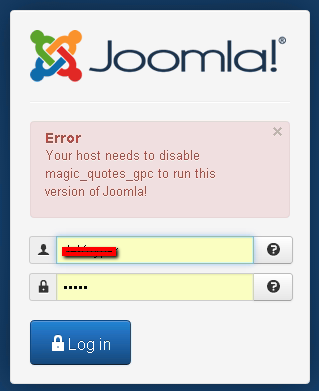
How to turn off magic quotes gpc for Joomla 3
This post is devoted to Joomla CMS.
New 3.2 Joomla version requries to make off the magic quotes option. There is a good article on how to that via php.ini and .htaccess files in local folders on your web site.
Unfortunately it does not work php parameters propagated entirely for all folders and subdomains from the server settings.
Here is the way to change it via the control panel.
Log in to your web hosting control panel.
Go to General Options\Software.
Then press light blue button "PHP CONFIGURATION" (Now I understand why it is capitalized)
Here press "Show PHP Settings" button.
And now the time to ask your evident question "Where in the world are my PHP settings?!" Take it easy, guys! You just need to change "PHP Version" parameter to any other one and then change it back to the version you work in. Do not press "Set as current" button!
Bingo! This is the turn.
Now just change "magic_quotes_gpc" option to OFF and do not forget to save the changes. That's it. You magic quotes successfully turned off.
Happy Joomling!
Subscribe to:
Posts (Atom)