Thursday, March 1, 2018

AX 2012 R3 CU13 Bug: DMF Bundle batch processing misses records

If you load many records via DMF, the most probable scenario is that you would divide them by setting a number of threads.

Unfortunately, there is a bug with it in the CU13.


When this batch job ends you will find 8*1041 records processed only.


As you can see the records ids are calculated correctly but the processing method gets wrong variables instead.


Down in the code, the batch task itself is set for a wrong number of records, too.

This is how to fix this bug.


There are two lessons we can take from this story:
- do not touch the code if it works;
- use really good names for your variables (it is not strong-typed environment!)

AX 2012 R3 CU13 Bug: DMF default value mapping for String type

There is bug in AX 2012 R3 CU13.

If you check Default type for your data entity staging mapping field of String type, then the system tries to find any first record matching to "Default" value as XML name to get the linked field and compare against its string length.


To fix it, we need to make the following changes in three methods of the form DMFStagingDefaultTable


public class FormRun extends ObjectRun
{
    SysDictField             dictField;
    DMFFieldType             dmfFieldType;
    DMFSourceXMLToEntityMap  dmfSourceXMLToEntityMap;
    Types                    valueType;
    // Begin: Alexey Voytsekhovskiy
    int                     myMaxStrSize;
    // End: Alexey Voytsekhovskiy
}


public void init()
{
    Args                                args;
    DMFEntity                           entity;
    DMFDefinitionGroupEntityXMLFields   dmfDefinitionGroupEntityXMLFields;
    SysDictType                         dictType;

    #define.Integer('Integer')
    #define.String('String')
    #define.RealMacro('Real')
    #define.DateMacro('Date')
    #define.DateTimeMacro('UtcDateTime')
    #define.Time('Time')

    super();

    if (!element.args() || element.args().dataset() != tableNum(DMFSourceXMLToEntityMap))
    {
        throw error(strfmt("@SYS25516", element.name()));
    }

    args = element.args();

    dmfSourceXMLToEntityMap = args.record();
    // Begin: Alexey Voytsekhovskiy
    select firstOnly FieldType, FieldSize from dmfDefinitionGroupEntityXMLFields
        where dmfDefinitionGroupEntityXMLFields.FieldName == dmfSourceXMLToEntityMap.EntityField
        && dmfDefinitionGroupEntityXMLFields.Entity == dmfSourceXMLToEntityMap.Entity
        && dmfDefinitionGroupEntityXMLFields.DefinitionGroup == dmfSourceXMLToEntityMap.DefinitionGroup
        ;
    myMaxStrSize = dmfDefinitionGroupEntityXMLFields.FieldSize ? dmfDefinitionGroupEntityXMLFields.FieldSize : 256;
    // End: Alexey Voytsekhovskiy
    if (dmfDefinitionGroupEntityXMLFields.FieldType && !dmfSourceXMLToEntityMap.IsAutoDefault)
    {
        dmfFieldType = dmfDefinitionGroupEntityXMLFields.FieldType;
        if (dmfsourceXMLToEntityMap.EntityField)
        {
            entity = DMFEntity::find(dmfsourceXMLToEntityMap.Entity);
            dictField = new SysDictField(tableName2id(entity.EntityTable), fieldName2id(tableName2Id(entity.EntityTable),dmfsourceXMLToEntityMap.EntityField));
        }
        switch(dmfDefinitionGroupEntityXMLFields.FieldType)
        {
            case #Integer:
                DMFStagingConversionTable_StagingIntValue.visible(true);
                break;
            case #String:
                DMFStagingConversionTable_StagingStrValue.visible(true);
                break;
            case #RealMacro:
                DMFStagingConversionTable_StagingRealValue.visible(true);
                break;
            case #DateMacro:
                DMFStagingConversionTable_StagingDateValue.visible(true);
                break;
            case #DateTimeMacro:
                DMFStagingConversionTable_StagingUtcDataTime.visible(true);
                break;
            case #Time:
                DMFStagingConversionTable_StagingTimeValue.visible(true);
                break;
            default:
                warning("@DMF694");
                element.close();
        }
    }
    else if(dmfSourceXMLToEntityMap.IsAutoDefault)
    {
        entity = DMFEntity::find(dmfsourceXMLToEntityMap.Entity);
        dictField = new SysDictField(tableName2id(entity.EntityTable),fieldName2id(tableName2Id(entity.EntityTable),dmfsourceXMLToEntityMap.EntityField));
        dictType = new SysDictType(dictField.typeId());
        if (dictType && dictType.isTime())
        {
            valueType = Types::Time;
        }
        else
        {
            valueType = dictField.baseType();
        }
        dmfFieldType = enum2str(dictField.baseType());
        switch(valueType)
        {
            case Types::Integer:
                DMFStagingConversionTable_StagingIntValue.visible(true);
                break;
            case Types::String:
                DMFStagingConversionTable_StagingStrValue.visible(true);
                break;
            case Types::Real:
                DMFStagingConversionTable_StagingRealValue.visible(true);
                break;
            case Types::Date:
                DMFStagingConversionTable_StagingDateValue.visible(true);
                break;
            case Types::UtcDateTime:
                DMFStagingConversionTable_StagingUtcDataTime.visible(true);
                break;
            case Types::Time:
                DMFStagingConversionTable_StagingTimeValue.visible(true);
                break;
            case Types::Guid:
                DMFStagingConversionTable_StagingGuidValue.visible(true);
                break;
            default:
                warning("@DMF694");
                element.close();
        }
    }

    else
    {
        element.close();
    }
}

and on the  sole form data source field StagingStrValue

public boolean validate()
{
    boolean                             ret;
    DMFDefinitionGroupEntityXMLFields   dmfDefinitionGroupEntityXMLFields;

    ret = super();

    if(ret)
    {
        // Begin: Alexey Voytsekhovskiy
        if(strLen(DMFStagingConversionTable.StagingStrValue) > myMaxStrSize)
        {
            throw error("@DMF788");
        }

//        select firstOnly FieldSize from dmfDefinitionGroupEntityXMLFields
//            where dmfDefinitionGroupEntityXMLFields.FieldName == dmfSourceXMLToEntityMap.XMLField;
//
//        if(dmfDefinitionGroupEntityXMLFields.FieldSize)
//        {
//            if(strLen(DMFStagingConversionTable.StagingStrValue) > dmfDefinitionGroupEntityXMLFields.FieldSize)
//            {
//                throw error("@DMF788");
//            }
//        }
        // End: Alexey Voytsekhovskiy
    }

    return ret;
}

Saturday, February 10, 2018

How to update progress in DMF batch tasks

I do not  know why but standard DMF writer does not update its batch task progress. It is really dull to run DMF target step and see 0% progress for long time trying to guess only what ETA is.

Fortunately it is easy to fix. The whole idea is simple: init a server side progress and update it every time the next record is processed.


DMFEntityWriter class
private void myProgressServerInit(RefRecId _startRecId, RefRecId _endRecId)
{
    if(xSession::isCLRSession())
    {
        // this progress just updates percentage in Batch task form
        myProgressServer = RunbaseProgress::newServerProgress(1, newGuid(), -1, DateTimeUtil::minValue());
        myProgressServer.setTotal(_endRecId - _startRecId);
    }
}


public container write(DMFDefinitionGroupExecution  _definitionGroupExecution,
                       DMFdefinationGroupName       _definitionGroup,
                       DMFExecutionID               _executionId,
                       DMFEntity                    _entity,
                       boolean                      _onlyErrored,
                       boolean                      _onlySelected,
                       RefRecId                     _startRefRecId = 0,
                       RefRecId                     _endRefRecId = 0,
                       boolean                      _isCompare = false,
                       DmfStagingBundleId           _bundleId = 0)
{
    Common                      target;
 ...

    if (_entity.TargetIsSetBased)
    {
        ...
    }
    else
    {
        ...

        while (nextStartRecId <= lastRecId)
        {
            ...

            try
            {
                
                this.myProgressServerInit(startRefRecId, endRefRecId);
                
                ...
                while select staging where staging.(defGroupFieldId) == _definitionGroup && staging.(execFieldId) == _executionId
                            && ( (!_onlyErrored && !_onlySelected) ||
                                    (_onlyErrored && staging.(transferStatusFieldId) == DMFTransferStatus::Error) ||
                                    (_onlySelected && staging.(selectedFieldId) == NoYes::Yes)
                                )
                    join tmpStagingRecords where
                        tmpStagingRecords.RecId                 >= startRefRecId   &&
                        tmpStagingRecords.RecId                 <= endRefRecId     &&
                        tmpStagingRecords.StagingRecordRecId    == staging.RecId
                {
                    try
                    {
                        
                        this.myProgressServerIncCount();
                        

                        ...
     }
     catch
     {
     ...
     }
            }
        }
        
        this.myProgressServerKill();
        
    }
 ...
    return [newCount, updCount, stagingLogRecId,msgDisplayed];
}

Why my batch job is still waiting?

You probably have compilation errors in CIL. Try to recompile full CIL.

Tuesday, February 6, 2018

Why your method is still not running in CIL

Please do not forget about the third parameter when you call your CIL wrapper.


It won't run in CIL if the current transaction level is not equal to zero, like in the following example with the standard import of Zip codes.


However, you can try to force ignoring TTS level at your own risk.


It works perfectly for my scenario.


This is how to check if your code is running in CIL.

Friday, February 2, 2018

Parallel Items/Product Validating or Deleting

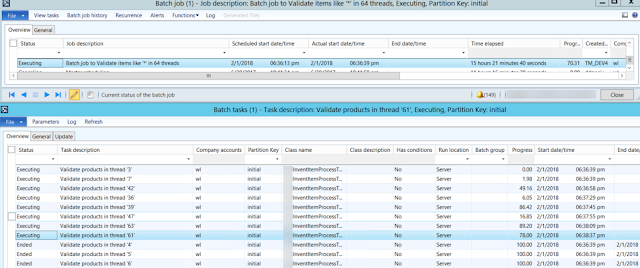
If you need to validate or delete items/products or any other records in a BIG number, it is better to run such processing, first, in CIL, second in parallel threads.

This project is to demonstrate this approach.

The whole concept is similar to what I explained in one of my previous blogpost about Multi thread parallelism and a dispatching table for finding a minimum

myInventItemProcessBatch class populates a special table containing RecIds to be processed and thread number they belong to.


Based on the user selection, it creates appropriate number of batch tasks that can run independently with their progress percentage.


Feel free to elaborate this project by adding new types of processing or new table to process. Also it is probably a good idea to add a new column to the table to separate different instances myInventItemProcessBatch simultaneously running in the same environment.


myInventItemProcessBatch 

private static server int64 populateItems2Process(str 20 _what2find, int _batchThreads)
{
    myInventItemProcessTable    myInventItemProcessTable;
    InventTable                 inventTable;
    int                         firstThread = 1;
    Counter                     countr;
    // flush all previously created items from the table
    delete_from myInventItemProcessTable;
    // insert all needed items in one shot. this part can be refactored to use Query instead
    insert_recordset myInventItemProcessTable (threadNum, ItemRecId, ItemId)
    select firstThread, RecId, ItemId from InventTable
    where
        inventTable.itemId like _what2find;
    // now group them in threads by simply enumerating them from 1 to N
    countr=1;
    ttsBegin;
    while select forUpdate myInventItemProcessTable
    {
        myInventItemProcessTable.threadNum = countr;
        myInventItemProcessTable.update();

        countr++;

        if(countr > _batchThreads)
        {
            countr=1;
        }
    }
    ttsCommit;
    // return the total number of items to process
    select count(RecId) from myInventItemProcessTable;

    return myInventItemProcessTable.RecId;
}

public void run()
{
    // get all required items by their RecIds in the table and group them in threads
    int64 totalRecords = myInventItemProcessBatch::populateItems2Process(what2find, batchThreads);
    if(totalRecords)
    {
        info(strFmt("Found %1 items like '%2' to %3", totalRecords, what2find, processType));
        // create number of batch tasks to parallel processing
        this.scheduleBatchJobs();
    }
    else
    {
        warning(strFmt("There are no items like '%1'", what2find));
    }
}
myInventItemProcessTask process()

... 
select count(RecId) from inventTable
        exists join myInventItemProcessTable
        where
            myInventItemProcessTable.ItemRecId == inventTable.RecId &&
            myInventItemProcessTable.threadNum == threadNum;
    // total number of lines to be processed
    totalLines = inventTable.reciD;
    // to enjoy our bored user during a few next hours
    // this progress just updates percentage in Batch task form
    progressServer = RunbaseProgress::newServerProgress(1, newGuid(), -1, DateTimeUtil::minValue());
    progressServer.setTotal(totalLines);

    while select inventTable
        exists join myInventItemProcessTable
        where
            myInventItemProcessTable.ItemRecId == inventTable.RecId &&
            myInventItemProcessTable.threadNum == threadNum
    {
        progressServer.incCount();

        try
        {
            // RUN YUR LOGIC HERE //////////////////////
...

Friday, January 5, 2018

AX 2012 Wizard does not update Analysis Serivce Project: workaround

Recently I bumped into a strange issue in AX 2012, which prevents importing Analysis Services Projects to AOT.

Given that this import is an essential part of cubes development and deployment, I decided to find a way to get this thing done.

The issue is in the fact that nevertheless all changes made to your perspective are successfully present in the Wizard tree, they are never saved back to AOT. Therefore, the previous version of your project is always deployed to SQL, no matter what you try to achieve.

The workaround is pretty simple. Make up your perspective, run the Wizard and let it finish its job. Make Deploy option unchecked because it is pointless.


Once the Wizard window is closed, just find your project in the node of Analysis Services Projects and delete it.


Then find a recently created folder in your TEMP directory; this one must contain your recently added artifacts, say, financial dimensions as depicted.


Here we go.


Now just import this particular project back to AOT, and run the Wizard again to deploy the projects.


It is also worth double-checking the project content in Visual Studio before running the Wizard for the second time.


If you missed the target, find the right folder with your added/changed objects.

Now the Wizard should find no changes and just deploy it.